Lighting / LED Strips
Innr FL 12x C Smart Light Strip User Manual
Quick guide for the Innr FL 12x C and FL 22x C Smart Light Strip. Learn how to install, connect to the app, perform a factory reset, and follow safety guidelines.
Table of contents
Manual images
Click an image to enlargeQuick guide from the manual
The Innr Smart Light Strip is designed for indoor use and connects to your smart home system via a bridge. To begin, ensure you have the Innr mobile app installed on your smartphone, as all connection and configuration steps are managed through the application. Follow the in-app instructions to pair the lamp with your bridge.

Installation
Proper installation is crucial for the longevity of the adhesive strip. Follow these steps:
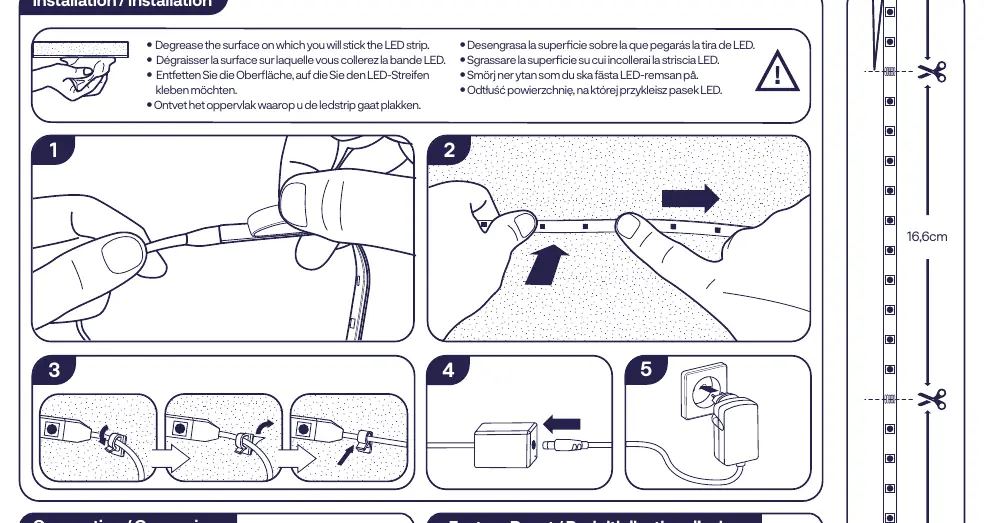
- Prepare the surface: Thoroughly degrease the surface where you intend to stick the LED strip.
- Apply the strip: Peel the backing and press the strip firmly onto the clean, dry surface.
- Connection: Connect the LED strip to the power adapter and plug it into a wall outlet.
Factory Reset
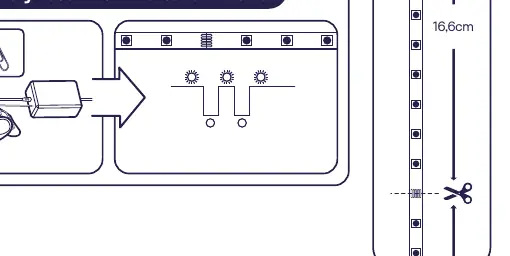
If you need to reset the device to its factory settings, refer to the factory reset diagram on the first page of the manual. This typically involves a specific sequence of power cycling or pressing a reset button on the controller unit, as indicated by the visual guide.
Safety and Maintenance
- Indoor use only: Do not use this product outdoors.
- Do not disassemble: Do not attempt to take the product apart. If any part is damaged, discontinue use immediately.
- Water exposure: Do not immerse the product in water.
- Cleaning: Use only a damp cloth for cleaning. Never use strong cleaning agents or chemicals.
Technical Specifications
- Frequency: 2.4 GHz (2400 ~ 2483.5MHz)
- RF Power: Max. 10 dBm
- Energy Efficiency: Class G
Manufacturer information
Innr Lighting
Practical help
Common problems
Cannot connect to bridge
Ensure you are following the specific instructions provided within the Innr mobile app.
LED strip falling off
Ensure the mounting surface is thoroughly degreased and clean before applying the adhesive strip.
Before use
- Ensure the installation surface is clean and degreased.
- Download the Innr mobile app.
- Verify the power adapter is connected correctly.
- Ensure the environment is indoors only.
Specs in practice
- Energy Efficiency
- The product contains light sources of energy efficiency class G.
Images and diagrams
- The installation diagram illustrates cleaning the surface, peeling the adhesive backing, and pressing the strip into place.
- The factory reset diagram shows the controller unit and the reset procedure.
Model compatibility
- Requires a bridge for operation.
- For indoor use only.

Manual page author
Michael Turner
Technical manual editor
Reviews PDF manuals for structure, safety notes, and practical product details so readers can find the right information quickly.