Lighting / LED Strips
Innr Smart LED Strip FL 14x C / FL 24x C Installation Guide
Quick installation and setup guide for the Innr Smart LED Strip (FL 14x C / FL 24x C). Includes mounting instructions, app connection steps, safety warnings, and factory reset procedures.
Table of contents
Manual images
Click an image to enlargeQuick Guide
This guide provides essential information for installing and setting up your Innr Smart LED Strip. Ensure you have the mobile app installed to connect the device to your smart lighting bridge.
Installation
Before applying the LED strip, ensure the surface is clean and dry. Follow these steps for proper installation:
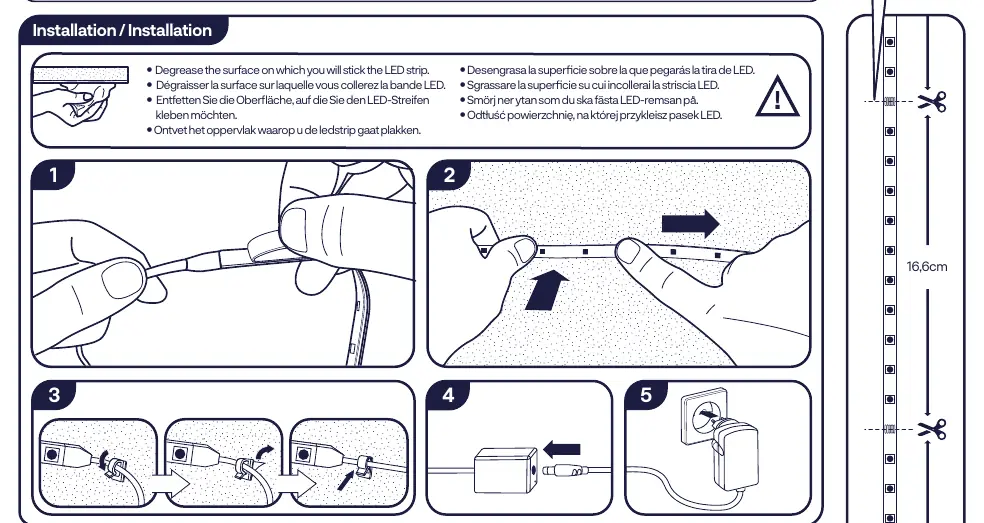
- Degrease the surface: Thoroughly clean the area where you intend to stick the LED strip to ensure proper adhesion.
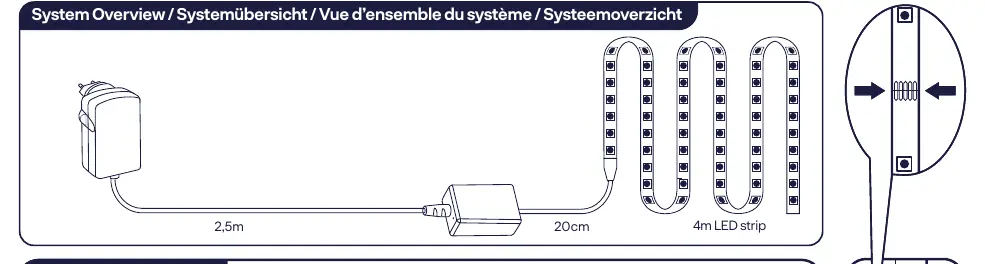
- Positioning: Plan the layout of the strip. The system includes a 2.5m power cable and a 4m LED strip.
- Cutting: The strip can be cut at marked intervals of 16.6cm if a shorter length is required.
- Application: Peel the backing and press the strip firmly onto the degreased surface.
Connection
To connect the lamp to your bridge:
- Ensure your smart lighting bridge is powered on and connected to your network.
- Open the mobile app on your smartphone.
- Follow the in-app instructions to pair the new LED strip with your bridge.
Factory Reset
If you need to reset the device to factory settings:
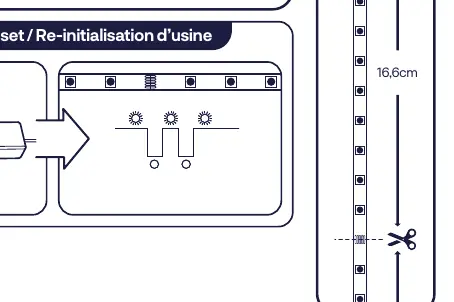
- Locate the reset button/switch on the controller unit.
- Follow the specific reset sequence as indicated in the diagram on the first page of the manual to restore default settings.
Safety Instructions
- Indoor Use Only: This product is designed exclusively for indoor environments.
- Do Not Disassemble: Do not attempt to open or modify the product. If any part is damaged, discontinue use immediately.
- Water Exposure: Do not immerse the product in water.
- Cleaning: Use only a damp cloth for cleaning. Never use strong cleaning agents or chemicals.
- Future Reference: Keep these instructions in a safe place for future use.
Technical Specifications
- Frequency: 2.4 GHz (2400 ~ 2483.5 MHz)
- RF Power: Max 10 dBm
- Energy Efficiency: This product contains light sources of energy efficiency class G.
Manufacturer information
Innr Lighting
Practical help
Common problems
LED strip does not stick to the surface
Ensure the surface was properly degreased and dried before application.
Cannot connect to the bridge
Ensure the bridge is active and follow the pairing instructions provided within the mobile app.
Before use
- Ensure the installation surface is clean and degreased
- Verify that the power supply is compatible
- Download the required mobile app
- Check the LED strip for any visible damage
Images and diagrams
- The system overview shows a 2.5m power cable and a 4m LED strip.
- The strip features cut marks every 16.6cm for customization.
- The factory reset diagram illustrates the button interaction required to reset the device.
Model compatibility
- For indoor use only.
- Requires a compatible smart lighting bridge to function as a smart device.

Manual page author
Michael Turner
Technical manual editor
Reviews PDF manuals for structure, safety notes, and practical product details so readers can find the right information quickly.