Computers / Keyboards Input
User Guide for Insignia Landline Phone Headset NS-MCHM25PB
Quick setup guide for the Insignia Landline Phone Headset (NS-MCHM25PB). Learn how to connect your headset, adjust the boom microphone, use the volume and mute controls, and ensure proper fit.
Quick answers from the manual
Quick answer
- The Insignia NS-MCHM25PB is a landline phone headset. To use it, plug the 2.5 mm cable into your phone's headset jack, place the headset on your head, and adjust the boom microphone to be about 1 inch from your mouth. p. 1
Key actions
- Connect the headset p. 1
- Adjust the microphone p. 1
- Mute the microphone p. 1
First start
- Turn down volume before connecting p. 1
Where to find it in the PDF
- Setup and Usage p. 1
- Legal and Warranty p. 2
Table of contents
Manual images
Click an image to enlargeQuick guide from the manual
The Insignia Landline Phone Headset (NS-MCHM25PB) is designed for use with landline phones featuring a 2.5 mm headset jack. This guide covers the basic setup, connection, and operation of the headset.
Features
The headset includes the following components:
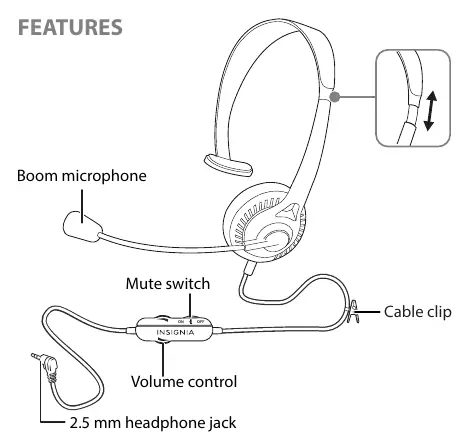
- Boom microphone: Adjustable for optimal voice pickup.
- Mute switch: Allows you to silence your conversation.
- Volume control: Adjusts the audio level.
- 2.5 mm headphone jack: Connects to your landline phone.
- Cable clip: Helps manage the cable during use.
Connecting your headset
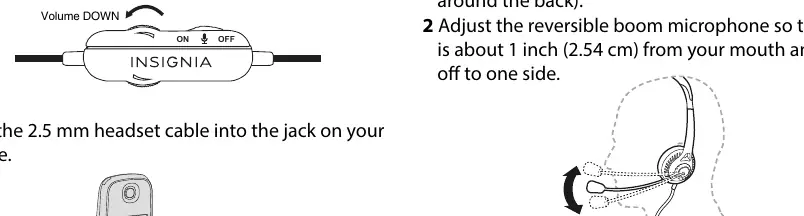
- Before connecting, turn down the volume on your headset to prevent sudden loud noises.
- Plug the 2.5 mm headset cable directly into the headset jack on your landline phone.
Using your headset
- Place the headset on the top of your head, not around the back.
- Adjust the reversible boom microphone so that it is approximately 1 inch (2.54 cm) from your mouth and positioned to one side.
- Begin your conversation and adjust the volume to a comfortable level using the volume control.
- To mute your conversation, slide the MUTE switch to the ON position.
Safety and warnings
Warning: Extended exposure to high volumes when using your headset may result in permanent hearing loss. Always adjust the volume to a comfortable level before and during use.
Contact Insignia
For customer service, you can contact Insignia at 1-877-467-4289 (U.S. and Canada) or 01-800-926-3000 (Mexico). For more details, visit www.insigniaproducts.com.
Official resources from the manual
Practical help
Common problems
Audio is too loud upon connection
Turn down the volume on the headset before plugging it into the phone.
Microphone is not picking up voice clearly
Adjust the boom microphone so it is about 1 inch (2.54 cm) from your mouth and off to one side.
Before use
- Ensure your landline phone has a 2.5 mm headset jack.
- Turn down the volume on the headset before connecting.
- Position the headset on the top of your head.
Specs in practice
- 2.5 mm connector
- The standard plug size required for the headset to interface with your landline phone.
Images and diagrams
- The manual provides a diagram identifying the boom microphone, mute switch, volume control, and cable clip.
- Visual steps are provided for connecting the cable to the phone and adjusting the microphone position.
Model compatibility
- Compatible with landline phones that feature a 2.5 mm headset jack.

Manual page author
Emily Carter
User documentation editor
Prepares concise manual descriptions and highlights the most useful setup, operation, and maintenance information for readers.