Electronics / Speakers & Soundbars
User Guide for Insignia 2.0-Channel 20 in. Soundbar NS-HTSB20S
Comprehensive user guide for the Insignia 2.0-Channel 20 in. Soundbar (NS-HTSB20S). Includes setup instructions, connection methods (Optical, AUX, USB, Bluetooth), wall mounting, remote control programming, and troubleshooting.
Quick answers from the manual
Quick answer
- The Insignia NS-HTSB20S is a 2.0-channel soundbar. Connect it to your TV or audio source via Digital Optical, 3.5mm AUX, USB, or Bluetooth. It features 30W total power and 3 sound modes (Standard, Theater, News). p. 1, 5
Key actions
- Connect to TV p. 11, 12
- Pair Bluetooth p. 13
- Wall Mount p. 15, 16
First start
- Connect power adapter, connect audio source, press power button, select source using the source button. p. 3, 17
Problems and fixes
No sound
Check volume, source selection, and cable connections.
p. 18, 19
Remote not working
Check batteries and line-of-sight to IR sensor.
p. 18Maintenance and reset
- To clear all learned remote codes, press and hold the power button on the soundbar for 10 seconds while in standby mode. p. 10
Technical specifications
| Parameter | Value | Meaning | Pages |
|---|---|---|---|
| Power Output | 15W x 2 | Left and right channel | p. 20 |
| Dimensions | 2.58 x 20.08 x 3.11 in. | Height x Width x Depth | p. 20 |
| Power Input | 100-240V at 50/60Hz | Power adapter rating | p. 20 |
Where to find it in the PDF
- Getting Started p. 3
- Connections p. 11, 12, 13
- Wall Mounting p. 15, 16
- Troubleshooting p. 18, 19, 20
Table of contents
Manual images
Click an image to enlargeQuick Start Guide
To get started with your Insignia 2.0-Channel 20 in. Soundbar, follow these basic steps:
- Connect your sound source: Identify the audio output on your TV or device (Optical, AUX, USB, or Bluetooth).
- Connect power: Plug the AC power adapter into the DC IN jack on the soundbar and into a power outlet.
- Power on: Press the power button on the side of the soundbar or the remote.
- Select source: Press the sound source selector button until the indicator matches your connection (Green=Optical, Orange=AUX, Purple=USB, Blue=Bluetooth).
Product Overview
The soundbar features a compact 20-inch design with 30 watts of RMS power. It includes a remote control for wireless operation and supports three sound modes: Standard, Theater, and News.
Controls and Indicators
- Front View: Features the speaker, status indicator LED, and remote control sensor. The LED color indicates the current mode (e.g., Red=Standby, Blue=Bluetooth, Green=Optical).
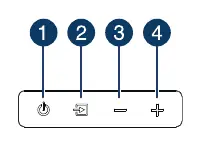
- Side View: Contains physical buttons for Power, Sound Source Selector, Volume Down, and Volume Up.
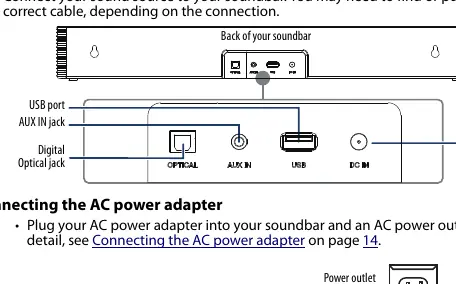
- Back View: Includes the Optical jack, AUX IN jack, USB port, and DC IN jack.
Connections and Setup
Choose the connection method that best fits your audio source:
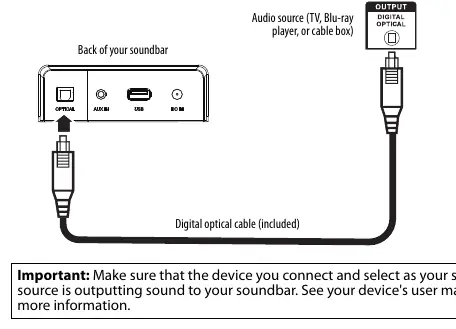
- Digital Optical (Better): Connect the included optical cable to the soundbar and your device. Ensure your device's audio output is set to PCM format.
- AUX (Good): Connect the included 3.5 mm audio cable to the AUX IN jack and your device's headphone or audio output.
- USB: Plug a USB drive containing MP3 or WAV files into the USB port.
- Bluetooth: Select Bluetooth mode, search for "NS-HTSB20S" on your device, and pair. If prompted for a PIN, enter 0000.
Using the Remote Control
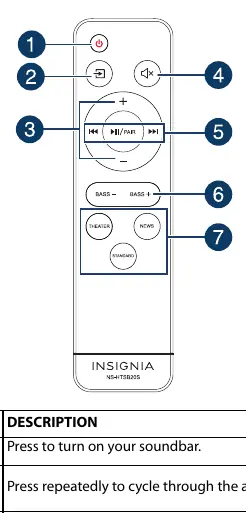
The remote allows you to control power, volume, mute, playback (for Bluetooth/USB), bass enhancement, and sound modes. You can also program the soundbar to learn codes from your TV remote using the IR learning function found in the full manual.
Wall Mounting
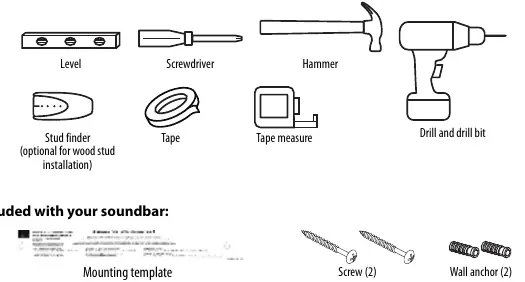
You can mount the soundbar on a wall under your TV. Use the included mounting template to mark the hole locations, drill holes, insert wall anchors, and secure the screws. Ensure the screws protrude about 5/32" (4 mm) from the wall to hang the soundbar brackets.
Cleaning and Maintenance
Clean the outside of the soundbar only with a soft, clean rag. Never use chemicals, detergents, or abrasives.
Troubleshooting
- No Power: Ensure the AC power cord is securely plugged in and the unit is turned on.
- Remote Not Working: Check batteries, remove obstacles between the remote and the IR sensor, or move closer to the unit.
- No Sound: Verify the correct source is selected, volume is up, and cables are secure. If using Optical, ensure the source is set to PCM.
- Bluetooth Issues: Ensure the device is within 33 ft (10 m), not paired to another device, and the soundbar is in pairing mode.
Practical help
Common problems
Power doesn't come on
Ensure the AC power cord is securely plugged into the power outlet and the soundbar.
Remote control doesn't work
Remove obstacles between the remote and the IR sensor, replace batteries, or move closer (within 50 ft).
No sound or low sound
Check volume levels, ensure the correct source is selected, and verify that the audio cable is not damaged.
Sound is breaking up or buzzing
Ensure you are connected to an audio OUT jack (not an input jack) and that the source device is set to PCM format if using Optical.
Before use
- Check package contents (Soundbar, remote, cables, mounting hardware)
- Identify audio OUT ports on your TV or source device
- Ensure you have the correct cable for your connection type
- Place the soundbar on a sturdy, flat surface or prepare for wall mounting
Specs in practice
- Power Output
- 15W x 2 (Left and Right channel)
- Working Environment
- Temperature 32~104° F (0~40° C), Humidity 5%~90%
Images and diagrams
- Front view: Shows speaker, status LED, and IR sensor
- Side view: Shows Power, Source, and Volume buttons
- Back view: Shows Optical, AUX, USB, and DC IN ports
- Wall mounting: Shows template usage and screw protrusion distance
Model compatibility
- Optical connection requires source device to be set to PCM format
- USB port supports MP3 and WAV files
- Bluetooth range is approximately 33 ft (10 m)

Manual page author
David Miller
Documentation analyst
Organizes user manual content into clear summaries, with attention to model details, product context, and everyday usability.