Electronics / Networking
Installation Guide for Secomp 2-Port Gigabit PoE+ Extender
Quick installation guide for the Secomp 2-Port Gigabit PoE+ Extender. Learn how to connect, cascade, and troubleshoot your PoE extender for extended network range.
Quick answers from the manual
Quick answer
- The Secomp 2-Port Gigabit PoE+ Extender extends network range by 100m per unit. It supports cascading to reach longer distances and is compliant with IEEE 802.3at standards. p. 1
Key actions
- Connect the PD input port to the PoE source using Cat 5e/6 cable. p. 1
- Connect the PSE output port to the next device or another extender. p. 1
First start
- The device is plug-and-play; simply connect the cables to the appropriate ports. p. 1
Problems and fixes
No connection
Check LED status. If Data LED is off, check cable connection.
p. 1Technical specifications
| Parameter | Value | Meaning | Pages |
|---|---|---|---|
| Standards | IEEE 802.3at, 802.3, 802.3u, 802.3ab, 802.3x | Network and PoE compliance standards | p. 1 |
| Dimensions | 20 x 32 x 123 mm | Physical size of the device | p. 1 |
Where to find it in the PDF
- Installation and Specifications p. 1
- Connection Diagrams p. 2
Table of contents
Manual images
Click an image to enlargeQuick guide from the manual
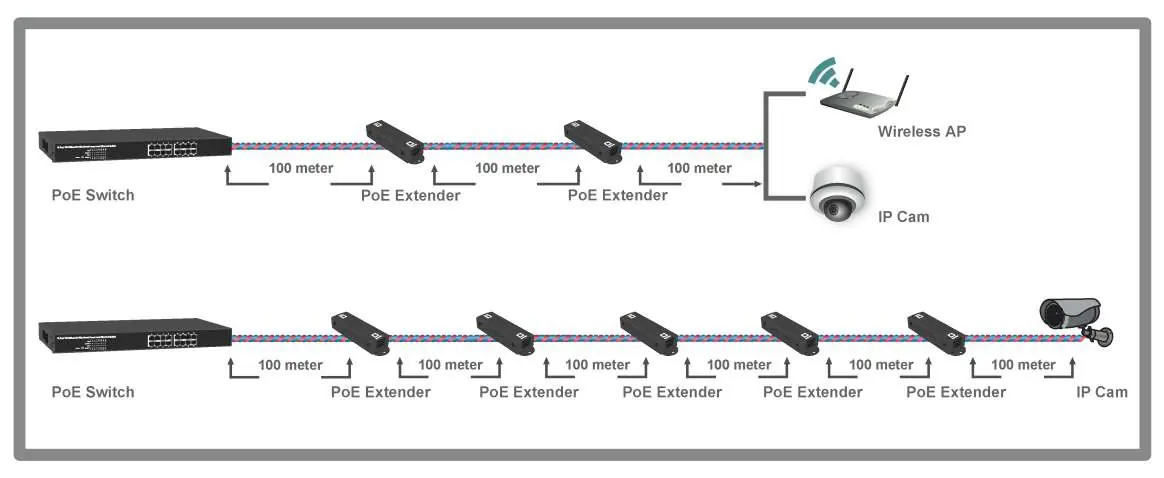
The Secomp 2-Port Gigabit PoE+ Extender is designed to extend the transmission distance of a PoE network. Each unit extends the range by 100 meters. By cascading multiple units, you can extend the network distance significantly (up to 600 meters). The device is plug-and-play and compliant with the IEEE 802.3at standard.
Package Contents
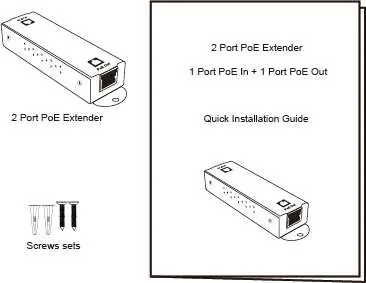
- 1x 2-Port Gigabit PoE+ Extender
- 1x Quick Installation Guide
- 2x Screw sets for wall mounting
Installation and Connections
The device features automatic crossover detection, allowing for simple connection using straight-through twisted pair cables.
- PD Input Port: Connect this port to your PoE source (PSE) using a Cat 5e/6 cable. This port receives power and data.
- PSE Output Port: Connect this port to your powered device (e.g., IP Camera, Wireless AP) or to the input of another PoE extender to cascade the connection.
Cascading: You can daisy-chain multiple extenders to extend the distance beyond 100 meters. Ensure the total power budget is sufficient for the connected devices at the end of the chain.
LED Indicators
- PoE LED: Indicates the PoE function status. If ON, the PoE function is active. If OFF, there is no connection or the function is inactive.
- Data LED: Indicates network activity. If ON, the port is connected. If Flashing, data is being transmitted or received. If OFF, there is no connection.
Technical Specifications
- Standards: IEEE 802.3at, IEEE 802.3, 802.3u, 802.3ab, 802.3x
- Ports: 1x PoE In (Data + Power), 1x PoE Out (Data + Power)
- Transmission Media: Cat 5e/6 UTP/STP
- Operating Temperature: 0 to 50 °C
- Dimensions: 20 x 32 x 123 mm
- Weight: 100g
Practical help
Common problems
No PoE power at the end device
Verify that the source switch is IEEE 802.3at compliant and that the cable length between devices does not exceed 100m per segment.
No data connection
Check the Data LED. If it is OFF, ensure the Ethernet cable is securely connected and not damaged. Verify the cable type is Cat 5e or Cat 6.
Before use
- Verify package contents (Extender and screw sets).
- Ensure you have Cat 5e or Cat 6 Ethernet cables.
- Confirm the PoE source (switch) is IEEE 802.3at compliant.
- Plan the installation location, keeping in mind the 100m distance limit per extender.
Specs in practice
- IEEE 802.3at
- The standard for PoE+ (Power over Ethernet Plus), allowing higher power delivery to connected devices.
- Store and Forward
- A switching method that ensures data integrity by checking the entire packet before forwarding.
Images and diagrams
- The connection diagram illustrates how to daisy-chain multiple extenders to reach distances of 200m, 300m, up to 600m.
- It shows the connection flow from the PoE Switch to the Extender, and then to the final device like an IP Camera or Wireless AP.
Model compatibility
- Requires Cat 5e or Cat 6 UTP/STP cables.
- Compatible with IEEE 802.3at PoE switches.

Manual page author
Michael Turner
Technical manual editor
Reviews PDF manuals for structure, safety notes, and practical product details so readers can find the right information quickly.