Tools / Measuring Tools
User Manual for Veratron Link Up 2-in-1 Gateway
Quick guide for the Veratron Link Up 2-in-1 gateway. Learn how to install, configure via NFC, and troubleshoot your NMEA 2000 engine sensor interface.
Quick answers from the manual
Quick answer
- The Veratron Link Up 2-in-1 gateway converts engine or transmission oil temperature and pressure sensor data into the NMEA 2000 standard. It is configured wirelessly via NFC using the Link Up Configurator app. p. 3
Key actions
- Install the device p. 6, 7
- Configure the device p. 8, 9
First start
- Ensure the device is connected to the NMEA 2000 network. The green LED should flash slowly (1Hz) indicating it is waiting for configuration. p. 7, 10
Problems and fixes
LED Off
Device not powered.
p. 10
Slow blink (1Hz)
Invalid or empty configuration; configure via app.
p. 10
Fast blink (5Hz)
Sensor value out of range.
p. 10Technical specifications
| Parameter | Value | Meaning | Pages |
|---|---|---|---|
| Operating voltage | 6 – 16.5 V | Voltage range for operation | p. 11 |
| Power consumption | ≤ 100 mA | Maximum current draw | p. 11 |
| Operating temperature | -30°C to 80°C | Ambient temperature range | p. 11 |
Where to find it in the PDF
- Introduction p. 3
- Safety Information p. 4, 5
- System Installation p. 6, 7
- Configuration p. 8, 9, 10
- Technical Data p. 11, 12, 13
Table of contents
Manual images
Click an image to enlargeQuick guide from the manual
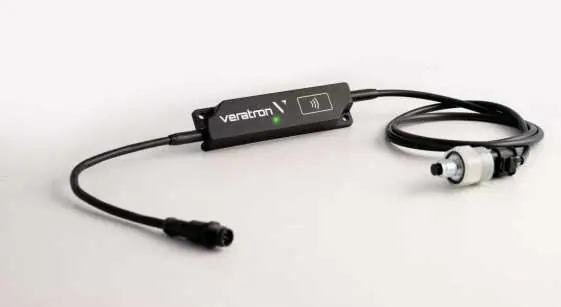
The Veratron Link Up 2-in-1 gateway is designed to convert engine or transmission oil temperature and pressure sensor data into the NMEA 2000 standard. It is a compact, wirelessly configurable device that allows you to display engine data on any NMEA 2000 compatible display (e.g., VMH, OceanLink, AcquaLink).
Safety Information
- Installation: Must be performed by a specialized technician. If installing yourself, wear appropriate work clothing and avoid loose items.
- Electrical: Always disconnect the negative terminal of the battery before beginning installation to prevent short circuits.
- Placement: Keep the device at least 300 mm away from any magnetic compass.
- Environment: The device is suitable for engine rooms (ISO 8846:1990 compliant).
System Installation
Before the Assembly
- Turn off the ignition and remove the key.
- Disconnect the negative terminal of the battery.
- Ensure the device is placed at least 300 mm away from any magnetic compass.
Connect to the NMEA 2000 Network
- Connect the sensor to the LinkUp gateway using the 3-pin Hirschmann 1.2 SealStar FA connector.
- Connect the LinkUp gateway to the NMEA 2000 backbone using the M12 plug.
- Ensure the M12 connector is screwed on tightly to maintain water tightness.
- Note: NMEA 2000 drop cables must not exceed 6 meters in length.
Configuration
The device is configured wirelessly using the Link Up Configurator app (available for Android and iOS) via the built-in passive NFC antenna.
- Launch the app on your smartphone.
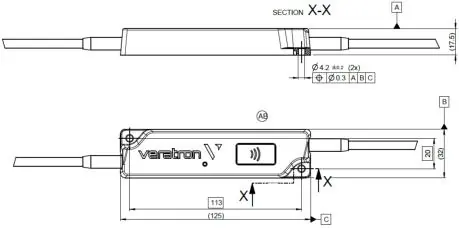
- Tap your smartphone onto the wireless area of the LinkUp device (indicated by the icon on the housing).
- The app will display the current configuration.
- Select the sensor type (Engine Oil or Transmission Oil) and engine instance.
- Set alarm thresholds if required.
- Press "Write Configuration" in the app and tap the smartphone against the device again to transfer the settings.
LED Notifications
- OFF: Device not powered.
- ON: Device configured and in operation.
- Slow blink (1Hz): Invalid or empty configuration; waiting for user setup.
- Fast blink (5Hz): Sensor value out of range.
- Very fast blink (10Hz): Reconfiguration in progress.
Technical Data
- Operating voltage: 6 – 16.5 V
- Nominal voltage: 12 V (from NMEA 2000 network)
- Power consumption: ≤ 100 mA
- Protection class: IPX7 (Gateway), IP69k (Sensor)
- Operating temperature: -30°C to 80°C
Practical help
Common problems
Device LED is OFF
Check the NMEA 2000 network connection and ensure the network is powered.
LED is blinking slowly (1Hz)
The device has an invalid or empty configuration. Use the Link Up Configurator app to configure the device.
LED is blinking fast (5Hz)
The analogue value from the sensor is out of range. Check the sensor connection and status.
Before use
- Turn off the ignition and remove the key.
- Disconnect the negative battery terminal.
- Ensure the device is at least 300 mm away from any magnetic compass.
- Verify the NMEA 2000 network backbone is active.
- Download the Link Up Configurator app on your smartphone.
Specs in practice
- Operating voltage
- 6 – 16.5 V DC
- NMEA 2000 LEN
- 2 (Load Equivalency Number)
- Protection class
- IPX7 for the gateway; IP69k for the sensor
Images and diagrams
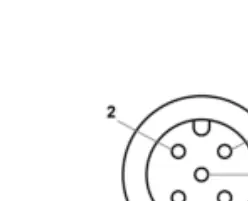
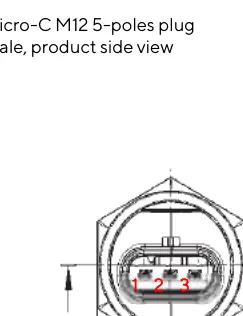
- The wiring diagram shows the M12 5-pin connector pinout for the NMEA 2000 network.
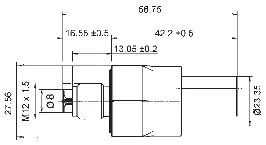
- The sensor plug diagram details the 3-pin Hirschmann connector pinout.
Model compatibility
- Compatible with NMEA 2000 network backbone.
- Requires NFC-enabled smartphone for configuration.
- Compatible with engine or transmission oil sensors.

Manual page author
David Miller
Documentation analyst
Organizes user manual content into clear summaries, with attention to model details, product context, and everyday usability.