Computers / Storage
User Manual for Intenso 2.5" Memory Drive
Quick guide and user manual for the Intenso 2.5" Memory Drive. Includes setup instructions, troubleshooting, safety guidelines, and warranty information.
Quick answers from the manual
Quick answer
- To connect the Intenso Memory Drive, use the supplied USB cable to connect the drive to your computer's USB port. The computer will automatically recognize the drive and install the necessary drivers. p. 13
Key actions
- Safely remove the drive before disconnecting to prevent data loss. p. 13
Problems and fixes
Status LED is not illuminated
Check for visible damage to the drive and cable. Ensure the cable is plugged in correctly.
p. 14Technical specifications
| Parameter | Value | Meaning | Pages |
|---|---|---|---|
| Transfer rate | max. 5 Gbit/sec | USB 3.0 speed | p. 15 |
Where to find it in the PDF
- Overview p. 12
- Safety Instructions p. 14
- Technical Data p. 15
Table of contents
Manual images
Click an image to enlargeQuick guide from the manual
This external hard drive is designed for data storage from PCs, notebooks, ultrabooks, and Mac computers. To use the drive, connect it to your computer using the supplied USB cable. The computer will automatically recognize the drive and install the necessary drivers. Always safely remove the drive via your operating system before disconnecting the cable to prevent data loss.
Overview and delivery scope
The package includes:
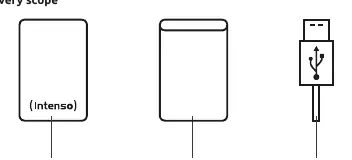
- Intenso Super Speed USB 3.0 hard drive (downwards compatible)
- Leather-look bag
- USB 3.0 cable
- Operating instructions
Intended use
The primary purpose of this external hard drive is the storage of data. It is not intended for commercial use, medical applications, or special applications where failure of the product could cause injuries, death, or significant material damage. Unauthorized modifications or use of unapproved accessories will void the warranty.
Connecting the hard drive
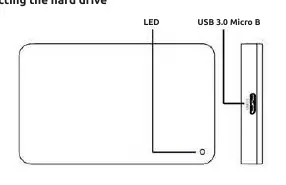
To connect the external hard drive to your computer, use only the supplied USB cable. Connect the USB 3.0 plug to the Intenso hard drive and the other end to your computer. The computer will recognize the new hardware and install the driver automatically. Once connected, the LED will light up and flash during read/write operations.
Removing the hard drive
Depending on your operating system, you must log off or eject the hard drive before disconnecting it. Do not remove the device while it is being accessed (indicated by a flashing LED), as this can lead to data loss or damage.
Safety instructions
- Children: Keep the device out of reach of children.
- Moisture: Do not expose the device to spray or dripping water. Do not operate with wet hands.
- Damage: Do not use the device if there is visible damage to the drive or the USB cable.
- Handling: Do not drop the device or subject it to vibrations, especially during transport.
- Environment: Keep away from moisture, dust, heat, and direct sunlight. Avoid using in strongly magnetized areas (e.g., near TV sets or speakers).
Troubleshooting
If the status LED is not illuminated, check for visible damage to the drive and cable, and ensure the connection is secure. If the drive is not recognized, try different USB ports, ensure you are not using an unpowered USB hub, and check your computer's Disk Management settings to ensure a drive letter is assigned.
Technical data
- Dimensions (2.5" housing): 11 / 13 / 17 / 20 x 78 x 127 mm
- Transfer rate: max. 5 Gbit/sec (USB 3.0)
- Capacity calculation: 1 MB = 1,000,000 bytes; 1 GB = 1,000,000,000 bytes
Disposal
Devices marked with the WEEE symbol must be disposed of separately from municipal waste via designated government-appointed collection facilities. Packaging materials are raw materials and should be recycled according to local regulations.
Warranty and complaints
Intenso International GmbH grants a two-year warranty for this product covering material and production errors. In case of a complaint, returns must include the sales receipt and all accessories. An RMA number is required for returns and can be requested via the website, email, or service hotline.
Practical help
Common problems
Status LED is not illuminated
Check for visible damage to the drive and USB cable. Ensure the cable is plugged in correctly.
Hard Drive is not recognized
Check other USB ports, ensure the drive is not connected via a USB hub without external power, and check Disk Management to assign a drive letter.
Before use
- Check for visible damage to the drive and cable.
- Ensure the computer has a free USB interface.
- Use only the supplied USB cable.
- Do not use extension cables.
Specs in practice
- Transfer rate
- Max 5 Gbit/sec (USB 3.0).
- Capacity calculation
- 1 MB = 1,000,000 bytes; 1 GB = 1,000,000,000 bytes.
Images and diagrams
- The diagram shows the drive, the leather-look bag, and the USB 3.0 cable.
- The connection diagram shows the LED indicator and the USB 3.0 Micro B port on the drive.
Model compatibility
- Compatible with MS Windows 7/8/8.1/10 and Mac OS 10.x.
- USB 3.0 operation requires a USB 3.0 interface card.
- USB 2.0 connection may require a powered USB hub if the drive is not recognized.

Manual page author
Emily Carter
User documentation editor
Prepares concise manual descriptions and highlights the most useful setup, operation, and maintenance information for readers.