Power / Power Inverters
User Manual for iTechworld 200W / 300W Solar Blanket Kit
Comprehensive user guide for the iTechworld 200W and 300W Solar Blanket Kits. Includes safety instructions, technical specifications, setup procedures, connection steps, and folding instructions.
Quick answers from the manual
Quick answer
- To use the solar blanket, extend it, fold out the stand, and point it towards the sun. Connect the battery clamps to your battery, then connect the controller to the battery, and finally connect the blanket to the controller using the extension lead if needed. p. 7
Key actions
- Connecting the solar kit p. 7
- Disconnecting the solar kit p. 7
First start
- Ensure the solar blanket is placed in a well-ventilated area, free from shade, and that all connectors are clean before use. p. 2
Maintenance and reset
- Keep the solar blanket and controller clean at all times and regularly check connectors to ensure they're free of grit. p. 2
Technical specifications
| Parameter | Value | Meaning | Pages |
|---|---|---|---|
| Max Power Output (300W) | 300W | Maximum power output | p. 3 |
| Max Power Output (200W) | 200W | Maximum power output | p. 4 |
Where to find it in the PDF
- Safety Information p. 2
- Technical Information p. 3, 4
- Included in the Kit p. 6
- How to Use p. 7
- Folding Steps p. 8
Table of contents
Manual images
Click an image to enlargeQuick Guide from the Manual
The iTechworld Solar Blanket Kit is designed to provide portable solar power. To ensure optimal performance and safety, always keep the panels clean, ensure they are in a well-ventilated area, and avoid shading from trees or buildings. The kit includes the solar blanket, a controller, a 5M extension lead, and battery clamps.
Safety Information
- Do not bend the solar panel cells.
- Keep the solar blanket and controller in a ventilated area, away from corrosive liquids or substances.
- Regularly check connectors to ensure they are free of grit before plugging them in.
- Do not scratch the solar blanket with sharp objects.
- Do not use the solar blanket to charge non-rechargeable batteries.
- Ensure the panels are not shaded by buildings, trees, or other objects during use.
- Protect the blanket from sharp or heavy objects during transport or storage.
- This product is not to be used by children.
Included in the Kit
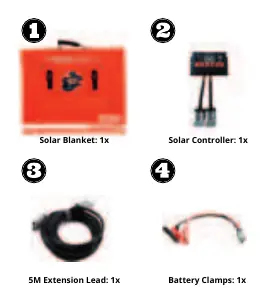
- Solar Blanket (1x)
- Solar Controller (1x)
- 5M Extension Lead (1x)
- Battery Clamps (1x)
Technical Specifications
The manual provides specifications for both the 200W and 300W models. Both feature Monocrystalline cells, ETFE Raptor Skin lamination, and 600D Ballistic Nylon canvas.
300W Model
- Max Power Output: 300W
- Max Power Voltage: 18.8V
- Max Power Current: 16A
- Open Circuit Voltage: 22.44V
- Weight: 11.5KG
200W Model
- Max Power Output: 200W
- Max Power Voltage: 18.8V
- Max Power Current: 10.64A
- Open Circuit Voltage: 22.44V
- Weight: 7.8KG
How to Use
Connecting Steps
- Extend the solar blanket.
- Fold out the built-in stand.
- Point the solar cells towards the sun at the optimum angle.
- Connect the battery clamps onto your battery.
- Connect the solar controller to your battery using the Anderson plug on the opposite end of the battery clamps.
- Connect the solar blanket to the solar controller using the 5M extension lead if required.
Disconnecting Steps
- Disconnect the solar blanket from the solar controller.
- Disconnect the solar controller from the battery clamps.
- Disconnect the battery clamps from your battery.
- Fold up the solar blanket.
- Store the accessories in the bag on the solar blanket.
Folding Steps
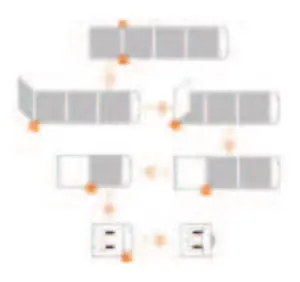
Follow the visual guide in the manual to fold the solar blanket correctly. Ensure the blanket is clean and dry before folding to prevent damage to the cells or canvas.
Warranty & Support
The warranty covers defects in design or manufacture under normal usage conditions. It does not cover improper use, faulty installation, transport damage, or fair wear and tear. For more information, visit www.itechworld.com.au or email [email protected].
Official resources from the manual
Manufacturer information
iTechworld
Practical help
Common problems
Reduced power output
Ensure the solar blanket is not shaded by buildings, trees, or other objects and is angled optimally towards the sun.
Connector issues
Regularly check connectors to ensure they are free of grit before plugging them in.
Damage to blanket
Do not bend the solar panel cells or use sharp objects near the blanket. Ensure it is stored safely.
Before use
- Extend the solar blanket fully.
- Fold out the built-in stand.
- Check that connectors are clean and free of grit.
- Ensure the area is well-ventilated.
- Verify the battery is rechargeable.
Specs in practice
- Max Power Output
- The maximum wattage the panel can produce under ideal conditions.
- Open Circuit Voltage
- The voltage of the panel when no load is connected.
- Operating Temperature
- The safe temperature range for the panel (-40°C to 85°C).
Images and diagrams
- The kit includes a solar blanket, controller, extension lead, and battery clamps.
- Connecting sequence: Battery -> Controller -> Blanket.
- Disconnecting sequence: Blanket -> Controller -> Battery.
Model compatibility
- Only use with rechargeable batteries.
- Do not use with non-rechargeable batteries.

Manual page author
Emily Carter
User documentation editor
Prepares concise manual descriptions and highlights the most useful setup, operation, and maintenance information for readers.