Toys / RC Models & Drones
User Manual for JAMARA Mercedes-Benz Arocs 2.4GHz Dump Truck
Quick guide for the JAMARA Mercedes-Benz Arocs 2.4GHz Dump Truck. Learn how to operate the remote control, install batteries, use the dump function, and follow safety guidelines.
Quick answers from the manual
Quick answer
- To start the model, switch on the truck first, then the transmitter. Wait for the beep, then press the start button on the transmitter. p. 6
Key actions
- Start sequence p. 6
- Lift/Lower dump p. 7
First start
- Switch on model, then transmitter. Wait for beep. Press start button. p. 6
Problems and fixes
Model turns off automatically
The model turns off after 50 seconds of inactivity. Restart the model.
p. 8Maintenance and reset
- Allow 10 minutes cooling time after battery replacement. p. 5
Technical specifications
| Parameter | Value | Meaning | Pages |
|---|---|---|---|
| Frequency | 2.4 GHz | Operating frequency | p. 1 |
Where to find it in the PDF
- Safety and General Information p. 1, 2
- Operation and Functions p. 3, 4, 6, 7
- Battery and Maintenance p. 5, 9, 10, 11
Table of contents
Manual images
Click an image to enlargeQuick Start Guide
To operate the model correctly, follow this start sequence: switch on the model first, then the transmitter. A short beep will sound. Press the start button on the transmitter to activate the model. To switch off, turn off the model first, then the transmitter.

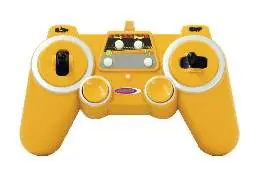
Important: If the model does not receive any commands for 50 seconds, it will automatically switch off and must be restarted.
Safety Information
- Not suitable for children under 36 months due to small parts (choking hazard).
- Use only under direct adult supervision.
- Do not operate the model in rain, snow, wet conditions, or sand.
- Do not operate on public roads or areas used by real vehicles.
- Allow a cooling phase of at least 10 minutes after battery replacement before operating the model again to prevent overheating.
Setup and Battery Installation
The model and transmitter require batteries (check the battery compartment for specific requirements). Ensure correct polarity when inserting batteries. Never store batteries in the model when not in use.
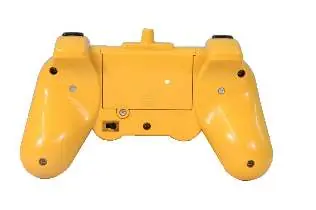
If the model pulls to the left or right while driving, use the trim lever located on the bottom of the model to adjust the straight-line performance.
Operation
The transmitter features several controls:

- Driving: Use the throttle stick to move forward or backward. Use the direction stick to turn left or right.
- Dump Function: Use the designated buttons on the transmitter to lift or lower the dump bed.
- Horn/Sound: Press the horn button for sound effects. Hold the button to switch the sound off.
- Demo Mode: Press the demo button to have the model perform automatic maneuvers.
- Memory Function: Hold the memory button to record movements. Press it again to replay the recorded sequence.
Maintenance and Disposal
Clean the model using a damp cloth. Do not use harsh chemicals. When disposing of the product, batteries, and accumulators, do not throw them in domestic waste. They must be disposed of separately at designated collection points. If the device contains personal data, remove it before disposal.
Practical help
Common problems
Model does not respond
Ensure batteries are fresh and installed correctly. Verify the start sequence: model first, then transmitter.
Model pulls to one side
Use the trim lever on the bottom of the model to adjust the steering alignment.
Model turns off unexpectedly
The model has an auto-off feature after 50 seconds of inactivity. Restart the model.
Before use
- Ensure batteries are installed with correct polarity.
- Perform a range test with a second person holding the model.
- Check that the environment is free of interfering frequencies.
- Ensure the model is not used in rain, snow, or sand.
- Allow a 10-minute cooling phase after battery replacement.
Images and diagrams
- Transmitter buttons control driving, dump lift/lower, horn, and demo functions.
- Trim lever on the bottom of the model adjusts steering alignment.
Model compatibility
- Suitable for children over 6 years.

Manual page author
Michael Turner
Technical manual editor
Reviews PDF manuals for structure, safety notes, and practical product details so readers can find the right information quickly.