Electronics / Headphones Earbuds
JBL Soundgear Sense True Wireless Open-Ear Headphones
User manual for JBL Soundgear Sense open-ear headphones, covering setup, wearing, controls, charging, and technical specifications.
Table of contents
Manual images
Jump to the sectionProduct Overview
The JBL Soundgear Sense are true wireless open-ear headphones featuring JBL OpenSound Technology. This design uses air conduction to deliver sound without completely closing off your ear canal, allowing you to enjoy your music while remaining aware of your surroundings. The headphones feature flexible, rotating earhooks for a comfortable, secure fit and include a detachable neckband for added stability during workouts.
Getting Started
To begin using your headphones, ensure they are fully charged. The package includes the earbuds, a charging case, a neckband, and a USB-C charging cable. For the best experience, download the My JBL Headphones app to customize your settings, gestures, and sound profile.
Wearing the Headphones
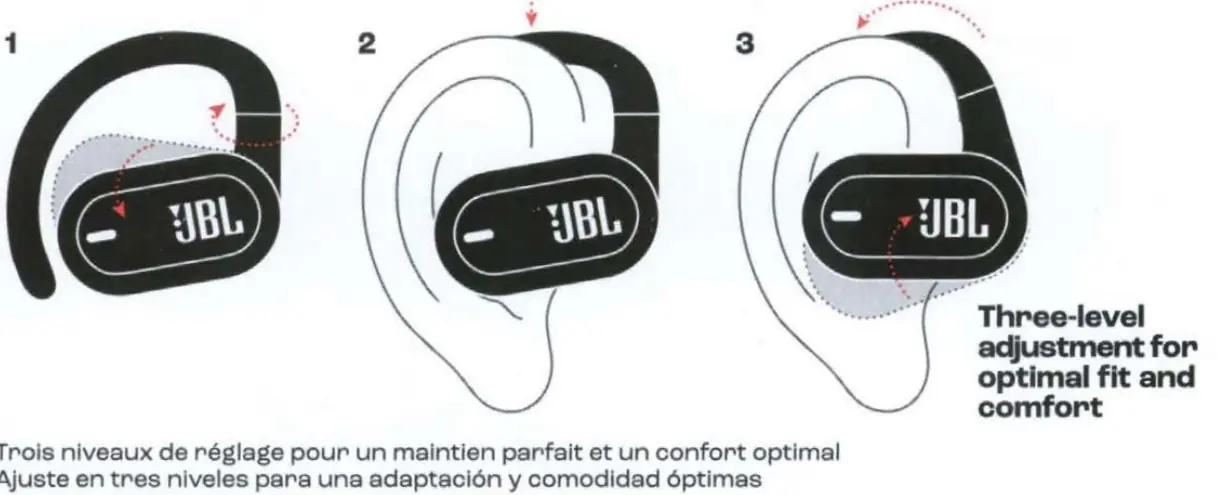
The earhooks offer three-level adjustment to ensure an optimal fit and comfort. For extra security during physical activities, you can attach the included neckband. The headphones are rated IP54, making them resistant to dust and light splashes, such as sweat or light rain.
Powering On and Connecting
To power on and connect, open the charging case. The earbuds will enter pairing mode. Select "JBL SOUNDGEAR SENSE" from your device's Bluetooth settings. The headphones support Fast Pair on Android 6.0+ and Microsoft Swift Pair on Windows 10 v1803+ for quick connectivity.
Controls and Features
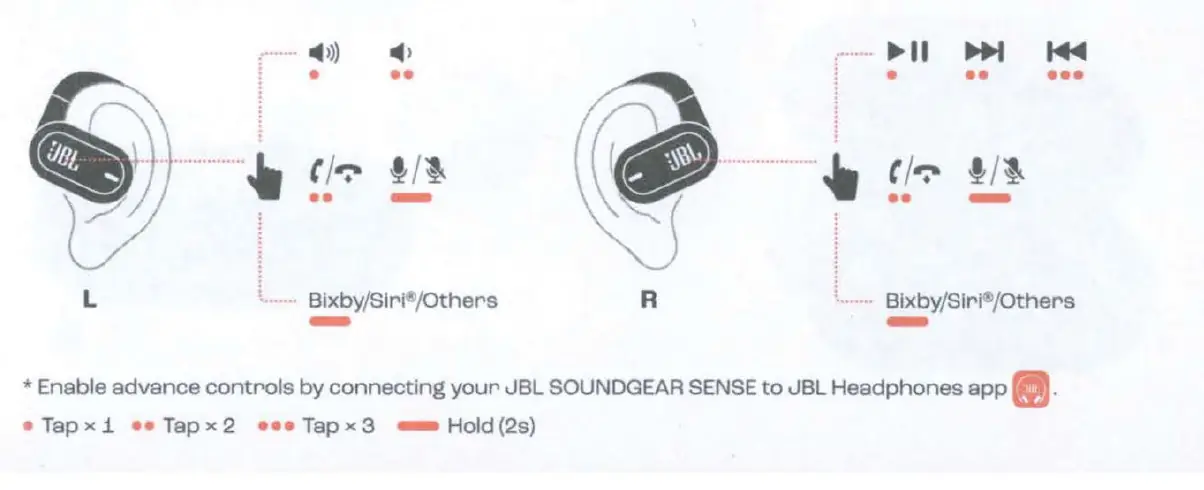
Each earbud features intuitive touch controls. You can manage music playback, volume, and calls directly from the earbuds. Advanced controls can be enabled via the My JBL Headphones app. The headphones also support Dual Connect, allowing you to use both earbuds together or either one individually in mono mode.
Charging and Battery
The earbuds provide up to 6 hours of playtime, with an additional 18 hours available from the charging case. A quick 15-minute charge provides 4 hours of music. Always charge the battery at least once every 3 months to maintain its lifespan.
Maintenance and Safety
Keep the device away from water and do not expose it to extreme temperatures. Do not attempt to disassemble the battery. If the device is damaged, contact an authorized service center. For detailed safety instructions, refer to the provided documentation.
Manufacturer information
JBL
Practical help
Common problems
Headphones not connecting
Ensure Bluetooth is enabled on your device and select 'JBL SOUNDGEAR SENSE' from the list. Perform a factory reset if issues persist.
Battery not charging
Ensure the charging case is charged and the earbuds are correctly seated in the case.
Before use
- Fully charge the earbuds and case
- Download the My JBL Headphones app
- Ensure Bluetooth is enabled on your source device
- Adjust earhooks for a comfortable fit
Specs in practice
- Bluetooth Version
- 5.3 for stable and efficient wireless connectivity
- Charging time
- 2 hours for a full charge from empty
Images and diagrams
- Placement: Shows how to position the earhooks on your ears and place them in the charging case.
- Charging: Illustrates the charging process via the case.
- How to Wear: Demonstrates the three-level adjustment and the optional neckband attachment.
- Controls: Explains touch gestures for music, calls, and voice assistants.
- Factory Reset: Shows the button/tap sequence to reset the device.
Model compatibility
- Compatible with Android 6.0+ (Fast Pair)
- Compatible with Windows 10 v1803+ (Microsoft Swift Pair)
- Supports dual-device connection (Multi-point)

Manual page author
Emily Carter
User documentation editor
Prepares concise manual descriptions and highlights the most useful setup, operation, and maintenance information for readers.