Electronics / Headphones Earbuds
User Manual for JBL Tour One M3 Smart Tx Headphones
Quick start guide and user manual for the JBL Tour One M3 Smart Tx headphones. Learn how to connect, use controls, charge, and configure settings.
Table of contents
Manual images
Click an image to enlargeQuick guide from the manual
The JBL Tour One M3 Smart Tx is a wireless over-ear noise-canceling headphone system that includes a smart transmitter. This guide covers the essential setup, operation, and maintenance of your device.
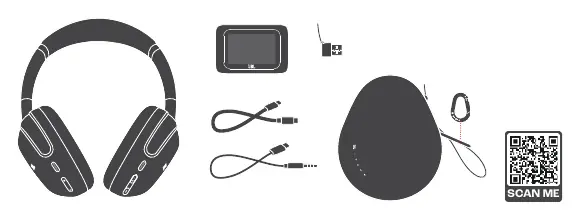
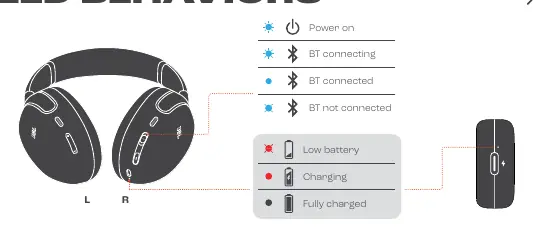
Powering on and connecting
To power on and enter pairing mode, slide the power switch to the bottom and hold for 2 seconds. The headphones support:
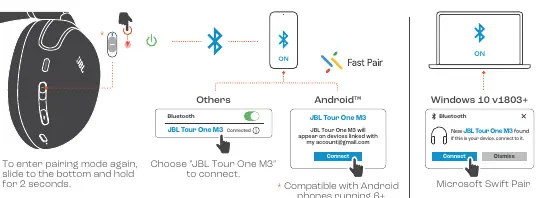
- Bluetooth pairing: Select "JBL Tour One M3" on your device's Bluetooth menu.
- Fast Pair: Compatible with Android phones running 6.0+.
- Microsoft Swift Pair: Compatible with Windows 10 v1803+.
- Multi-point connection: Connect up to 2 devices simultaneously.
Controls and gestures
The headphones feature touch and button controls:
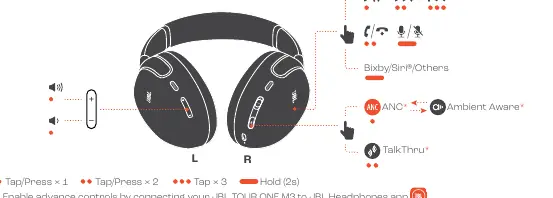
- Playback: Tap/Press once for play/pause, twice for next track, three times for previous track.
- Calls: Tap/Press once to answer/end calls.
- Voice Assistant: Access Bixby, Siri, or other assistants.
- Sound Modes: Toggle between ANC, Ambient Aware, and TalkThru.
Charging
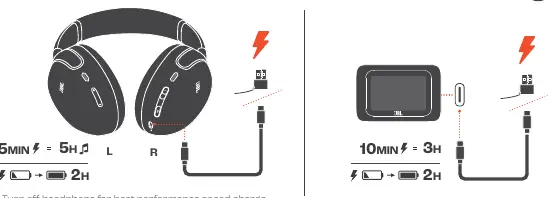
To charge the headphones, connect them via the USB-C port. A 5-minute charge provides approximately 5 hours of playback. Ensure the device is turned off for the fastest charging performance. The power adapter used should provide between 2.5W and 5W.
Advanced features
- Smart Talk: Automatically pauses music when you speak.
- SilentNow: Allows for noise cancellation without Bluetooth connectivity.
- VoiceAware: Adjusts the amount of your own voice heard during calls.
- Auto Play/Pause: Automatically pauses audio when headphones are removed.
Technical specifications
- Driver size: 40 mm dynamic driver.
- Bluetooth version: 5.3.
- Battery life (Headphones): Up to 70 hours (ANC off), 40 hours (ANC on).
- Battery life (Transmitter): Up to 18 hours.
- Charging time: 2 hours from empty.
- Frequency response: 10 Hz - 40 kHz.
Manufacturer information
JBL
Practical help
Common problems
Headphones not entering pairing mode
Slide the power switch to the bottom and hold for 2 seconds.
Audio quality issues in wired mode
Ensure you are using the original cables provided with the device.
Slow charging
Ensure the power adapter output is between 2.5W and 5W and the headphones are turned off.
Before use
- Download the JBL Headphones app for full control.
- Charge the headphones fully before first use.
- Ensure Bluetooth is enabled on your source device.
- Check that your Android device is running version 6.0+ for Fast Pair.
Specs in practice
- Bluetooth version
- 5.3 for stable, low-power connectivity.
- Charging time
- 2 hours to reach full charge from empty.
- Music playtime
- Up to 70 hours with ANC off, 40 hours with ANC on.
Images and diagrams
- Page 1: Setup and controls overview.
- Page 5: Bluetooth pairing process for various devices.
- Page 6: Wired connection options.
- Page 8: Touch control gestures.
- Page 19: LED behavior indicators.
Model compatibility
- Compatible with Android 6+ for Fast Pair.
- Windows 10 v1803+ required for Microsoft Swift Pair.
- Transmitter supports Auracast for sharing audio.

Manual page author
Emily Carter
User documentation editor
Prepares concise manual descriptions and highlights the most useful setup, operation, and maintenance information for readers.