Electronics / Headphones Earbuds
User Manual for JBL Vibe Buds 2
Quick start guide and user manual for JBL Vibe Buds 2. Learn how to pair, use touch controls, manage multi-point connections, charge, and reset your earbuds.
Table of contents
Manual images
Click an image to enlargeQuick guide from the manual
This guide provides essential instructions for setting up and using your JBL Vibe Buds 2. For optimal performance, ensure you download the JBL Headphones app to customize your sound and settings. The earbuds support multi-point connection for up to two devices and feature Active Noise Cancelling (ANC) and Smart Ambient modes.
What's in the box
- JBL Vibe Buds 2 headphones
- Charging case
- Ear tips (S/M/L sizes)
- Type-C USB charging cable
First time use and pairing
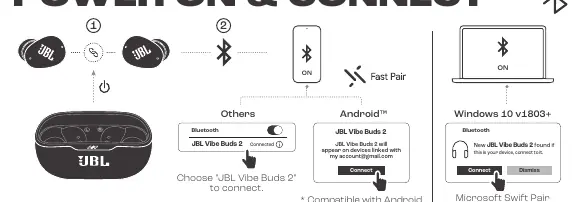
- Remove the protective film from the earbuds.
- Place the earbuds into the charging case.
- Open the Bluetooth settings on your device.
- Select "JBL Vibe Buds 2" to connect.
- For Android devices (6+), the earbuds support Google Fast Pair. For Windows 10 (v1803+), they support Microsoft Swift Pair.
How to wear
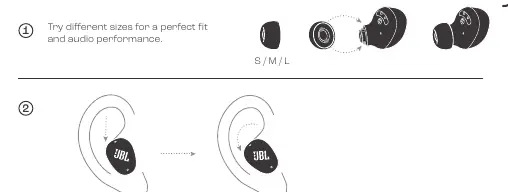
For the best audio performance and fit, try the different sizes of ear tips (S, M, L) included in the box. Insert the earbud into your ear and twist it slightly to secure it.
Controls
The earbuds feature touch controls on both the left (L) and right (R) sides:
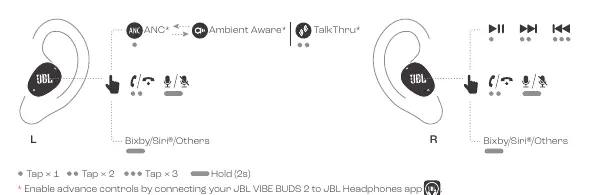
- Tap x1: Play/Pause, Answer/End call
- Tap x2: Next track
- Tap x3: Previous track
- Hold (2s): Activate Voice Assistant (Bixby/Siri/Others)
- Left Earbud Hold (2s): Cycle through ANC, Ambient Aware, and TalkThru modes
Multi-point connection
You can connect to two Bluetooth devices simultaneously. To set this up, ensure both devices have Bluetooth enabled and follow the pairing process. The earbuds will manage the connection between the two devices.
Charging
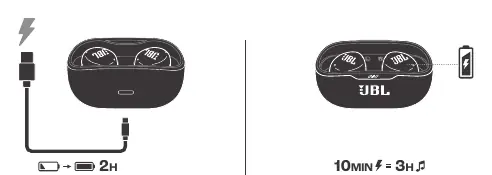
To charge, place the earbuds in the case and connect the case to a power source using the provided USB-C cable. A full charge takes approximately 2 hours. A 10-minute quick charge provides up to 3 hours of playtime.
LED Behaviors
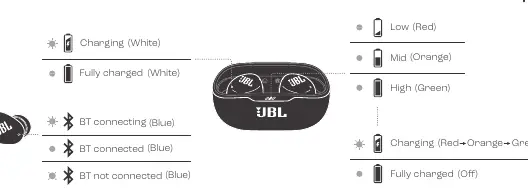
- Charging (White): Earbuds are charging.
- Fully Charged (White): Charging complete.
- BT Connecting (Blue): Searching for a device.
- BT Connected (Blue): Successfully paired.
- BT Not Connected (Blue): Ready to pair.
Factory Reset
If you experience connectivity issues, you can perform a factory reset. With the earbuds in the case, tap x2 and hold for 5 seconds on the earbuds.
Battery Maintenance
To protect battery lifespan, fully charge the device at least once every 3 months. Battery life varies based on usage patterns and environmental conditions.
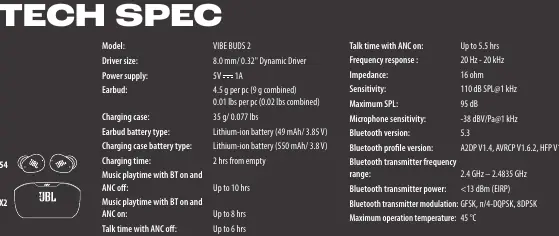
Technical Specifications
- Driver size: 8.0 mm Dynamic Driver
- Bluetooth version: 5.3
- Water/Dust resistance: IP54 (earbuds), IPX2 (case)
- Music playtime (ANC off): Up to 10 hours
- Music playtime (ANC on): Up to 8 hours
- Charging time: 2 hours from empty
Manufacturer information
JBL
Practical help
Common problems
Earbuds not connecting
Ensure Bluetooth is enabled on your device, the earbuds are in pairing mode, or perform a factory reset.
Charging issues
Ensure the charger provides between 2.5W and 5W of power for optimal charging speed.
Battery health
Charge the device at least once every 3 months to maintain battery lifespan.
Before use
- Charge the earbuds fully before first use
- Select the correct ear tip size (S/M/L) for a perfect fit
- Download the JBL Headphones app for advanced controls
- Ensure Bluetooth is enabled on your source device
Specs in practice
- Smart Ambient
- Allows you to hear your surroundings without removing the earbuds.
Images and diagrams
- Touch controls: Tap x1, x2, x3, or hold for specific functions.
- LED behaviors: White for charging status, Blue for Bluetooth connection status.
Model compatibility
- Compatible with Android 6+ for Fast Pair
- Compatible with Windows 10 v1803+ for Swift Pair
- Supports multi-point connection for up to 2 devices

Manual page author
Emily Carter
User documentation editor
Prepares concise manual descriptions and highlights the most useful setup, operation, and maintenance information for readers.