Electronics / Headphones Earbuds
User Manual for JBL Tune 670NC Headphones
Quick start guide and user manual for JBL Tune 670NC headphones. Learn how to pair, use controls, manage multi-point connections, and optimize your listening experience.
Table of contents
Manual images
Click an image to enlargeQuick guide from the manual
This guide provides essential instructions for setting up and using your JBL Tune 670NC headphones. For the best experience, download the free JBL Headphones App to customize your sound, EQ settings, and voice assistant preferences.
Power on and connect
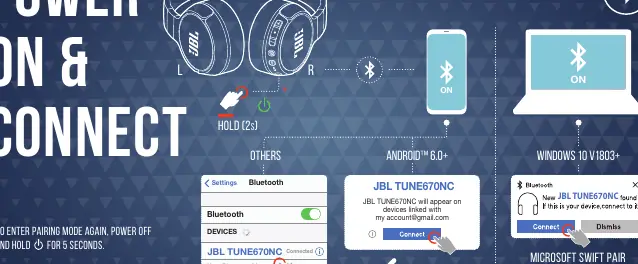
To power on the headphones, hold the power button for 2 seconds. To enter pairing mode, power off the device and hold the power button for 5 seconds. The headphones support Fast Pair for Android 6.0+ and Microsoft Swift Pair for Windows 10 v1803+.
Multi-point connection
You can connect to two Bluetooth devices simultaneously:
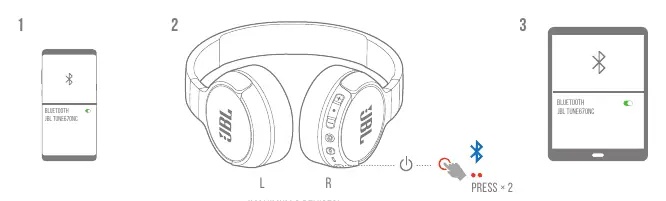
- Connect the first device to the headphones via Bluetooth.
- Ensure the headphones are in pairing mode.
- Connect the second device via Bluetooth settings.
- To switch between devices, press the Bluetooth button twice on the headphones.
Controls
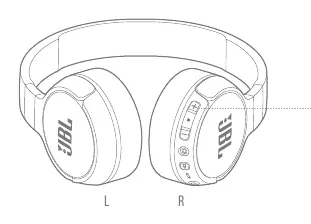
The right ear cup features physical buttons for playback and call management:
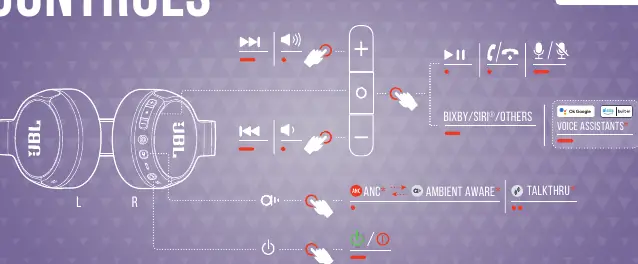
- Volume +/-: Press to adjust volume.
- Center button: Press once for play/pause or to answer/end calls. Press and hold for voice assistant.
- Skip/Previous: Press and hold the volume buttons to skip tracks or go back.
- ANC/Ambient/TalkThru: Press the dedicated button to cycle through these modes.
- Power: Press and hold to turn on/off.
Wired listening mode
You can use the headphones in wired mode by connecting the provided detachable audio cable to the headphones and your audio source device.
Charging
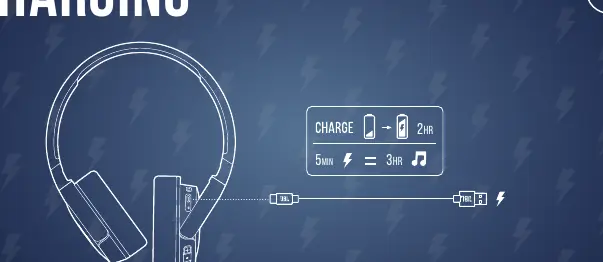
Charge the headphones using the provided USB-C cable. A full charge takes 2 hours. A quick 5-minute charge provides 3 hours of playback.
Factory reset
If you encounter connectivity issues, you can perform a factory reset. With the headphones powered on, press and hold the volume '+' and '-' buttons simultaneously for 5 seconds.
LED behaviors
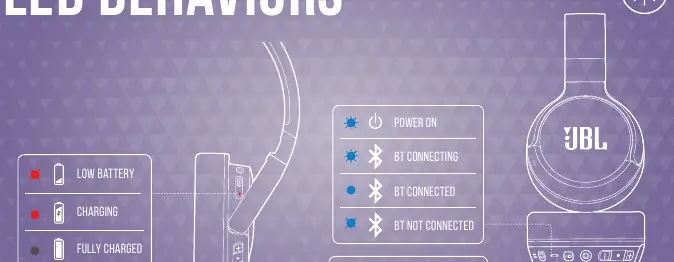
- Blue flashing: Power on / BT connecting.
- Blue solid: BT connected.
- Blue slow flashing: BT not connected.
- Red solid: Charging.
- Red off: Fully charged.
- Red flashing: Low battery.
Manufacturer information
JBL
Practical help
Common problems
Headphones not connecting
Power off the headphones, then hold the power button for 5 seconds to re-enter pairing mode.
Multi-point connection not working
Ensure both devices are paired, then press the Bluetooth button twice on the headphones to switch.
Battery life seems short
Ensure you are charging the battery fully at least once every 3 months to maintain lifespan.
Before use
- Charge the headphones fully before first use.
- Download the JBL Headphones App for advanced features.
- Check Bluetooth settings on your source device.
- Ensure the headphones are in pairing mode if not connecting automatically.
Specs in practice
- Ambient Aware
- Allows you to hear your surroundings without removing the headphones.
Images and diagrams
- The right ear cup contains all control buttons, the charging port, and the audio jack.
- LED indicators are located on the right ear cup to show battery and connection status.
Model compatibility
- Fast Pair is available for Android 6.0+ devices.
- Microsoft Swift Pair is available for Windows 10 v1803+.

Manual page author
David Miller
Documentation analyst
Organizes user manual content into clear summaries, with attention to model details, product context, and everyday usability.