General / Accessories
JBL TUNE 120TWS True Wireless Earbuds User Guide
Quick start guide for JBL TUNE 120TWS earbuds, covering pairing, button controls, LED indicators, charging, and technical specifications.
Table of contents
Quick guide from the manual
This document provides essential instructions for setting up and using your JBL TUNE 120TWS earbuds. It covers initial pairing, manual controls, LED status indicators, and charging procedures.
First time use and pairing
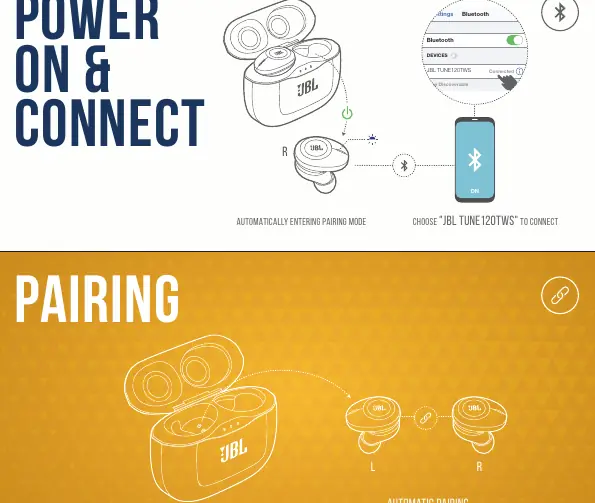
- Remove earbuds from the charging case to automatically enter pairing mode.
- Open Bluetooth settings on your device and select "JBL TUNE 120TWS" to connect.
- The earbuds will automatically pair with each other when removed from the case.
Manual controls
Powering on and connecting: Press and hold the button on the right earbud for 5 seconds to power on and enter pairing mode.
Powering off: Press and hold the button on either earbud for 5 seconds to power off.
Playback and voice assistant:
- Right earbud: Press once for play/pause, press twice for Siri/Google Assistant/Bixby.
- Left earbud: Press once for next track, press twice for previous track.
Charging and LED behaviors
Charge the case using the provided cable. A full charge takes less than 2 hours.
- Low battery: Flashing white LED.
- Charging: Solid white LED.
- Fully charged: LED turns off.
- Bluetooth connecting: Flashing blue LED.
- Bluetooth connected: Solid blue LED.
Technical specifications
- Driver size: 5.8 mm dynamic driver
- Frequency response: 20 Hz – 20 kHz
- Bluetooth version: 4.2
- Battery type: Lithium-ion (85 mAh/3.7 V DC for earbuds, 850 mAh/3.7 V DC for case)
- Music playtime: Up to 4 hours
- Charging time: < 2 hours from empty
Manufacturer information
JBL
Practical help
Common problems
Earbuds not connecting to device
Ensure the earbuds are in pairing mode (flashing blue LED) and select 'JBL TUNE 120TWS' in your device's Bluetooth settings.
Earbuds not charging
Ensure the charging case is charged and the earbuds are correctly seated in the case.
Before use
- Select the correct size ear tips (S, M, L) for a secure fit.
- Ensure the charging case is fully charged.
- Check that Bluetooth is enabled on your source device.
Specs in practice
- Music Playtime
- Up to 4 hours of continuous playback with Bluetooth enabled.
- Charging Time
- Less than 2 hours to charge both earbuds and case from empty.
Images and diagrams
- The manual provides visual cues for ear tip replacement, automatic pairing, and button command mapping for both left and right earbuds.
- LED behavior section clarifies the status of the earbuds during charging and connection states.
Model compatibility
- Supports Bluetooth 4.2.
- Compatible with A2DP 1.3, AVRCP 1.5, and HFP V1.6 profiles.

Manual page author
David Miller
Documentation analyst
Organizes user manual content into clear summaries, with attention to model details, product context, and everyday usability.