Electronics / Headphones Earbuds
User Guide for JBL Wave 100TWS Earbuds
Quick start guide for JBL Wave 100TWS earbuds. Learn how to pair, control playback, manage calls, charge, and reset your device.
Table of contents
Manual images
Click an image to enlargeQuick Start Guide
This guide provides essential instructions for setting up and using your JBL Wave 100TWS earbuds. Ensure you charge the device fully before the first use.
What's in the box
The package includes the JBL Wave 100TWS earbuds, a charging case, and three sizes of eartips (S, M, L).
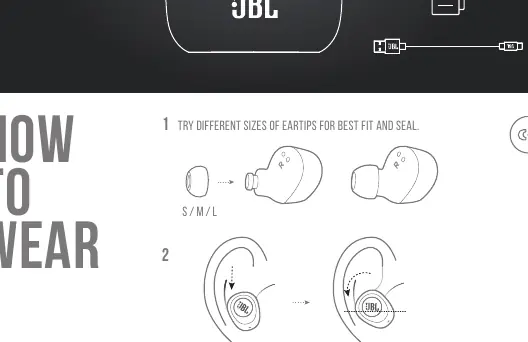
How to wear
For the best fit and sound seal, try the different sizes of eartips provided. Insert the earbuds into your ears and adjust until they sit securely.
Power on and connect
To connect, open the charging case and select "JBL WAVE100TWS" from the Bluetooth settings on your device.
Dual connect
The earbuds support both Stereo and Mono modes. They will automatically switch between these modes based on how you use them.
Button commands
Use the buttons on the earbuds to control playback and calls:
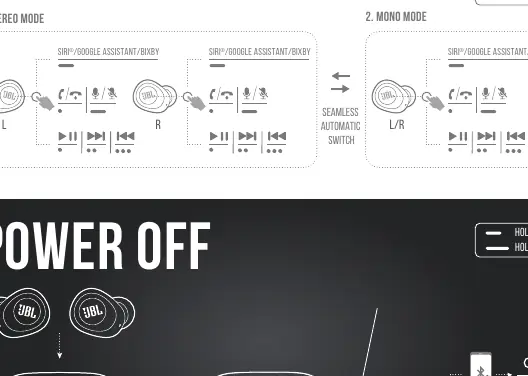
- Press 1x: Play/Pause or Answer/End call.
- Press 2x: Next track.
- Press 3x: Previous track.
- Hold 2s: Activate Voice Assistant (Siri/Google Assistant/Bixby).
- Hold 5s: Power off.
Manual controls
If you need to troubleshoot or pair with a new device:
- Connect to a new Bluetooth device: Follow the standard pairing process.
- Reconnect Left & Right: Use the manual reconnect function if the earbuds lose sync.
- Reset: Use the reset function if you encounter connectivity issues.
Charging and LED behaviors
The LED indicators on the case and earbuds show the status:
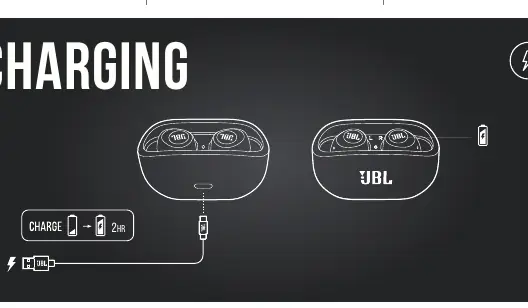
- Charging: Red, Orange, or Green light.
- Fully Charged: Light turns off.
- BT Connecting: Blue light.
- BT Connected: Blue light.
- BT Not Connected: Blue light.
- Battery Levels: Red (Low), Orange (Mid), Green (High).
Technical specifications
Key specifications include an 8mm dynamic driver, 5 hours of music playtime with Bluetooth on, and a 2-hour charging time from empty. The operating temperature is up to 45°C.
Battery maintenance
To prolong battery lifespan, fully charge the earbuds at least once every 3 months. Battery life varies by use and settings.
Manufacturer information
JBL
Practical help
Common problems
Earbuds not connecting
Ensure Bluetooth is enabled on your device and try the manual reset procedure.
Battery draining quickly
Ensure you are charging the device fully at least once every 3 months to maintain battery health.
Earbuds out of sync
Use the 'Reconnect Left & Right' manual control function.
Before use
- Select the correct eartip size (S/M/L) for a secure fit.
- Charge the case and earbuds fully before first use.
- Ensure Bluetooth is enabled on your source device.
- Check that the charging case is powered.
Specs in practice
- Charging Time
- 2 hours to charge from empty to full.
- Music Playtime
- Up to 5 hours of playback with Bluetooth enabled.
- Bluetooth Version
- 5.0 for stable wireless connection.
Images and diagrams
- The manual provides visual guides for eartip fitting, button press sequences, and LED status indicators.
- The 'Button Command' section illustrates the difference between single, double, triple presses, and holds.
Model compatibility
- Compatible with devices supporting Bluetooth 5.0.
- Supports profiles: A2DP V1.3, AVRCP V1.6, HFP V1.7.

Manual page author
Emily Carter
User documentation editor
Prepares concise manual descriptions and highlights the most useful setup, operation, and maintenance information for readers.