Home Appliances / Food Processing Equipment
Quick Start Guide for Kenmore SMART 1500e Series Air Purifier
A quick start guide for the Kenmore SMART 1500e Series Air Purifier. Includes instructions for filter installation, initial setup, app connectivity, and an overview of control panel functions and modes.
Table of contents
Quick guide from the manual
This document provides essential steps to set up and begin using your Kenmore SMART 1500e Series Air Purifier. Before first use, it is critical to remove the protective packaging from the internal filters.
Setting up your air purifier
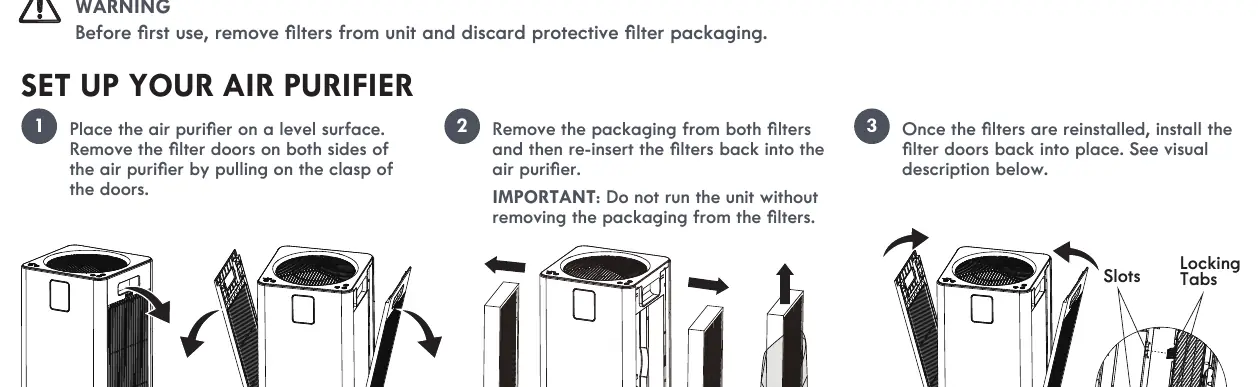
- Prepare filters: Place the unit on a level surface. Pull the clasp on the filter doors on both sides of the unit to remove them.
- Remove packaging: Take the filters out, remove all protective packaging, and re-insert the filters back into the unit. Important: Do not run the unit without removing the packaging from the filters.
- Reinstall doors: Place the filter doors back into position, ensuring the locking tabs and slots are aligned.
- Positioning: Place the unit on a level surface away from obstructions like curtains that could block airflow.
- Power: Insert the power adapter into the power port on the back of the unit and plug the cord into an electrical outlet. Tap the Power Button to turn the unit on; it will default to AUTO mode.
App connectivity
To utilize smart features, download the Kenmore Smart app to your device and create a profile. Follow the on-screen prompts to pair the device. The air purifier supports 2.4GHz Wi-Fi networks and is compatible with Apple iOS 11+ and Android 6+.
Understanding your air purifier
The control panel allows you to manage the following functions:
- On/Off Button: Turns the unit on or off.
- Mode Button: Switches between AUTO, SLEEP, and Manual modes. The corresponding light indicates the active mode.
- Fan Speed Button: Manually choose between 5 fan speeds.
- Timer: Allows you to set a timer for operation.
- Child Lock: To activate or deactivate, hold down the 'Mode' and 'Fan Speed' buttons simultaneously for more than 3 seconds.
- Filter Reset: When the filter life indicator flashes, press and hold the Filter Reset button for more than 3 seconds after installing new filters to reset the meter.
- Wi-Fi Indicator: Flashes during pairing mode, illuminates steadily when connected, and turns off when disconnected.
Operating modes
- AUTO Mode: Fan speed adjusts automatically based on air quality changes.
- SLEEP Mode: The fan runs at the lowest speed and the display screen turns off. Press any button to exit this mode.
Practical help
Common problems
Unit will not run or airflow is restricted
Ensure all protective packaging has been removed from the filters inside the unit.
Filter life indicator is flashing
Replace the filters and press and hold the Filter Reset button for more than 3 seconds to reset the counter.
Cannot connect to Wi-Fi
Ensure your network is a 2.4GHz Wi-Fi network. The unit is not compatible with 5GHz networks.
Before use
- Remove protective packaging from both filters.
- Ensure filters are correctly re-inserted into the unit.
- Place the unit on a level surface.
- Ensure there is clearance around the unit (away from curtains or obstructions).
- Download the Kenmore Smart app.
Specs in practice
- 2.4GHz Wi-Fi
- Required network frequency for app connectivity.
Images and diagrams
- The setup diagram illustrates the filter door removal process by pulling the clasp.
- The power port is located on the back of the unit.
Model compatibility
- Requires Apple iOS 11 or above.
- Requires Android 6 or above.

Manual page author
David Miller
Documentation analyst
Organizes user manual content into clear summaries, with attention to model details, product context, and everyday usability.