Tools / Grinding Tools
Instruction Manual for KIMO 20V 2.0Ah Lithium-Ion Battery
Quick guide for the KIMO 20V 2.0Ah Lithium-Ion Battery. Learn how to install, charge, and safely maintain your battery pack with this user manual summary.
Quick answers from the manual
Quick answer
- To install, depress the green button and insert the battery into the tool until it clicks. To charge, slide the battery into the charger bay; a red light indicates charging, while a green light indicates it is fully charged. p. 3
Key actions
- Install/Remove Battery p. 3
- Charge Battery p. 3
First start
- Fully charge the battery before every use. p. 4
Problems and fixes
Short Circuit
Check for conductive materials on terminals or water exposure.
p. 3, 4Maintenance and reset
- Store in a clean, dry, cool place away from heat sources and metal objects. p. 4
Technical specifications
| Parameter | Value | Meaning | Pages |
|---|---|---|---|
| Charging Time | 30-90 minutes | Time required to charge a fully discharged battery. | p. 3 |
Where to find it in the PDF
- General Use Rules p. 3
- Safety Instructions p. 4
Table of contents
Manual images
Click an image to enlargeQuick Guide
This manual provides essential instructions for the KIMO 20V 2.0Ah Lithium-Ion Battery. Always fully charge the battery before its first use. The battery is designed exclusively for use with KIMO 20V tools and chargers. If you encounter issues, check the charging indicator lights to determine the battery status.
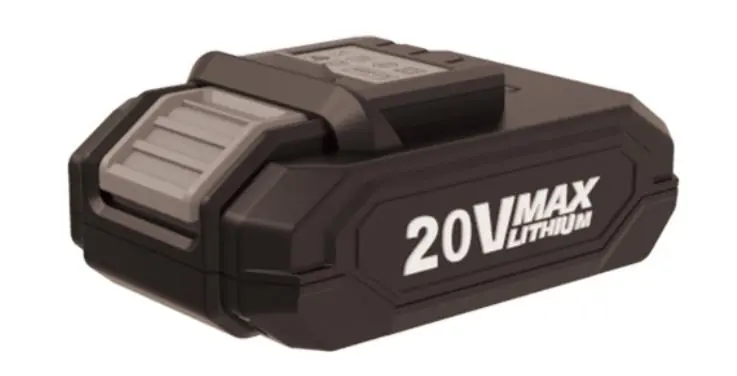
Installation and Removal
To install the battery pack:
- Depress the green button on the battery.
- Insert the battery pack into the tool.
- Push until an audible click is heard.
- Release the button to ensure the battery is fully seated and secure.
To remove the battery pack:
- Depress the green button on the battery.
- Pull the battery pack out of the tool.
Charging the Battery
To charge the battery, align the battery pack with the charger bay and slide it in as far as possible. A fully discharged battery typically takes 30 to 90 minutes to charge, depending on the specific charger and battery condition. KIMO 2.0 batteries feature built-in overheating and overcharge protection.
Charging Indicators
Monitor the charging status using the indicator lights on the charger:
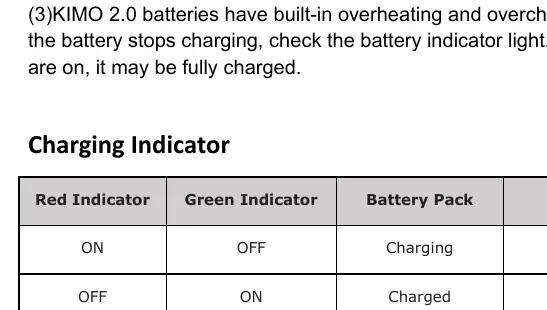
- Red ON / Green OFF: The battery is currently charging.
- Red OFF / Green ON: The battery is fully charged.
- Red OFF / Green OFF: A short circuit has been detected.
Safety Instructions
Follow these guidelines to ensure safe operation and longevity of your battery:
- Compatibility: Use only with KIMO 20V tools and chargers.
- Storage: Store in a clean, dry, cool place away from heat sources and metal objects.
- Short Circuit Prevention: Do not touch terminals with conductive materials. Avoid storing with metal objects like nails or coins. Do not expose to water or rain.
- Handling: Do not drop, strike, or disassemble the battery.
- Disposal: Do not incinerate the battery, even if damaged, as it may explode.
Customer Support
If you have questions or need assistance, contact KIMO support:
- Email: [email protected]
- Website: www.kimotool.com
- Hotline: +1 833 303 1997
- WhatsApp: +86 189 3805 9242
Official resources from the manual
Manufacturer information
Zhejiang Kimo Power Tools Co., Ltd.
Practical help
Common problems
Battery stops charging
Check the battery indicator lights. If all four lights are on, the battery may already be fully charged.
Short circuit detected (Red and Green lights OFF)
Ensure the battery terminals are clean and not touching any conductive materials. Do not expose the battery to water or rain.
Before use
- Fully charge the battery before the first use.
- Verify you are using a compatible KIMO 20V charger.
- Inspect the battery for any physical damage.
- Ensure the battery terminals are free of debris.
Specs in practice
- Charging Time
- 30 to 90 minutes depending on the battery pack and charger.
- Compatibility
- Exclusively designed for KIMO 20V tools and chargers.
Images and diagrams
- The battery features a green release button used for both installation and removal.
- The charging indicator table helps identify if the battery is charging, charged, or experiencing a short circuit.
Model compatibility
- Only use with KIMO 20V tools.
- Only use with KIMO 20V chargers.

Manual page author
Emily Carter
User documentation editor
Prepares concise manual descriptions and highlights the most useful setup, operation, and maintenance information for readers.