Home Appliances / Small Kitchen Appliances
User Manual for Lauben Contact Grill Deluxe 2000ST
Quick guide for the Lauben Contact Grill Deluxe 2000ST. Includes setup, menu settings, cooking instructions, and safety guidelines.
Quick answers from the manual
Quick answer
- The Lauben Contact Grill Deluxe 2000ST is a home contact grill with adjustable temperature and time settings for various food types like beef, fish, and chicken. p. 9
Key actions
- Preheating p. 13
- Adjusting settings p. 13
First start
- Unpack and clean p. 12
Problems and fixes
Grill goes to standby
If Start/Stop is not pressed within 15 seconds of selection, it enters standby.
p. 13Technical specifications
| Parameter | Value | Meaning | Pages |
|---|---|---|---|
| Power consumption | 2000 W | Energy usage | p. 9 |
Where to find it in the PDF
- Specifications p. 9
Table of contents
Manual images
Click an image to enlargeQuick guide from the manual
The Lauben Contact Grill Deluxe 2000ST is designed for home use. This guide covers the essential steps for setup, operation, and maintenance to ensure safe and optimal performance.
Product Description
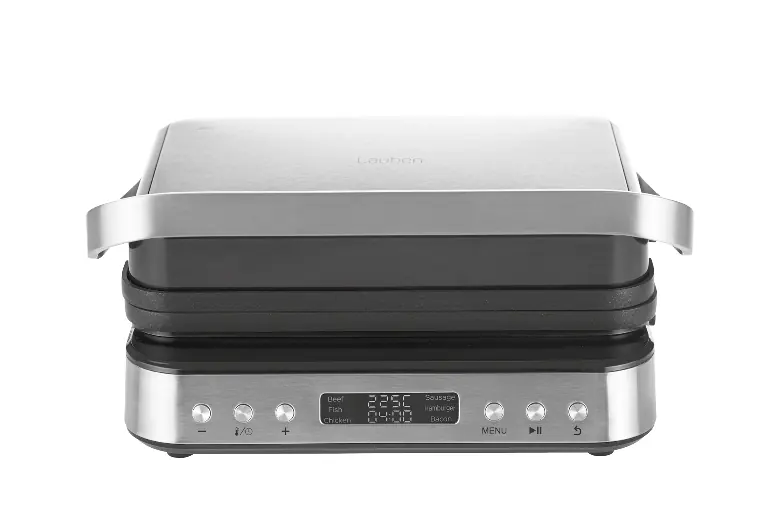
The grill consists of a lid, handle, non-stick grill plates, a control panel, and a drip tray. The control panel allows for precise adjustment of cooking time and temperature.

Before Use
- Remove all packaging and promotional materials.
- Clean the grill plates with warm water and a mild detergent. Dry thoroughly.
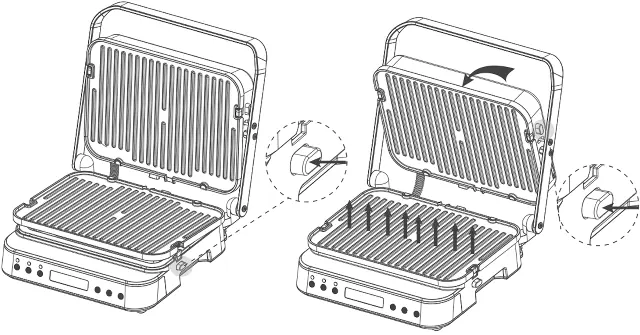
- Ensure the grill plates are seated correctly.
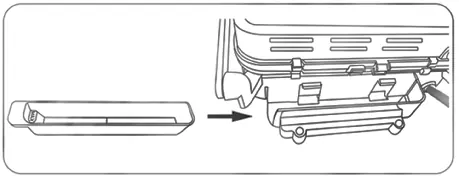
- Verify the drip tray is properly inserted at the back of the appliance.
Using the Appliance
- Plug in the appliance; it will beep and display 'OFF'.
- Press the 'Menu' button to select a program (Beef, Fish, Chicken, Sausage, Hamburger, Bacon). The default time and temperature will be displayed.
- Press 'Temperature/Timer' to toggle between time and temperature settings. Use '+' or '-' to adjust.
- Press 'Start/Stop' to begin preheating. 'PRE' will appear on the display. Close the grill during preheating. The unit will beep 5 times when ready.
- Place food on the grill plate and press 'Start/Stop' to begin the countdown.
- When the timer ends, the unit will beep 5 times and enter standby mode, displaying 'DONE'.
- Press 'Back' to return to 'OFF'.
Flat Grill Mode
To use the grill in a flat position:
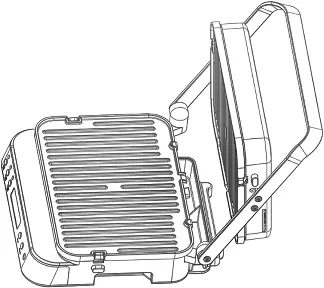
- After preheating, use the handle to open the lid.
- Wear oven gloves, move the top plate to align with the handle, and press the handle and top plate down into the flat position.
- Be careful, as the top plate will be hot.
Maintenance and Safety
- Always switch off and unplug the appliance before cleaning.
- Allow the appliance to cool down completely before cleaning.
- Do not use metal tools or knives on the non-stick surface.
- Do not immerse the power cord, plug, or appliance in water.
- Keep the appliance away from heat sources and flammable materials.
Manufacturer information
Lauben
Practical help
Common problems
Appliance does not start
Ensure it is plugged in and the Start/Stop button is pressed within 15 seconds of selecting a program.
Food sticking to plates
Use a small amount of cooking oil and ensure the non-stick surface is not damaged by metal tools.
Temperature units are in °F instead of °C
In standby mode (OFF), press and hold the Temperature/Timer button for 5 seconds to toggle units.
Before use
- Remove all packaging and promotional materials.
- Clean the grill plates with warm water and mild detergent.
- Ensure the drip tray is correctly inserted at the back.
- Check that the grill plates are seated correctly.
Images and diagrams
- The grill features a lid, handle, grill plates, control panel, and release mechanism.
- The control panel includes buttons for time/temperature adjustment, menu selection, and start/stop.
Model compatibility
- Intended for home use only.
- Not suitable for commercial use.

Manual page author
Michael Turner
Technical manual editor
Reviews PDF manuals for structure, safety notes, and practical product details so readers can find the right information quickly.