Computers / Printers
Technical Reference for Lexmark Forms Printer 248x/249x
Comprehensive technical reference and programming guide for the Lexmark Forms Printer 248x/249x series. Includes printer commands, interface specifications, barcode printing, and character downloading instructions.
Quick answers from the manual
Quick answer
- The Lexmark 248x/249x is a dot-matrix printer series supporting IBM, Epson, and OKI Microline emulation modes. This manual provides technical specifications, command references, interface setup, and barcode printing instructions. p. 9
Key actions
- Run a printer test p. 18
- Configure serial interface p. 96, 103
Problems and fixes
Barcode not printing
Check if barcode option is enabled in setup menu and if data exceeds margins.
p. 147, 179Show 2 more answers Show less
Technical specifications
| Parameter | Value | Meaning | Pages |
|---|---|---|---|
| Operating Power | 38 W | Average operating power | p. 12 |
| Idle Power | 7 W | Average idle power | p. 12 |
| Ribbon Life (Standard) | 4 million characters | Life expectancy in 10 cpi draft mode | p. 17 |
Where to find it in the PDF
- Introduction p. 9
- Printer Commands p. 21, 65, 79
- Printer Interface p. 91
- Barcodes p. 147
Table of contents
Manual images
Click an image to enlargeIntroduction
This technical reference manual provides detailed information for the Lexmark Forms Printer 2400 Series dot-matrix family, including the 248x and 249x models. It is intended for hardware and software programmers, engineers, and technicians requiring in-depth technical data.
Printer Specifications
The 2400 series printers utilize dot-matrix impact technology. Key specifications include:
- Printhead: 248x features a 9-wire printhead; 249x features a 24-wire printhead.
- Power Requirements: 90-137 V ac or 180-265 V ac, 50/60 Hz.
- Power Consumption: 38 W average operating power, 7 W average idle power.
- Environmental: Operating temperature +10° to +40.6°C (+50° to +105°F); Humidity 8.0% to 90%.
- Ribbon Life: Standard re-inking ribbon (11A3540) lasts approx. 4 million characters; High yield (11A3550) lasts approx. 8 million characters.
Diagnostics
The printer performs automatic power-on diagnostics, including RAM, ROM, and NVRAM tests. If an error occurs, blinking LEDs indicate the failure. A printer test can be run by turning the printer off, pressing and holding the Line Feed button, and turning the printer on.
Printer Commands
The manual details command sets for three emulation modes:
- IBM Emulation Mode: Includes control codes, escape sequences, and printer command parameters.
- Epson Emulation Mode: Covers font selection, graphics print modes, and page formatting.
- OKI Microline Emulation Mode: Details character sets, custom characters, and graphics modes.
Printer Interface
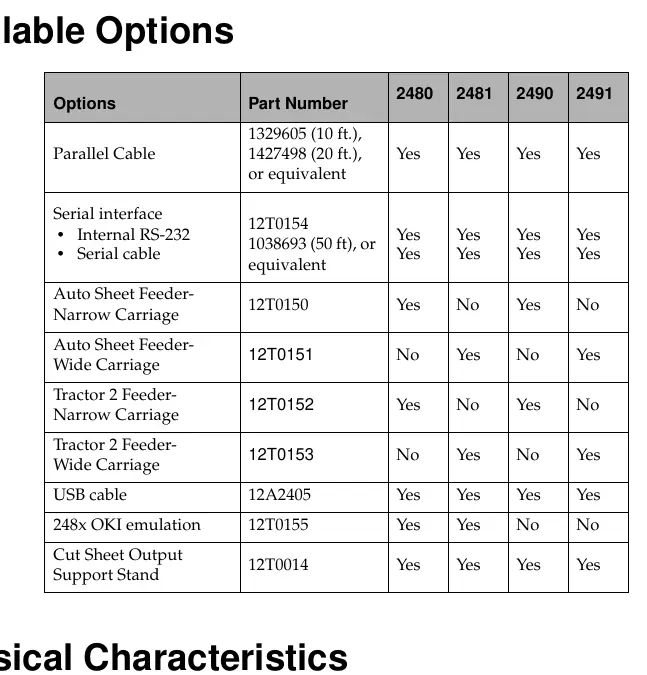
The printer supports Parallel, USB, and Serial (RS-232C) interfaces. The manual provides detailed pin assignments, voltage levels, and communication parameters for these interfaces, including configuration recommendations for DOS and OS/2 environments.
Downloading Characters and Fonts
Users can create and download custom fonts and special characters. The manual explains the download sequence, including how to initialize the download area, calculate counts, and define character data and lookup tables.
Barcodes
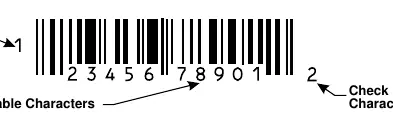
The printer supports resident barcode generation, including EAN-13, EAN-8, Code 39, Interleaved 2of5, UPC-A, POSTNET, and Code 128. The manual provides setup commands, data transfer procedures, and examples for each symbology.
Practical help
Common problems
Barcode not printing
Ensure the barcode option is set to ENABLE in the Data Options setup menu (for 248x) and that sufficient buffer space is available.
Barcode print area exceeds margins
Ensure the barcode print area does not exceed the page length, bottom margin, or right margin.
Invalid character in barcode
Ensure only valid characters for the specific barcode type are used (e.g., numbers only for EAN/POSTNET).
Before use
- Ensure paper and ribbon are installed.
- Verify printer is on a level surface away from vibration.
- Check that the interface cable is securely connected.
- Ensure the correct emulation mode is selected.
Show more Show less
Specs in practice
- Power Consumption
- 38 W average operating power, 7 W average idle power.
Images and diagrams
- Pin assignments for parallel interface (Page 93).
- Serial cable pin assignments (Page 97).
- Barcode structure (Page 148).
Model compatibility
- Supports IBM, Epson, and OKI Microline emulation modes.
- Compatible with Parallel, Serial (RS-232C), and USB interfaces.

Manual page author
David Miller
Documentation analyst