Electronics / Monitors
LG 22MK600M LED LCD Monitor User Manual
Quick setup guide for the LG 22MK600M, 24MK600M, 27MK600M, and 27MK60TM monitors. Includes assembly instructions, connection diagrams, power setup, and technical specifications.
Quick answers from the manual
Quick answer
- To set up the monitor, assemble the stand by attaching it to the monitor body with the provided screws while the screen is face down. Connect your video source via HDMI or D-SUB, and plug the power adapter into the DC-IN port. p. 2, 3, 4
Key actions
- Assemble the stand p. 2
- Connect video cables p. 3
- Connect power p. 4
Problems and fixes
Compatibility issues
Do not use DVI to HDMI or DisplayPort to HDMI cables; use supplied cables.
p. 3Show 2 more answers Show less
Technical specifications
| Parameter | Value | Meaning | Pages |
|---|---|---|---|
| Resolution | 1920 x 1080 @ 60 Hz | Recommended resolution | p. 5 |
| Power | 19V 1.3A | Required power input | p. 5 |
Where to find it in the PDF
- Assembly p. 2
- Connections p. 3
- Specifications p. 5
Table of contents
Manual images
Click an image to enlargeQuick guide from the manual
This document provides essential setup instructions for the LG 22MK600M series monitors. It covers physical assembly, cable connections, power setup, and technical specifications. It is recommended to use the supplied components for optimal performance.
Assembly and installation
To assemble the monitor, follow these steps:
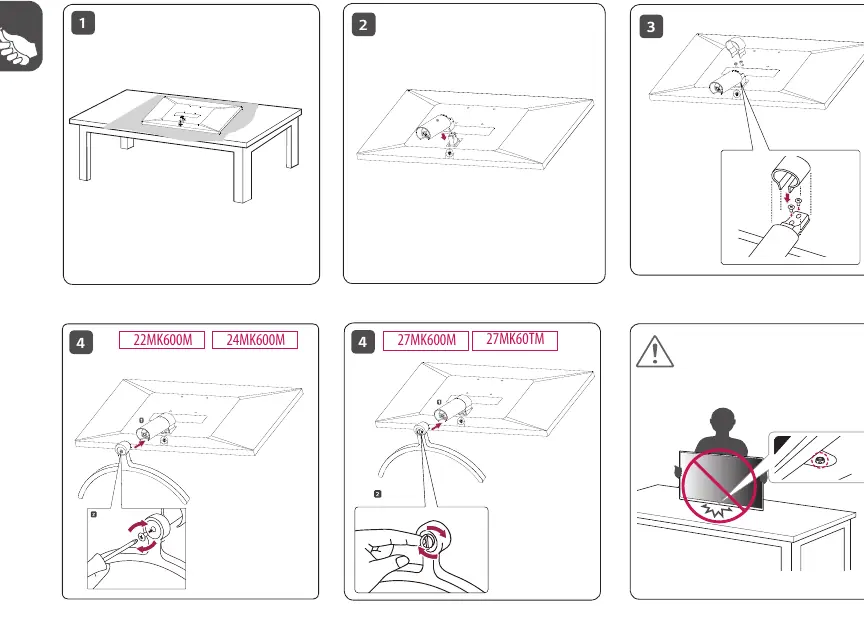
- Place the monitor face down on a soft, flat surface to prevent screen damage.
- Attach the stand base to the monitor body.
- Secure the stand using the provided screws.
- Ensure the stand is firmly attached before standing the monitor upright.
Connecting the monitor
The monitor features several input ports on the back panel:
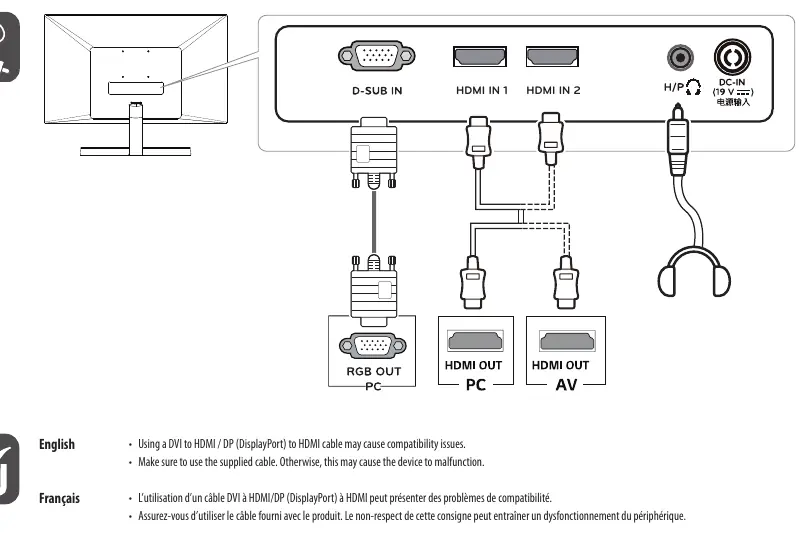
- D-SUB IN: For analog video connection.
- HDMI IN 1 / HDMI IN 2: For digital video and audio connection.
- H/P: Headphone output jack.
- DC-IN: Power input.
Important: Using a DVI to HDMI or DisplayPort to HDMI cable may cause compatibility issues. Always use the supplied cables to ensure proper device functionality.
Power connection
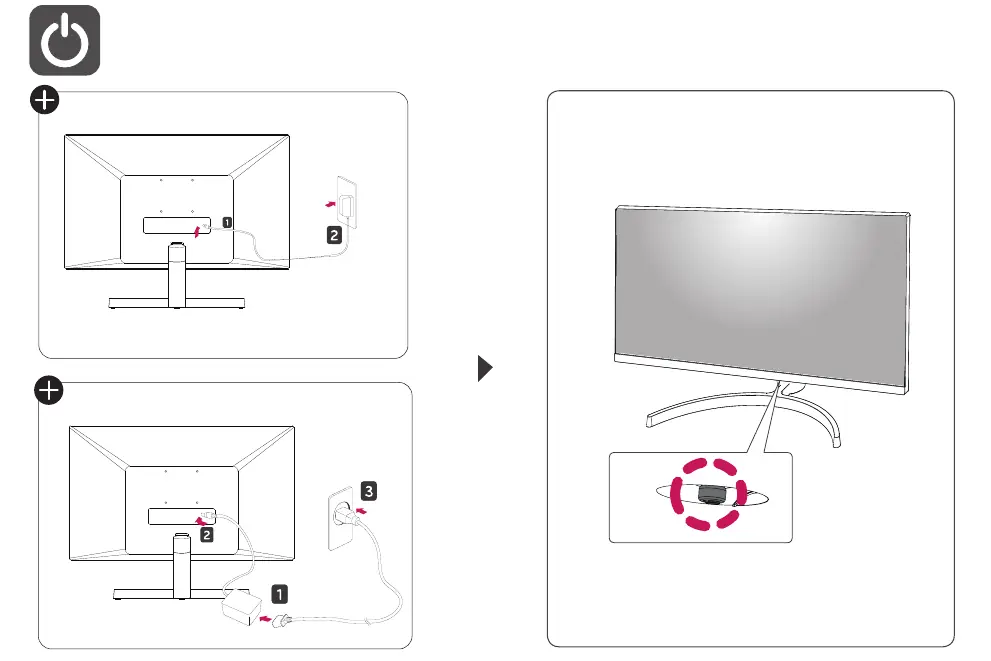
Connect the power adapter to the DC-IN port on the back of the monitor and plug the power cord into a wall outlet. Ensure the power source matches the requirements specified in the technical data.
Technical specifications
The monitor supports a recommended resolution of 1920 x 1080 at 60 Hz. Power requirements are 19V, 1.3A. Detailed dimensions and weights for each model (22MK600M, 24MK600M, 27MK600M, 27MK60TM) are provided in the specifications table, covering both configurations with and without the stand.
Manufacturer information
LG Electronics
Practical help
Common problems
Compatibility issues with video signal
Avoid using DVI to HDMI or DisplayPort to HDMI cables. Use the supplied cables.
Device malfunction
Ensure you are using the supplied components and cables provided with the monitor.
Before use
- Place the monitor on a soft surface during assembly to protect the screen.
- Verify all supplied components are present.
- Ensure the stand is securely fastened with the provided screws.
- Check that the power adapter is connected to the DC-IN port.
- Use the recommended resolution of 1920 x 1080 @ 60 Hz.
Show more Show less
Specs in practice
- Recommended Resolution
- 1920 x 1080 @ 60 Hz for optimal image quality.
- Power Requirement
- 19V, 1.3A DC input.
- Input Voltage
- 100-240 V~ 50/60 Hz (Adapter input).
Images and diagrams
- The assembly diagram illustrates placing the monitor face down, attaching the stand, and securing it with screws.
- The connection diagram shows the location of D-SUB, HDMI, and headphone ports.
- The power diagram shows the connection of the DC adapter to the monitor and the wall outlet.
Model compatibility
- The monitor is compatible with standard HDMI and D-SUB connections.
- DVI to HDMI or DisplayPort to HDMI cables are not recommended due to potential compatibility issues.

Manual page author
David Miller
Documentation analyst