Electronics / Monitors
LG Monitor Quick Setup Guide
A quick setup guide for LG monitors, covering assembly, cable connections, power setup, and technical specifications for various models including the 22MR410, 24MR400, and 27MR400 series.
Quick answers from the manual
Quick answer
- This guide provides assembly, connection, and technical specification details for various LG monitor models, including the 22MR410, 24MR400, and 27MR400 series. p. 1, 2, 3, 4
Key actions
- Assemble the stand according to your specific model group (2-1, 2-2, or 2-3). p. 2
- Connect the power adapter to the DC-IN port and plug into a wall outlet. p. 4
Technical specifications
| Parameter | Value | Meaning | Pages |
|---|---|---|---|
| Resolution | 1920 x 1080 | Recommended resolution for all models. | p. 5, 6, 7 |
| Vertical Frequency | 60 Hz | Refresh rate for all models. | p. 5, 6, 7 |
| Power Input | 19V 1.3A | Power requirement for all models. | p. 5, 6, 7 |
Show 1 more answers Show less
Where to find it in the PDF
- Assembly p. 2
- Connections p. 3
- Specifications p. 5, 6, 7
Table of contents
Manual images
Click an image to enlargeQuick guide from the manual
This document provides essential setup instructions for various LG monitor models. It covers the physical assembly of the stand, connection of input cables, power supply connection, and provides a comprehensive table of technical specifications for different screen sizes.
Assembly
The monitor stand assembly varies by model. Ensure you identify your specific model number to follow the correct procedure:
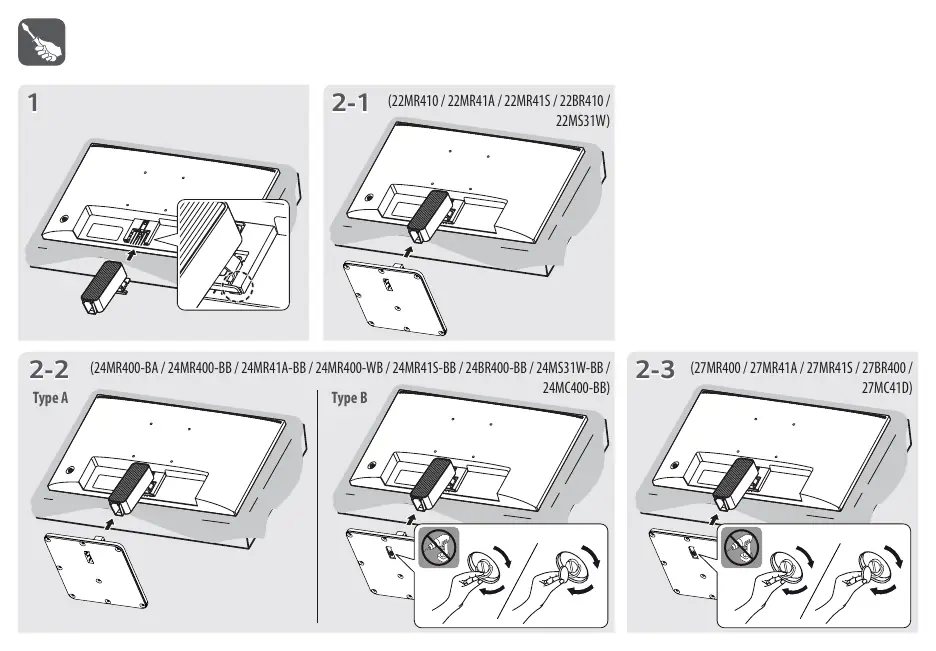
- 22MR410 / 22MR41A / 22MR41S / 22BR410 / 22MS31W: Follow the standard stand attachment procedure shown in section 2-1.
- 24MR400 series / 24MC400-BB: Follow the procedure in section 2-2. Note that some models may require specific Type A or Type B attachment methods.
- 27MR400 / 27MR41A / 27MR41S / 27BR400 / 27MC41D: Follow the procedure in section 2-3.
Connections
The monitor supports the following input and output connections:
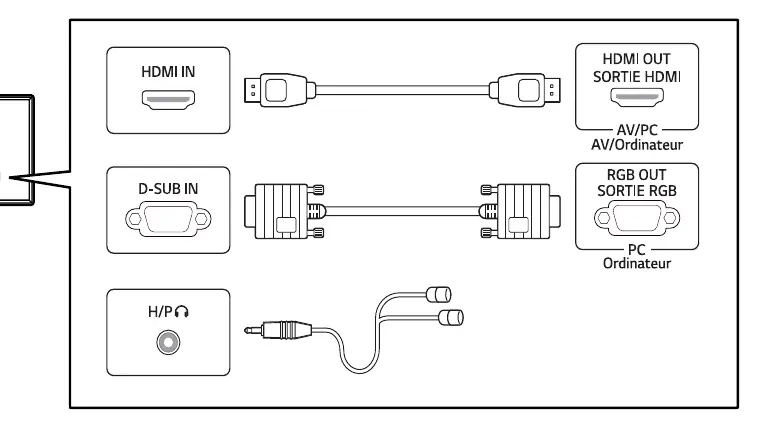
- HDMI IN: For high-definition video and audio input.
- D-SUB IN: For analog video input (VGA).
- H/P (Headphone): 3.5mm jack for audio output.
Power
To power on the monitor:
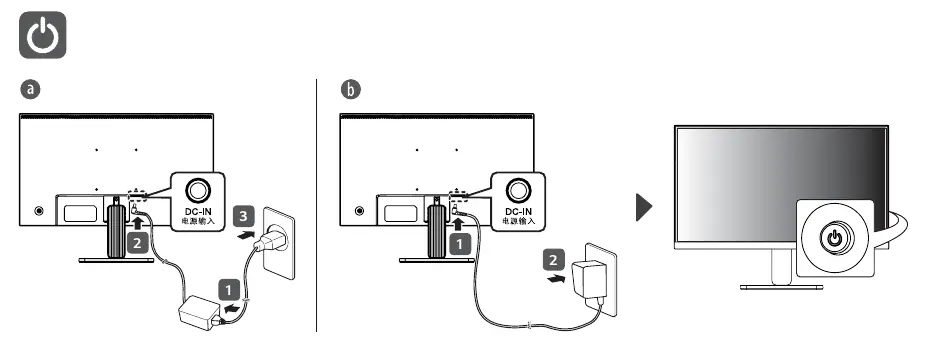
- Connect the DC power adapter to the DC-IN port on the back of the monitor.
- Connect the power cable to the power adapter.
- Plug the power cable into a wall outlet.
Technical Specifications
The monitor specifications vary by model series. All models listed support a recommended resolution of 1920 x 1080 at 60 Hz. Power input for all models is 19V 1.3A.
Manufacturer information
LG Electronics
Practical help
Before use
- Verify all components (stand, power adapter, cables) are present.
- Identify your specific model number from the list on page 1.
- Ensure you have a flat, stable surface for assembly.
- Check that your computer supports HDMI or D-SUB output.
Specs in practice
- Recommended Resolution
- 1920 x 1080 (Full HD) for optimal image quality.
- Vertical Frequency
- 60 Hz refresh rate.
Show more Show less
Images and diagrams
- Page 2: Stand assembly instructions for different model groups.
- Page 3: Port identification for HDMI, D-SUB, and Headphone connections.
- Page 4: Power connection steps.
Model compatibility
- Supports HDMI and D-SUB (VGA) video inputs.
- Compatible with various 22-inch, 24-inch, and 27-inch LG monitor models.

Manual page author
Emily Carter
User documentation editor