HVAC / Air Conditioners
LG Air Conditioner Indoor Unit Owner's Manual
Comprehensive owner's manual for LG indoor air conditioner units. Includes safety guidelines, operating instructions, filter cleaning procedures for various models, and troubleshooting tips.
Quick answers from the manual
Quick answer
- This manual provides safety, operation, and maintenance instructions for various LG indoor air conditioner units. It covers filter cleaning procedures for different models and basic troubleshooting. p. 2, 11, 13, 31
Key actions
- Clean air filters p. 13, 14, 18, 19
- Perform Forced Operation p. 12
First start
- Ensure the unit is installed by a specialist, connected to a dedicated circuit, and the ground wire is properly connected. p. 11, 30
Problems and fixes
Air conditioner does not operate
Check timer operation, fuse, or circuit breaker.
p. 31Maintenance and reset
- Clean filters every 2 weeks. p. 13, 27
Where to find it in the PDF
- Safety Instructions p. 3, 4, 5, 6
- Maintenance and Service p. 13, 14, 15, 16
Table of contents
Manual images
Click an image to enlargeQuick guide from the manual
This manual provides essential safety, operation, and maintenance instructions for various LG indoor air conditioner units. Key takeaways include:
- Safety First: Always turn off the main power before performing any maintenance.
- Filter Maintenance: Air filters should be checked and cleaned at least once every two weeks to maintain efficiency.
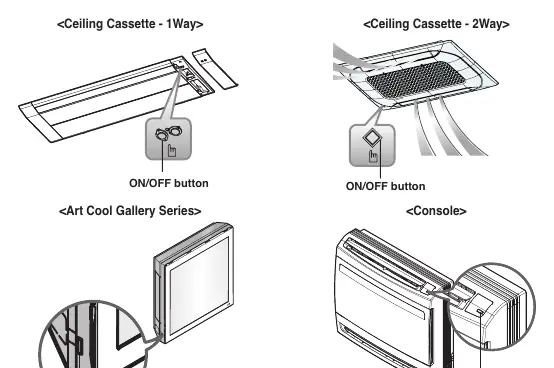
- Forced Operation: If the remote control is unavailable, you can operate the unit by pressing the tact switch (ON/OFF button) for 2 seconds.
Safety Instructions
To prevent injury or damage, observe the following precautions:
- Do not use a defective or underrated circuit breaker.
- Always ground the product to prevent fire or electric shock.
- Do not touch the unit with wet hands.
- Do not place heaters or other appliances near the power cable.
- Do not block the air inlet or outlet.
- If strange sounds, smells, or smoke occur, turn off the breaker immediately.
Operating Instructions
Forced Operation: Used when the remote control is not available. Press the tact switch (ON/OFF button) on the unit for 2 seconds to start. Press again to stop.
Auto Restart: In the event of a power failure, the unit will automatically resume operation with the previous settings once power is restored.
Maintenance and Service
Regular cleaning is required for optimal performance. Always disconnect the power supply before cleaning.
General Cleaning
- Use a soft dry cloth to clean the unit. Do not use bleach, abrasives, or volatile substances like benzene or thinner.
- Do not use water hotter than 40 °C as it may cause deformation.
Filter Cleaning
Procedures vary by model type (Ceiling Cassette, Wall Mounted, Console, etc.), but generally follow these steps:
- Turn off the main power.
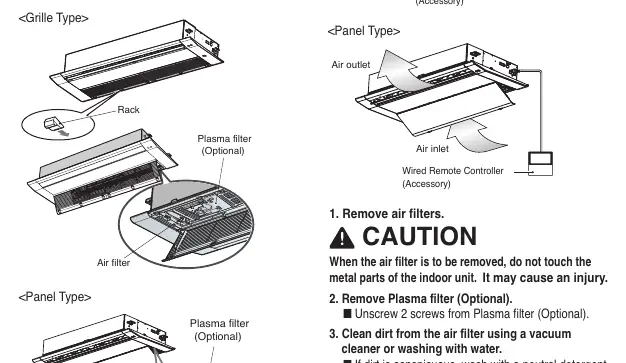
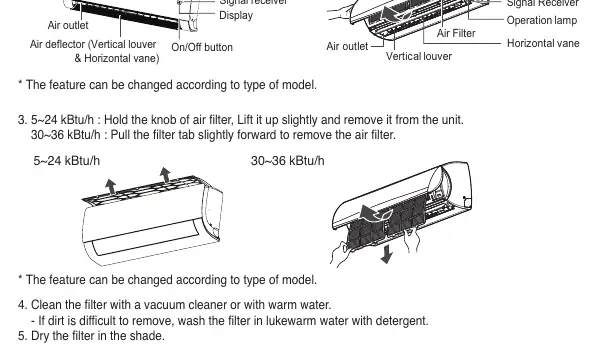
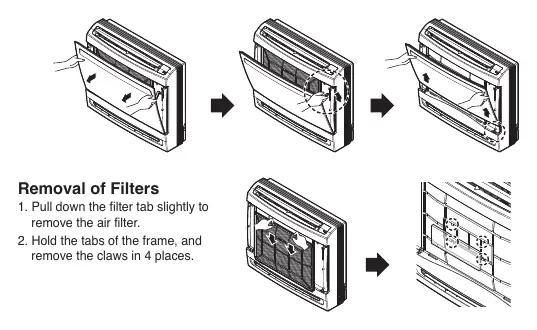
- Remove the air filter according to the specific model instructions (usually by pulling a tab or pressing a hook).
- Clean the filter using a vacuum cleaner or wash with lukewarm water and neutral detergent.
- Dry the filter completely in the shade. Do not expose to direct sunlight or heat.
- Reinstall the filter securely.
Troubleshooting
Before calling for service, check the following:
- Unit does not operate: Check timer settings, fuse, or circuit breaker.
- Peculiar odor: Check for damp smells in the room (walls, carpet, furniture).
- Condensation leaking: This is normal when the airflow cools warm room air.
- Noisy operation: Sounds like water flowing (freon) or compressed air releasing (dehumidifying water) are normal.
- Unit does not start immediately: The mechanism protector may be active; wait about three minutes.
Manufacturer information
LG Electronics
Practical help
Common problems
Air conditioner does not operate
Check if the timer is set correctly, or if the fuse has blown or the circuit breaker has tripped.
Peculiar odor in the room
Check if the smell is coming from damp items in the room, such as walls, carpets, or furniture.
Condensation leaking from the unit
This is a normal occurrence when the airflow from the air conditioner cools the warm room air.
Noisy operation
Sounds like water flowing or compressed air releasing are normal operational sounds of the refrigerant and dehumidification process.
Before use
- Ensure the air inlet and outlet vents are not obstructed.
- Check that the ground wire is connected correctly.
- Ensure the air filter is clean and properly installed.
- Verify that the remote control batteries are not depleted and are inserted correctly.
Images and diagrams
- Forced Operation: Press the tact switch (ON/OFF button) on the unit for 2 seconds if the remote control is unavailable.
- Filter Cleaning: Most filters require cleaning every 2 weeks; remove the filter, vacuum or wash with lukewarm water, and dry in the shade.
Model compatibility
- This manual covers multiple indoor unit types including Ceiling Cassette (1-Way, 2-Way, 4-Way, Round), Ceiling Concealed Duct, Concealed Floor Standing, Art Cool Gallery, Wall Mounted, Convertible, and Console models.

Manual page author
Michael Turner
Technical manual editor
Reviews PDF manuals for structure, safety notes, and practical product details so readers can find the right information quickly.