Tools / Welding Equipment
User Manual for Lincoln Electric BesterMIG 200-S and 215-S Welding Power Sources
Quick guide for the Lincoln Electric BesterMIG 200-S and 215-S. Learn about setup, welding processes (MIG/MAG, MMA, TIG), technical specifications, and included accessories.
Quick answers from the manual
Quick answer
- The BesterMIG 200-S and 215-S are multiprocess welding power sources (MIG/MAG, FCAW, MMA, TIG Lift) featuring Synergy technology for automatic parameter selection. p. 2
Key actions
- Select welding process and adjust parameters using the digital display and Synergy technology. p. 2
First start
- Connect the appropriate welding gun or cable, install the correct wire spool and feed roll, and connect the power supply. p. 3, 4
Technical specifications
| Parameter | Value | Meaning | Pages |
|---|---|---|---|
| Input Voltage | 230V +/- 15% | Required power supply voltage. | p. 4 |
| Welding Current Range | 15-200A | Adjustable output current. | p. 4 |
Where to find it in the PDF
- Product Overview and Features p. 2
- Package Contents and Models p. 3
- Specifications and Accessories p. 4
Table of contents
Manual images
Click an image to enlargeQuick guide from the manual
The BesterMIG 200-S and 215-S are multiprocess welding power sources designed for MIG/MAG, FCAW, MMA, and TIG Lift welding. These units feature Synergy technology, which automatically selects welding parameters based on the material and wire, simplifying the setup process for perfect welds.
Product Overview
The BesterMIG range is designed for efficiency and ease of use. Key differences between the models include:
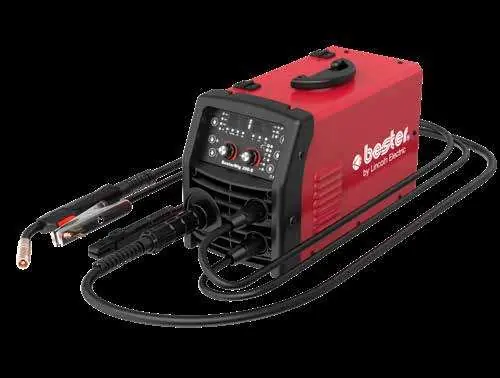
- BesterMIG 200-S: A portable, compact welder weighing 11.7 kg. It supports wire spools up to 200 mm in diameter (5 kg).
- BesterMIG 215-S: A larger unit weighing 27 kg, featuring an enlarged feed spool capacity of up to 300 mm (15 kg) for more demanding DIY applications.
Package Contents
Both models include the following items in the package:
- Mig Gun (EURO connection, 3 m, 150A@35%)
- Welding cable with electrode holder (3 m)
- Ground cable with clamp (3 m)
- Gas hose (2 m)
- Two rolls (0.6/0.8 mm and 0.8/1.0 mm)
- Instruction manual on USB
Welding Processes
The units support multiple welding methods:
- MIG/MAG: Uses Synergy technology for automatic parameter adjustment. Supports solid and self-shielding wires.
- MMA: Features built-in Arc Force and Anti-Sticking devices to improve arc starting and stability.
- TIG Lift: Supported for precision welding.
Technical Specifications
Both models operate on a 230V (+/- 15%) 50/60 Hz power supply with a 16A fuse. The welding current range is 15-200A. The units are rated IP21S for protection.
Accessories
A wide range of accessories is available, including various contact tips (0.6 mm, 0.8 mm, 0.9 mm, 1.0 mm), PTFE liners for aluminum wire, and adapters for different spool types (S200, B300). Always ensure the correct contact tip and liner are used for the specific wire type and diameter.
Practical help
Common problems
Poor arc stability or starting
Ensure the correct welding process is selected and check that the Arc Force and Anti-Sticking features are functioning. Verify the contact tip and wire diameter match.
Wire feeding issues
Check that the correct feed drive roll is installed for the wire type (Solid, Aluminium, or Cored) and diameter. Ensure the liner is appropriate for the wire.
Before use
- Verify power supply is 230V +/- 15%.
- Check that the correct wire spool size is installed (200mm for 200-S, 300mm for 215-S).
- Ensure the correct feed drive roll is installed for the wire type.
- Connect the gas hose if performing MIG/MAG welding.
- Select the appropriate welding process (MIG/MAG, MMA, or TIG Lift) on the digital display.
- Ensure the ground clamp is securely attached to the workpiece.
Specs in practice
- Synergy Technology
- Automatically selects welding parameters (current, wire feed, material thickness) to ensure optimal weld quality.
Model compatibility
- BesterMIG 200-S supports max spool size 200mm (5kg).
- BesterMIG 215-S supports max spool size 300mm (15kg).
- Use specific roll kits for Aluminium or Cored wires as listed in the accessories section.

Manual page author
David Miller
Documentation analyst
Organizes user manual content into clear summaries, with attention to model details, product context, and everyday usability.