Electronics / AV Converters
Instruction Manual for Matchmaster 14MM-DTM2 DVB-T Modulator
Quick guide for the Matchmaster 14MM-DTM2 DVB-T modulator. Learn how to install, configure output settings, and manage the device via the front panel.
Table of contents
Manual images
Click an image to enlargeQuick Guide
The Matchmaster 14MM-DTM2 is a DVB-T modulator that converts HDMI signals to DVB-T RF output. Upon connecting the power, the device requires approximately 37 seconds to boot. Once operational, the display will show Keyboard Locked. To access the configuration menu, press the ENTER button and enter the default password: 0000.
Description
The 14MM-DTM2 is an H.264 encoding modulator designed to convert 4K Pass FHD HDMI signals to DVB-T RF output. It features one HDMI input, one HDMI output (with 4K pass-through), and one DVB-T RF output. The device automatically adjusts the compression rate based on available bandwidth using DVB-T parameters.
Installation
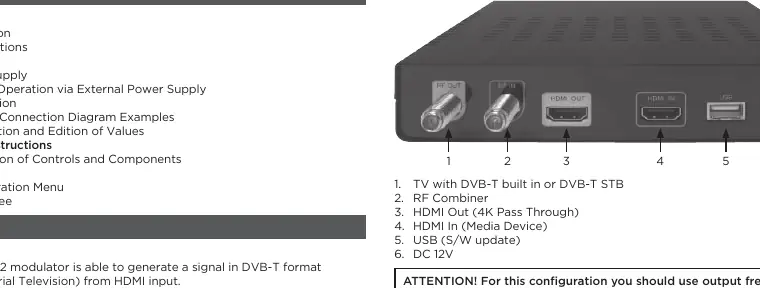
To install the device, connect the provided external power supply to a 100-230V mains outlet and plug the 12V connector into the instrument input. Connect your HDMI source device to the HDMI IN port. Connect your TV or DVB-T set-top box to the RF Output port. If using the 4K pass-through feature, connect your 4K display to the HDMI Out port.
Operation
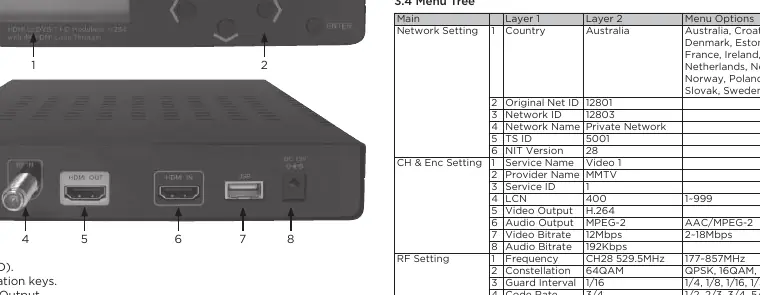
The device is configured using the 6 keys located on the front panel. The ENTER button selects parameters or menus, Left/Right buttons navigate between menus or characters, Up/Down buttons adjust values, and the MENU button returns to the start menu.
Configuration Menu
The configuration menu allows for detailed adjustment of the output signal. Key settings include:
- Frequency: Sets the output channel frequency (177–858 MHz). Ensure the selected frequency is not already in use by a local television channel.
- RF Level Adj: Adjusts the output power level from 0 to -30 dB.
- Bandwidth: Selects channel bandwidth (6, 7, or 8 MHz).
- Constellation: Sets the modulation type (QPSK, 16QAM, 64QAM).
- Code Rate: Available values include 1/2, 2/3, 3/4, 5/6, 7/8.
- Video/Audio Settings: Configure video bitrate (2-18 Mbps) and audio encoding (MPEG-2 or AAC).
- System Settings: Includes options for Service Name, Provider Name, LCN, Country, and Network IDs.
Always select Apply Setting to save changes to the non-volatile memory.
Technical Specifications
- Input: HDMI (supports up to 4K 3840x2160/4096x2160).
- Output: 1 Multiplex DVB-T with digital TV service.
- Output Level: 100dBµV.
- Operating Temperature: 5°C to 40°C.
- Relative Humidity: 80% at 30°C.
Manufacturer information
Matchmaster Communications Pty Ltd
Practical help
Common problems
Display shows 'Keyboard Locked' after power on
This is normal. Press the ENTER button and enter the default password '0000' to unlock the menu.
No signal on TV
Ensure the selected output frequency is not already being used by an existing television distribution channel.
4K signal not displaying via HDMI Out
Ensure the connected TV supports 4K Ultra HD resolution, HDMI 2.0, HDCP 2.2, and 4K50P/60P, and use a high-quality HDMI 2.0 cable.
Before use
- Ensure the 12V power adapter is connected to the instrument.
- Verify the HDMI source is connected to the HDMI IN port.
- Check that the output frequency is free from interference.
- Have the default password '0000' ready for initial setup.
Specs in practice
- RF Level Adj
- Adjusts the output signal power in dB (0 to -30 dB).
- Constellation
- Modulation type (QPSK, 16QAM, 64QAM) affecting signal robustness.
Images and diagrams
- Front Panel: Features an LCD display and 6 navigation keys (Enter, L/R, Up/Down, Menu).
- Rear Panel: Includes RF Out, HDMI Out (4K Pass Through), HDMI In, USB port, and 12V DC input.
Model compatibility
- Requires HDMI 2.0 and HDCP 2.2 for 4K pass-through functionality.
- Output resolution is representative of the LCD display indication.

Manual page author
Emily Carter
User documentation editor
Prepares concise manual descriptions and highlights the most useful setup, operation, and maintenance information for readers.