Electronics / AV Converters
User Manual for Matchmaster 14MM-IP-DVBT IP COFDM Modulator
Quick guide for the Matchmaster 14MM-IP-DVBT IP COFDM Modulator. Learn how to connect the device, access the web management interface, configure modulation parameters, and troubleshoot common issues.
Table of contents
Manual images
Click an image to enlargeQuick guide from the manual
The 14MM-IP-DVBT is an IP COFDM modulator designed to convert IP streams into DVB-T RF signals. To get started, connect the device to your network and power supply, then access the web management interface via a browser to configure modulation and network settings.
Device connection
Follow these steps to connect the hardware:
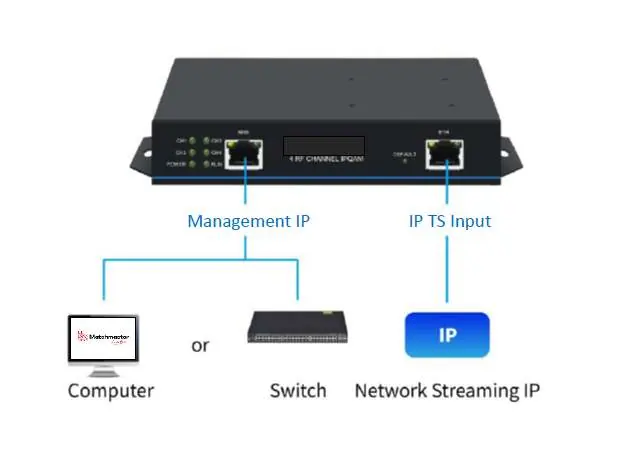
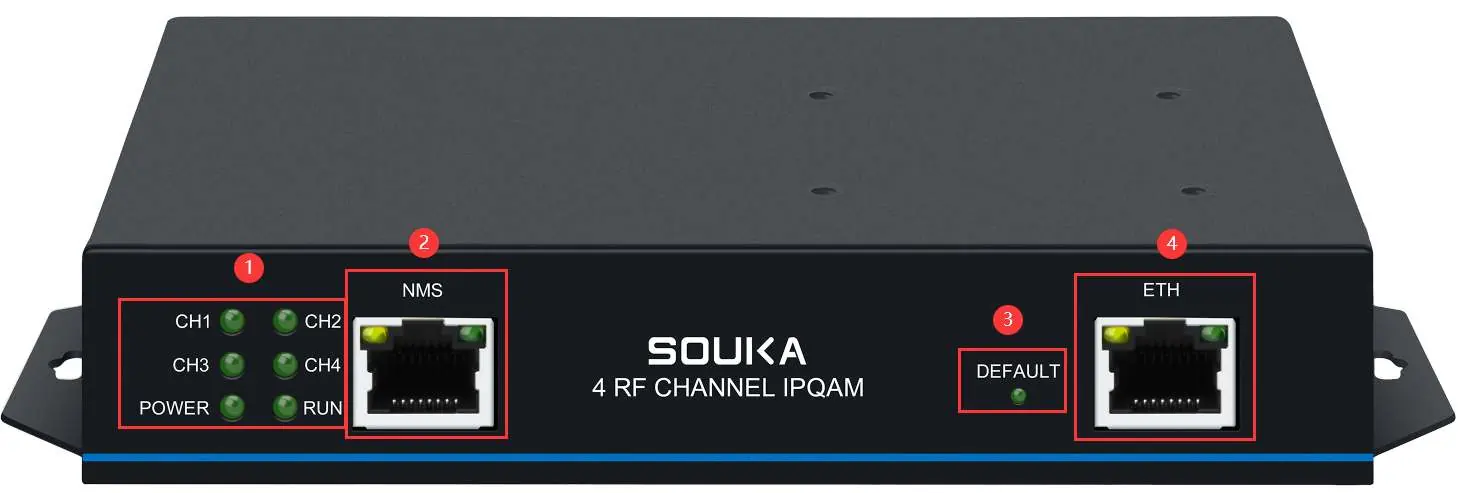
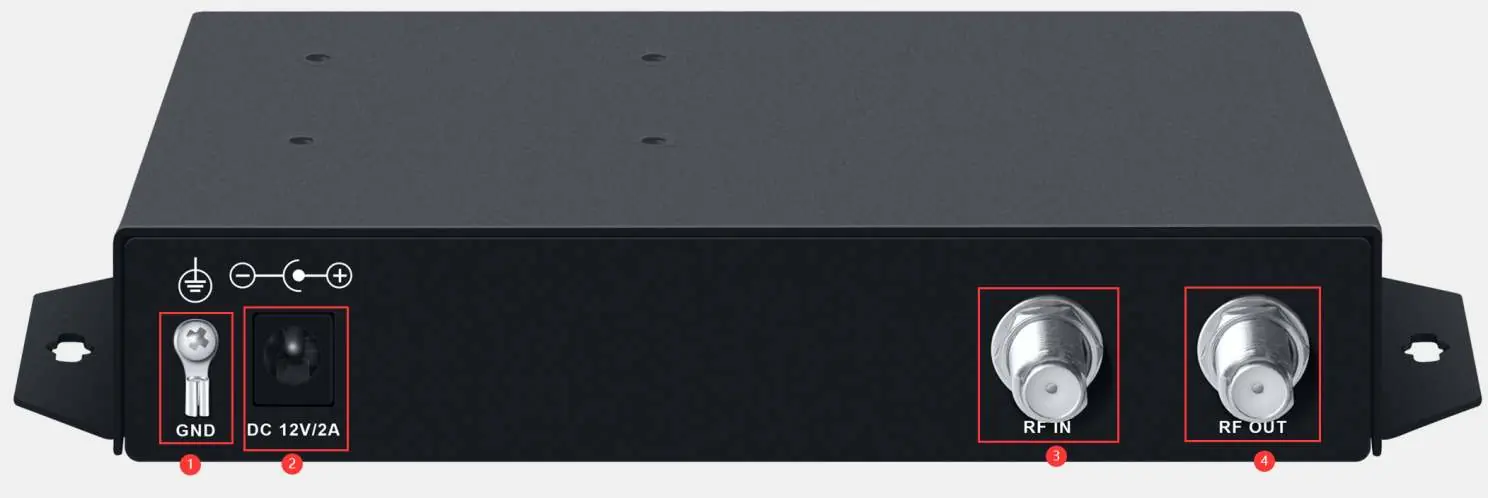
- Connect the IP line from your computer or switch to the NMS port.
- Connect the ETH port to the network streaming IP source.
- Connect the RF OUT port to your MATV network or TV/Set-top box.
- Connect the power supply to the DC 12V/2A port.
Web management interface
To configure the device, use a web browser (Google Chrome is recommended):
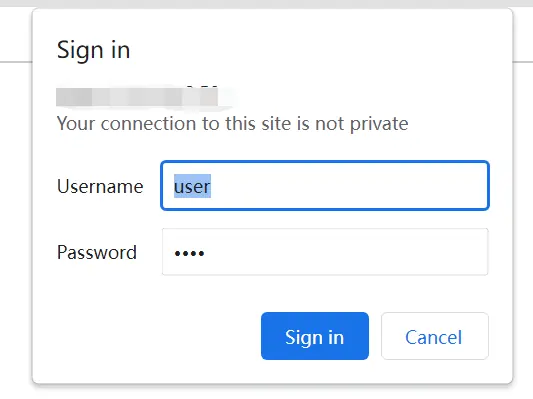
- Enter the default IP address: 192.168.1.30.
- Log in using the default credentials: username user, password user.
- Use the System Status page to check modulation format, RF frequency, and device health.
Modulation parameters
You can modify modulation settings to suit your requirements:
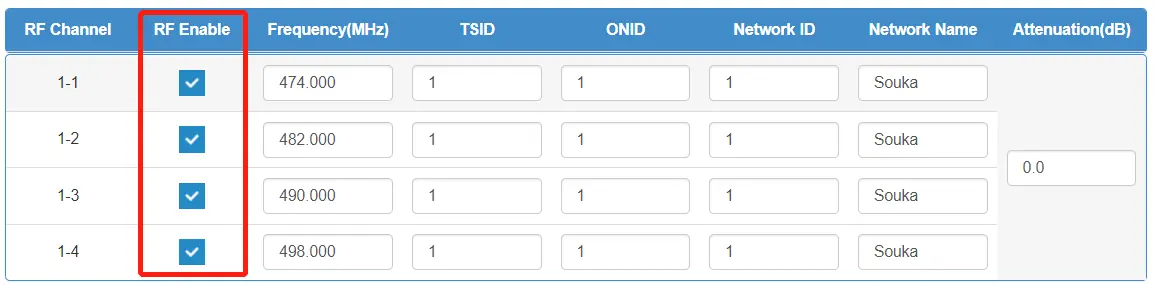
- RF Enable: Check the box to activate the RF channel.
- Frequency: Set the frequency for each channel.
- TSID/ONID/Network ID: Modify these identifiers as needed (ranges vary).
- Bandwidth: Select 6M, 7M, or 8M.
- Constellation: Choose between QPSK, QAM16, or QAM64.
- Coderate: Select from 1/2, 2/3, 3/4, 5/6, or 7/8.
- Guard Interval: Select from 1/32, 1/16, 1/8, or 1/4.
- Transmission Mode: Select 2K, 4K, or 8K.
Always click the Submit button after making changes to apply them.
TS parameters
This section allows for network configuration:
- Network Configuration: Change the MAC address and IP address as required.
- IGMP: Enable or disable IGMP and select the version (V2 or V3).
- Enter Address: Add or modify input IP addresses and ports for program sources.
- Program Source: Forward programs by selecting the RF channel and clicking the forward button.
System configuration
Manage general system settings:
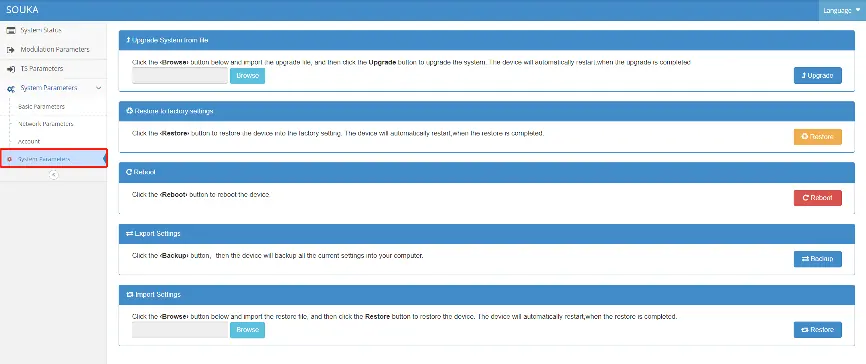
- Basic Parameters: Set time zone, date, and time (automatic or manual).
- Network Parameters: Configure DHCP or manual network settings (IP, Subnet Mask, Gateway, DNS).
- Account: Change the login username and password.
- System Parameters: Perform firmware upgrades, restore factory settings, reboot the device, or export/import configuration files.
Equipment precautions
- Operate in a ventilated, dry environment at 0-45°C.
- Ensure the rear panel heat sink is unobstructed.
- Do not switch the machine frequently; wait at least 10 seconds between power cycles.
- Unplug the power cord if the device is damaged, exposed to liquid, or needs repair.
Performance parameters
- Input Interface: 1 Gigabit RJ45.
- Input Format: Unicast/multicast protocol, UDP, IGMP V2/V3.
- RF Frequency Range: 50-999.999MHz.
- Output Level: >=100dBuV.
- Power Supply: DC 12V, 2000mA.
Manufacturer information
Matchmaster Communications Pty Ltd
Practical help
Common problems
No signal
Check that the modulation standard of the device is consistent with the received standard.
Connection not available
Check if the PC and device are on the same network segment. If not, add a new network segment in the advanced TCP/IP settings of the PC.
Cannot connect or forgot login
Operate the front panel of the device to restore factory defaults.
Missing program
Check for channel conflicts, verify the video signal input is normal, and restart the device.
Before use
- Connect IP line from computer/switch to NMS port.
- Connect ETH port to network streaming IP.
- Connect RF OUT to MATV network or TV/STB.
- Connect power supply (DC 12V/2A).
- Ensure environment is ventilated and dry (0-45°C).
Specs in practice
- RF Frequency Range
- 50-999.999MHz with 1KHz minimum step.
- Output Level
- >=100dBuV with 0-31.5dB modulation range.
- Input Interface
- 1 Gigabit RJ45 interface.
- Supply Voltage
- DC 12V, max current 2000mA.
Images and diagrams
- Front Panel: Shows CH1-CH4 signal lights, NMS port, ETH port, and DEFAULT button.
- Back Panel: Shows GND, DC 12V/2A power, RF IN, and RF OUT ports.
Model compatibility
- Supports unicast/multicast protocols (UDP, IGMP V2/V3).
- Operating temperature: 0-45°C.
- Storage temperature: -40°C to 70°C.

Manual page author
Michael Turner
Technical manual editor
Reviews PDF manuals for structure, safety notes, and practical product details so readers can find the right information quickly.