Automotive / Car Audio
User Manual for Matchmaster 14MM-PRO7 Profiler Revolution
Quick guide for the Matchmaster 14MM-PRO7 Profiler Revolution. Learn how to install, configure inputs, set up channel conversion, and manage settings for this programmable filter amplifier.
Table of contents
Manual images
Click an image to enlargeQuick guide from the manual
The Matchmaster 14MM-PRO7 Profiler Revolution is a programmable filter amplifier designed to optimize terrestrial VHF/UHF and FM signals. Key operations include mounting the unit vertically with 15cm clearance, connecting inputs, and configuring channel plans via the rotary button. Always ensure the unit is grounded and check the status LED for power indication.
Product Description
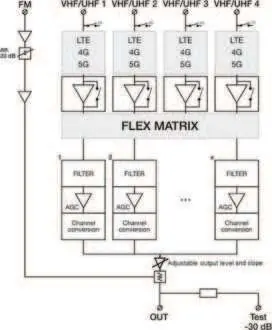
The Profiler Revolution is a state-of-the-art filter amplifier and converter. It features 5 inputs (FM + 4 VHF/UHF), real-time AGC on all filters, and the ability to process over 50 channels. It allows for flexible channel assignment and frequency shifting (Flex Matrix) to provide high-quality TV images.
Installation
Mounting: Mount the module vertically to a wall in a well-ventilated room. Leave a minimum space of 15 cm around the product to guarantee maximum ventilation.
Connections:
- Connect an earth wire to the grounding clamp.
- Connect the power adapter cord to the power supply socket.
- Connect the VHF/UHF and/or FM inputs to the unit.
- Connect a coaxial cable to the output connector for signal distribution.
- Connect a network analyser to the test port to control signal quality.
Configuration
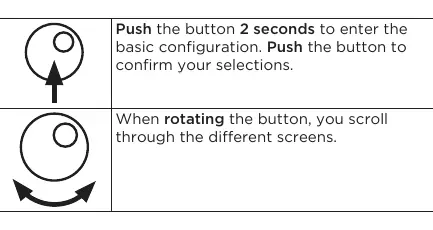
Menu Navigation: Use the Johansson rotary/push button to navigate. Push the button for 2 seconds to enter basic configuration. Rotate to scroll through screens and push to confirm selections.
Region/Country Settings: It is advised to set the correct region before starting. Unpower the unit, push and hold the button while repowering until the display shows "RESET FINISHED". Select your country/region to determine the channel plan and DC voltage.
Input Settings: Navigate to the specific input (FM or V/U 1-4). You can configure gain, pre-amplifier settings (ON/OFF), and DC voltage (OFF/12V/24V). Use the "Add Channel" function to select starting and stopping channels for conversion.
Advanced Settings
SD Card: Use an SD card to load or save presets, allowing you to copy configurations between modules.
Security: You can lock the device with a security code to prevent unauthorized changes. If the code is forgotten, the master code is 50.
Technical Specifications
- Inputs: 4 VHF/UHF + 1 FM
- Frequency Range: FM: 88-108MHz, VHF: 174-240MHz, UHF: 470-862MHz
- LTE Protection: Automatic selection (694MHz, 790MHz, or OFF)
- Operating Temperature: -5 to +50°C
- Power Supply: 100-240Vac
Safety and Maintenance
Safety: Do not expose the unit to rain, moisture, or dripping liquids. Install in a dry, non-dusty location. Ensure the mains plug remains accessible.
Maintenance: Clean the cabinet only with a dry soft cloth. Do not use solvents. Refer all repairs to qualified personnel.
Manufacturer information
Matchmaster Communications Pty Ltd
Practical help
Common problems
Star (*) appears on the display
Indicates that two channels are assigned to the same output channel or that you are converting to a different channel bandwidth.
Forgot the lock code
Use the master code 50. This code is fixed and cannot be changed.
Bad image quality or scrambled images
Ensure that only one input channel is assigned to one output channel.
Before use
- Mount the unit vertically on a wall.
- Ensure 15 cm of clearance around the unit for ventilation.
- Connect an earth wire to the grounding clamp.
- Check the status LED for DC power presence.
- Set the correct region/country during the initial reset procedure.
Specs in practice
- LTE Protection
- Automatically filters out interference from 694MHz or 790MHz signals.
Images and diagrams
- The block diagram illustrates the signal path from the 5 inputs through the LTE filters, the Flex Matrix, and the individual channel conversion/AGC stages to the final output and test port.
Model compatibility
- Compatible with terrestrial VHF/UHF and FM signals.
- Requires a network analyser for output signal quality control.
- Supports SD card for configuration backup and transfer.

Manual page author
David Miller
Documentation analyst
Organizes user manual content into clear summaries, with attention to model details, product context, and everyday usability.