Automotive / Car Audio
Matchmaster 14MM-SM90-5G Smart Amplifier User Manual
Quick guide for the Matchmaster 14MM-SM90-5G Smart Amplifier. Learn how to install, configure autoscan, manage duplicate channels, and troubleshoot signal issues.
Table of contents
Quick guide from the manual
The Matchmaster 14MM-SM90-5G is a smart amplifier designed to scan channels, amplify weak signals, and maintain strong ones. Key operational points include:
- Installation: Mount the unit vertically in a well-ventilated area with at least 15 cm of clearance.
- Autoscan: The device performs an automatic channel scan upon power-up. A blinking green LED indicates scanning; solid green indicates it is ready.
- Reset/Reprogram: If channels are missing after a power outage, unplug the power supply and plug it back in within 6 seconds to force a re-scan.
- Compatibility: Does not support pass-through DC-power for pre-amplifiers or active antennas.
Product Description
This smart amplifier features SAW filters for LTE (4G/5G) protection on all inputs and is housed in an outdoor weatherproof mast-head housing. It automatically recognizes the applied country channel plan and provides equal and stable output power across all channels.
Hardware Installation
Follow these steps to install the amplifier:
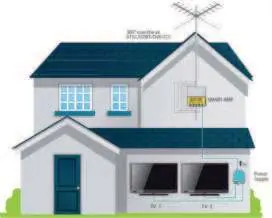
- Connect your terrestrial antennas to the Smart Amp.
- Connect the Smart Amp output to the Power Supply.
- Connect your TVs to the Power Supply.
- Ensure the module is mounted vertically to the mast or a wall.
Important: Maintain a minimum space of 15 cm around the product to guarantee maximum ventilation.
Autoscan and Reprogramming
The device automatically scans for channels when powered on. If you need to force a channel scan or reprogram the device due to missing channels:
- To Force Scan: Unplug the power supply and plug it back in within 6 seconds.
- Status LED: Blinking green means scanning. Solid green means ready. Red indicates an error; if this occurs, unpower and repower within 6 seconds to restart.
- Note: If a power interruption lasts longer than 6 seconds, the device retains its initial settings and does not perform a new scan.
Duplicate Channel Settings
The amplifier allows you to manage duplicate channels via a switch:
- Duplicate Channel Switch OFF: The weakest channel is rejected.
- Duplicate Channel Switch ON: The weakest channel is converted to the LTE band.
Maintenance and Safety
To ensure the longevity and safety of the device:
- Clean the cabinet only with a dry, soft cloth; do not use solvents.
- Install in a dry location without infiltration or condensation of water.
- Do not expose the unit to rain, moisture, dripping, or splashing.
- Use only in moderate climates; avoid tropical climates.
- Ensure the mains plug remains readily operable.
- Do not open the housing of the adapter to avoid electrical shock.
Manufacturer information
Matchmaster Communications Pty Ltd
Practical help
Common problems
Missing channels after a power outage
Perform a reset by unplugging the power supply and plugging it back in within 6 seconds.
Status LED is red during scan
This indicates an error. Unpower and repower the device within 6 seconds to restart the autoscan.
No channel scan occurs after power cycle
If the power interruption lasts longer than 6 seconds, the device keeps its initial settings. Ensure the power cycle is under 6 seconds.
Before use
- Mount the unit vertically.
- Ensure at least 15 cm of space around the unit for ventilation.
- Connect terrestrial antennas to the Smart Amp.
- Connect the Smart Amp output to the Power Supply.
- Ensure the power supply is accessible for future resets.
Specs in practice
- LTE Band Rejection
- >40dB, provides protection against 4G/5G interference on all inputs.
- Operating Temperature
- -20 to +50 Celsius, suitable for outdoor use in moderate climates.
Images and diagrams
- The installation diagram illustrates the connection path from the antenna to the Smart Amp, then to the power supply, and finally to the TVs.
- The reprogramming diagram shows the power cycle sequence: unplug, wait less than 6 seconds, and plug back in.
Model compatibility
- Does not allow pass-through DC-power for pre-amplifiers or active antennas.
- Designed for moderate climates; not suitable for tropical climates.

Manual page author
Emily Carter
User documentation editor
Prepares concise manual descriptions and highlights the most useful setup, operation, and maintenance information for readers.