Electronics / AV Converters
User Manual for Matchmaster 14MM-JM02 Universal HDMI Modulator
Quick guide for the Matchmaster 14MM-JM02 Universal HDMI Modulator. Learn how to install, configure, and set up your device for optimal RF signal distribution.
Table of contents
Manual images
Click an image to enlargeQuick guide from the manual
The Matchmaster 14MM-JM02 is a universal HDMI modulator designed to convert HDMI signals into RF signals for distribution over coaxial cables. It supports various standards including DVB-T(2), DVB-C, DTMB, ATSC-C/T, and ISDB-T. The device is configured using a rotary/push button interface.
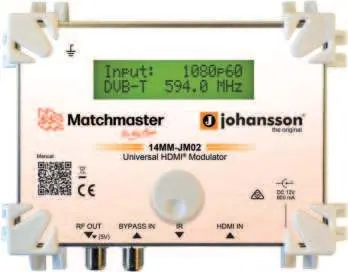
Product description
The modulator features one HDMI input (up to 1080p60), one RF input for bypassing terrestrial/cable signals, and one RF output. It is optimized for cascading multiple modulators on a coaxial network and supports an optional IR link (14MM-JM02-IR).
Hardware installation
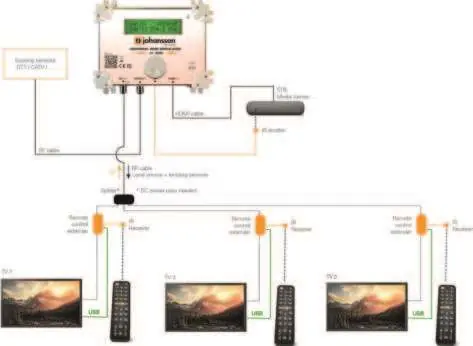
- Connect the power adapter to the power supply socket.
- Connect an earth wire to the appropriate clamp.
- Connect the HDMI output of your video source (Blu-Ray player, DVD player, satellite receiver) to the HDMI input.
- Connect your TV to the RF output connector.
- Optionally, insert an existing coaxial distribution to the Bypass In connector to combine the HDMI modulated signal with existing services.
Software settings
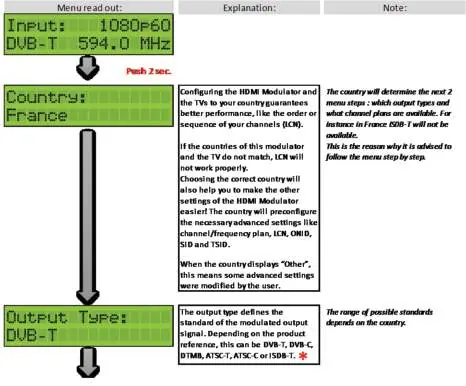
The device uses a Johansson rotary/push button for navigation:
- Push for 2 seconds: Enter basic configuration.
- Rotate: Scroll through different screens.
- Push: Confirm selections.
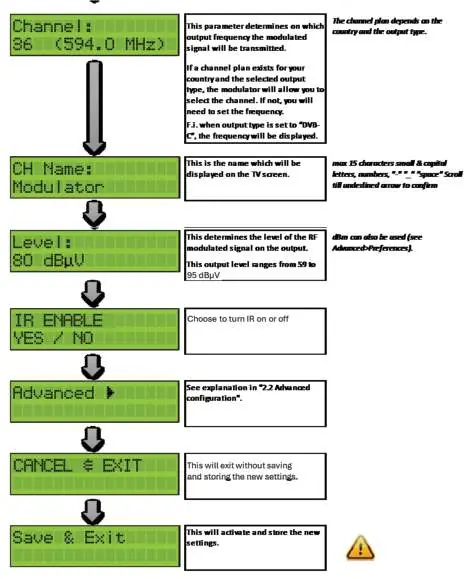
Important: The modulator only activates settings at the end of the menu process when you select Save & Exit.
Basic configuration
Follow the menu step-by-step. Setting the Country is critical as it preconfigures advanced settings like channel/frequency plans, LCN, ONID, SID, and TSID. Incorrect country settings may cause LCN issues.
Advanced configuration
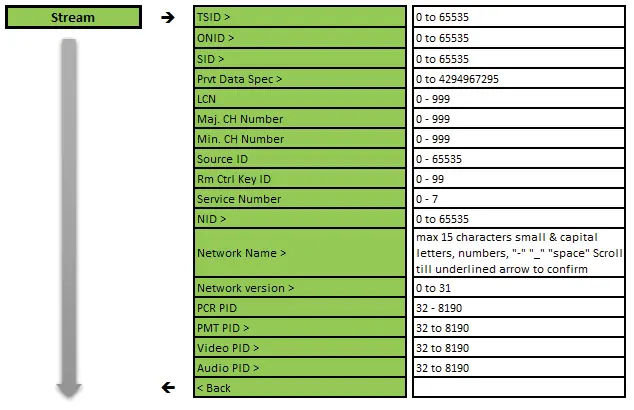
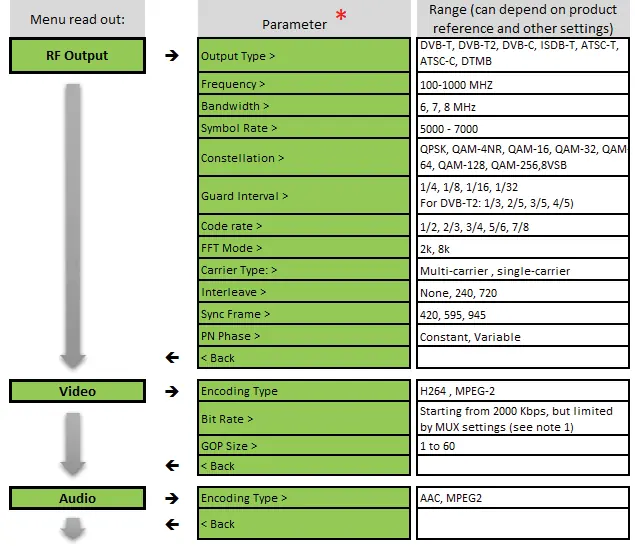
Advanced settings allow for fine-tuning of RF output (Output Type, Frequency, Bandwidth, Symbol Rate, Constellation, Guard Interval, Code Rate, etc.), Video encoding (H264, MPEG-2), and Audio encoding (AAC, MPEG2).
Safety instructions
- Install in a dry location without water infiltration or condensation.
- Maintain a minimum distance of 15 cm around the apparatus for ventilation.
- Do not place objects filled with liquids on the unit.
- Connect only to a socket with a protective earth connection.
- Do not open the housing of the adapter.
Maintenance
Use only a dry soft cloth to clean the cabinet. Do not use solvents. For repairs, refer to qualified personnel.
Manufacturer information
Matchmaster Communications Pty Ltd
Practical help
Common problems
Cannot reach 18,000kbps
Increase bandwidth by changing RF Output settings (set constellation to 64QAM, guard interval to 1/32, and/or code rate to 7/8).
LCN not working properly
Ensure the country setting on the modulator matches the country of the TV.
IR Kit not working
If using 3 or more IR kits, ensure the USB cable is connected to power the IR kit.
Before use
- Ensure the installation location is dry and free from moisture.
- Maintain a minimum distance of 15 cm around the unit for ventilation.
- Connect an earth wire to the appropriate clamp.
- Verify the HDMI source is connected to the HDMI input.
- Ensure the power adapter is connected to a socket with a protective earth connection.
Specs in practice
- Video resolution
- Supports up to 1080p60.
- Output level
- Adjustable from 50 to 95 dBµV.
- Power consumption
- 5W (6W max).
Images and diagrams
- The rotary/push button is used to navigate the menu: push for 2 seconds to enter configuration, rotate to scroll, and push to confirm.
- The start screen displays the HDMI signal status, resolution, output type, and output frequency.
Model compatibility
- Supports DVB-T(2), DVB-C, DTMB, ATSC-C/T, and ISDB-T standards.
- Optional 14MM-JM02-IR IR Kit sold separately.

Manual page author
David Miller
Documentation analyst
Organizes user manual content into clear summaries, with attention to model details, product context, and everyday usability.