Tools / Power Tools
User Manual for MAX 56015 200W Palm Sander
Quick guide for the MAX 56015 200W Palm Sander. Includes setup, operation, safety warnings, maintenance, and technical specifications.
Quick answers from the manual
Quick answer
- The MAX 56015 is a 200W palm sander designed for dry sanding of wood, metal, and plastic. Always wear protective gear and ensure the workpiece is secured before starting. p. 28, 30
Key actions
- Fitting sandpaper p. 32
- Operating the sander p. 32
Problems and fixes
Sander overheating
Avoid blocking the vent holes.
p. 32Maintenance and reset
- Clean the air vents regularly and brush off dust after each use. p. 32
Technical specifications
| Parameter | Value | Meaning | Pages |
|---|---|---|---|
| Voltage/frequency | 220-230 V~ 50 Hz | Power supply requirements | p. 28 |
| Power rating | 200 W | Power consumption | p. 28 |
Where to find it in the PDF
- Technical Data p. 28
- Safety Warnings p. 28, 29, 30
- Operation p. 32
Table of contents
Manual images
Click an image to enlargeQuick guide from the manual
This manual provides essential instructions for the safe and effective use of the MAX 56015 200W Palm Sander. Before using the tool, ensure you have read all safety warnings. The sander is intended for dry sanding of wood, metal, plastic, and similar materials. Do not use it on plaster or surfaces painted with lead-based paint.

Technical Specifications
- Voltage/frequency: 220-230 V~ 50 Hz
- Power rating: 200 W
- Speed: 13,000 oscillations/min
- Sanding pad: 140x140x98 mm
Parts List
- On/off button
- Handle
- Cord and plug
- Dust collector
- Sandpaper
- Sanding pad with Velcro
- Vent holes
Fitting Sandpaper
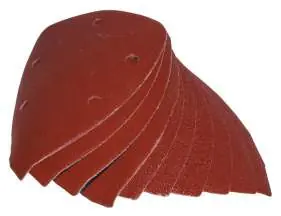
Select a sandpaper with the appropriate grit size for your task. Use coarse grit (40-80) for rough sanding and finer grits (120-240) for fine sanding. Position the sandpaper so that its holes are aligned with those on the sanding pad. Press the sandpaper onto the sanding pad's Velcro surface and check that it is secure.
Operation
Fit the dust collector to the sander. Keep hands away from the sanding pad and plug the sander into a power outlet. Hold the sander with both hands on the handle and switch it on using the on/off button. Apply the sanding pad to the item. Give the sander time to work; it is rarely necessary to press the pad hard against the surface. Avoid blocking the vent holes, as this may cause the sander to overheat. Switch the sander off after use and unplug it.
Cleaning and Maintenance
Use a brush to remove any dirt from the sander after each use. Ensure the ventilation slots are free of dirt. If necessary, wipe the sander with a well-wrung cloth. Never use corrosive or abrasive cleaning agents, as they may attack the plastic parts.
Safety Warnings
Always wear protective gear, including a dust mask, safety goggles, and ear protection. Ensure the work area is clean and well-lit. Secure any loose work items before sanding. Never use the sander for materials containing asbestos. Sparks can be generated when sanding metal surfaces; avoid using in flammable surroundings.
Practical help
Common problems
Sander overheating
Ensure vent holes are not blocked by dust or hands during operation.
Sander not starting
Check that the power cord is securely plugged into a functioning outlet and the switch is in the 'on' position.
Excessive dust accumulation
Ensure the dust collector is properly fitted and emptied regularly.
Before use
- Check that the power supply matches the tool's requirements (220-230V).
- Ensure the work area is clean and well-lit.
- Wear appropriate protective gear (dust mask, safety goggles, ear protection).
- Secure the workpiece with clamps or a vice.
- Check that the sandpaper is correctly fitted and holes are aligned with the pad.
- Inspect the power cord for any damage.
Specs in practice
- Power rating
- 200W - Indicates the power consumption of the motor.
Images and diagrams
- 1. On/off button
- 3. Cord and plug
- 4. Dust collector
- 6. Sanding pad with Velcro
- 7. Vent holes
Model compatibility
- Intended for wood, metal, plastic, and similar materials.
- Not for use on plaster or lead-painted surfaces.
- Not for use on asbestos-containing materials.

Manual page author
Michael Turner
Technical manual editor
Reviews PDF manuals for structure, safety notes, and practical product details so readers can find the right information quickly.