Home Appliances / Ice Makers
User Manual for Maxima M-ICE Series Ice Cube Maker
Quick guide for the Maxima M-ICE series ice cube makers. Includes installation steps, operation instructions, troubleshooting, cleaning, and maintenance procedures for models M-ICE 15B through M-ICE 130 FLAKE.
Table of contents
Manual images
Click an image to enlargeQuick guide from the manual
This manual covers the installation, operation, and maintenance of the Maxima M-ICE series ice cube makers. Before first use, ensure the machine is placed on a flat, stable surface with at least 10cm of space for ventilation. Allow the machine to stand for at least one hour after placement to let the refrigerant settle before plugging it in. Clean the interior and exterior with a food-safe detergent, rinse, and dry. Always discard the first two batches of ice produced after installation or long periods of inactivity.
Safety Regulations
- The machine is for indoor use only.
- Do not move the appliance while it is operational.
- Ensure the power supply is grounded and matches the machine's requirements.
- Keep the power cord away from sharp objects, heat sources, and open flames.
- Do not touch the power plug with wet hands.
- If the machine falls into water, unplug it immediately and have it checked by a certified technician.
- Do not attempt to repair the machine yourself; this may cause life-threatening situations.
- The maximum water inlet temperature is 38°C.
- Water pressure must be between 0.1Mpa and 0.8Mpa.
Installation
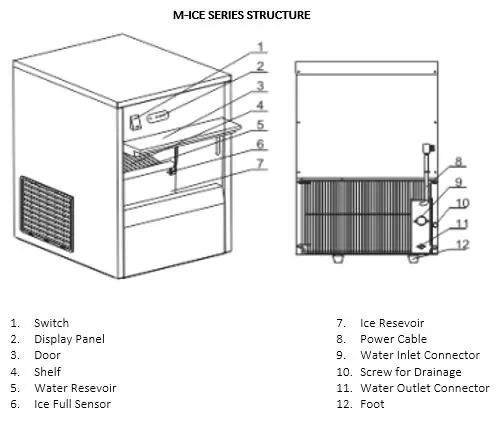
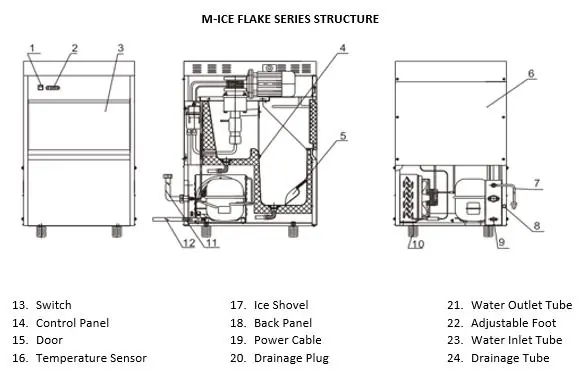
- Unpack the machine and remove all protective film.
- Position the machine on a flat surface, ensuring it is level using the screw legs.
- Maintain a 10cm distance from walls or other objects for ventilation.
- Connect the water inlet tube to a fresh water supply (not applicable for M-ICE 15).
- Connect the water drainage pipe to a sewage pipe or container. Ensure the pipe is lower than the machine's outlet and has a downward slope to allow water to flow.
- Wait at least one hour before connecting to power to allow the refrigerant to settle.
Operation
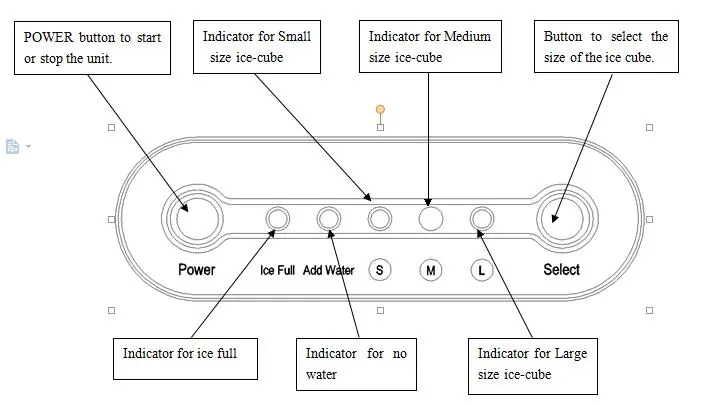
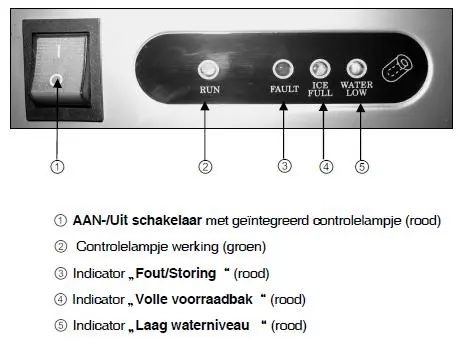
Plug the machine into a grounded socket. Press the ON/OFF button on the control panel to start. The machine will perform a self-inspection for approximately 5 minutes. The RUN indicator will light up when the compressor is operational. For M-ICE 15 models, remove the ice basket to fill the water reservoir to the MAX marker and select the ice size (S, M, L) using the Select button. The machine stops automatically when the ice storage container is full.
Troubleshooting
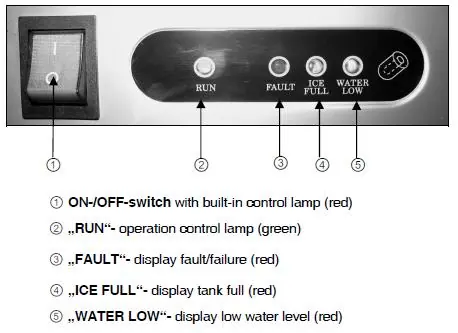
The machine features a self-checking function. If the machine stops, check the indicators on the control panel:
- No indicators illuminated: Check power supply, plug, and ensure ambient temperature is above 6°C.
- ICE FULL indicator illuminated: The ice storage container is full; remove ice.
- WATER LOW indicator flashing: Check water supply, pressure (2-3 bar), and ensure the water filter is not blocked and the hose is not kinked.
- FAULT indicator illuminated: Contact a certified technician; the machine has detected an internal error.
Cleaning and Maintenance
- Always switch off and disconnect the power before cleaning.
- Use warm, soapy water and a soft cloth. Do not use aggressive cleaning agents, solvents, or abrasive scourers.
- Remove calcification using a mixture of water and vinegar.
- Clean the condenser every 2 to 3 months.
- Never hose down the machine or immerse it in water.
- Clean the water tank if unused for 48 hours; flush the system if unused for 5 days.
Storage and Guarantee
Before storing, clean the machine thoroughly, coil the power cord, and store in a cool, dry place. The product comes with a 12-month warranty from the date of purchase, covering material and manufacturing defects under correct operation.
Practical help
Common problems
Appliance does not work (no lights)
Check power supply, plug, and ensure ambient temperature is above 6°C.
WATER LOW indicator flashing
Check water supply, ensure pressure is between 2-3 bar, clean the water filter, and check for kinked hoses.
Compressor does not work
Check if the ice storage bin is full, water supply is sufficient, or if the storage sensor is defective.
FAULT indicator illuminated
The machine has detected an error. Contact a certified technician for repair.
Before use
- Remove all protective film from surfaces.
- Place on a flat, stable surface with 10cm ventilation space.
- Level the machine using the screw legs.
- Connect to a water supply (not required for M-ICE 15).
- Wait at least one hour before plugging in to allow refrigerant to settle.
- Clean the exterior and interior with food-safe detergent.
- Discard the first two batches of ice.
Specs in practice
- Production (kg/24h)
- The amount of ice the machine can produce in a 24-hour period.
- Ice Storage (kg)
- The maximum capacity of the internal ice bin.
Images and diagrams
- Drainage connection: The drain pipe must be positioned lower than the machine's water outlet and slope downwards to the floor drain to ensure proper water flow.
Model compatibility
- M-ICE 15 model does not require an external water supply connection.
- Ambient temperature must be above 6°C for proper operation.
- Water pressure for connected models must be between 0.1Mpa and 0.8Mpa.

Manual page author
David Miller
Documentation analyst
Organizes user manual content into clear summaries, with attention to model details, product context, and everyday usability.