Electronics / Two-Way Radios
User Manual for Cobra BlueBound 1350B Marine VHF Radio
Quick guide for the Cobra BlueBound 1350B marine VHF radio. Includes instructions for distress calls, MMSI entry, menu navigation, radio settings, and channel configuration.
Table of contents
Manual images
Click an image to enlargeQuick Start and Essential Information
The Cobra BlueBound 1350B is a marine VHF radio with DSC (Digital Selective Calling) capabilities. Before using any DSC features, you must enter a valid MMSI number into the radio. If you attempt to use DSC features without an MMSI, the radio will sound a warning beep and prompt you to enter one.
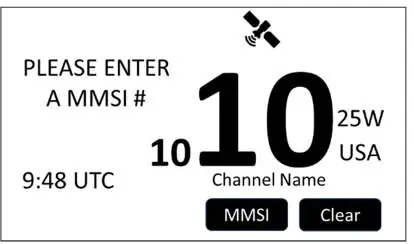
Key Operations:
- Distress Call: Press and release the red DISTRESS key to select the nature of distress, then press and hold the DISTRESS key for 3 seconds to transmit.
- Cancelling a Distress Call: Press the CANCEL button before an acknowledgement is received. Follow up with a voice transmission as required by regulatory documents.
- Menu Access: Press the MENU button to access Radio Settings, Channel Settings, DSC Setup, and Waypoints.
Radio Settings
You can customize the radio's behavior through the main menu:
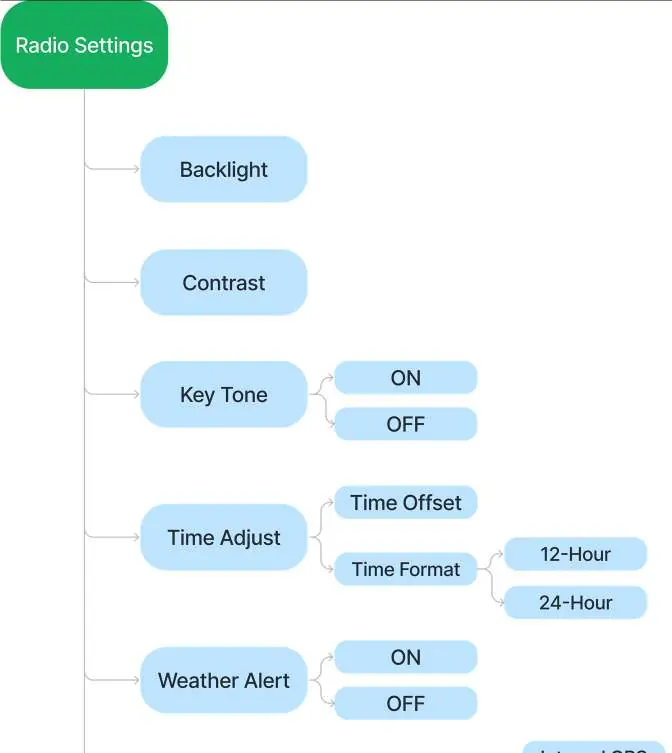

- Backlight: Adjustable from 0-3. Use the LEFT/RIGHT arrow keys or the volume/squelch knob to adjust.
- Contrast: Adjustable from 0-16 (Default is 8).
- Key Tone: Toggle ON/OFF.
- Time Adjust: Set time offset (increments of 00:30) and time format (12 or 24-hour).
- Weather Alert (US Models): When set to ON, the radio alerts you to NOAA 1050Hz tones.
- GPS: Configure internal/external antenna, coordinate system (DD, DMM, DMS), and SBAS settings.
Channel Settings
The radio allows for specific channel configurations:
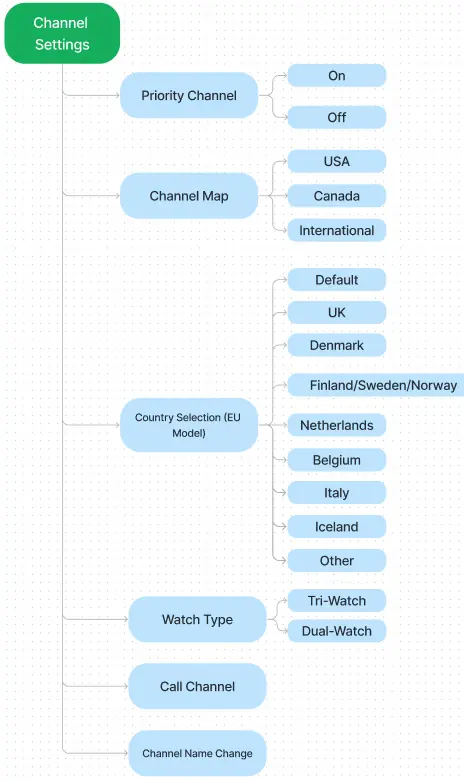
- Priority Channel: Toggle whether channel 16 is included in the favorite channel scan.
- Channel Map: Select between USA, Canada, or International maps.
- Country Selection (EU Models): Allows selection of specific countries (UK, Denmark, Finland/Sweden/Norway, Netherlands, Belgium, Italy, Iceland) to append private and coast guard channels to the international list.
Softkey Functions
- STAR: Press and hold for 2 seconds to add/remove the current channel from the favorite list. Press to cycle through favorites.
- NAV: Access the compass navigation screen and save waypoints.
- BACKLIGHT: Open the brightness adjustment sub-menu.
- LOG: Open the DSC received call log.
- PA: Activate Public Address option.
- NAME: Edit the name of the displayed channel.
Manufacturer information
Cobra Electronics
Practical help
Common problems
DSC features are not accessible.
Ensure a valid MMSI number has been entered into the radio. The radio will prompt you if it is missing.
Weather alert is not sounding.
Ensure the Weather Alert setting is set to ON in the menu and that the radio is tuned to a WX channel.
GPS coordinates are not displaying.
Check that 'GPS Info Display' is set to ON in the GPS menu. Also, verify if you are using the correct antenna setting (Internal vs External).
Distress call transmission is paused.
You can either cancel the call or return to the wait for acknowledgement screen. The countdown timer will resume once unpaused.
Before use
- Enter your vessel's MMSI number.
- Select the appropriate Channel Map (USA, Canada, or International).
- Configure the GPS antenna setting (Internal or External).
- Adjust the backlight and contrast for your environment.
- Set the correct time offset and format.
Specs in practice
- Distress Transmit Power
- Transmits at 25W.
- Weather Alert Tone
- 1050Hz tone used by NOAA to alert users.
- Radio Alert Reset Time
- Once an alert tone is played, it is prevented from playing again for at least 60 seconds.
Images and diagrams
- The Main Menu diagram shows the hierarchy of Radio Settings, Channel Settings, DSC Setup, and Waypoints.
- The Weather Alert diagram illustrates the 4-step process of detecting the 1050Hz tone and broadcasting the voice announcement.
- The Priority Scan diagram shows how channel 16 is included or excluded from the scan list based on the Priority Channel setting.
Model compatibility
- Weather Alert feature is for US Models only.
- Country Selection feature is for EU Models only.
- Radio cannot edit channel 16's name or edit a channel name during Dual-Watch, Tri-Watch, or Scan.

Manual page author
Emily Carter
User documentation editor
Prepares concise manual descriptions and highlights the most useful setup, operation, and maintenance information for readers.