Electronics / Two-Way Radios
Cobra 19MINICB Ultra Compact CB Radio
Quick guide for the Cobra 19MINICB CB radio. Learn how to operate the device, adjust squelch and volume, use VOX, access menu settings, and reset to factory defaults.
Table of contents
Manual images
Click an image to enlargeQuick Guide
The Cobra 19MINICB is an ultra-compact recreational CB radio designed for vehicle installation. Key operations include:
- Power On/Off: Press and hold the POWER button.
- Volume Control: Turn the POWER button to adjust volume.
- Channel Selection: Press the POWER button to enter channel selection mode, then turn the knob to change channels.
- Squelch Control: Use the SQ/ASQ button to adjust squelch levels (1-34) or Auto Squelch (ASQ) levels (1-9).
- Emergency Channels: Press the 9/19 button to toggle between CH9 and CH19.
Device Overview
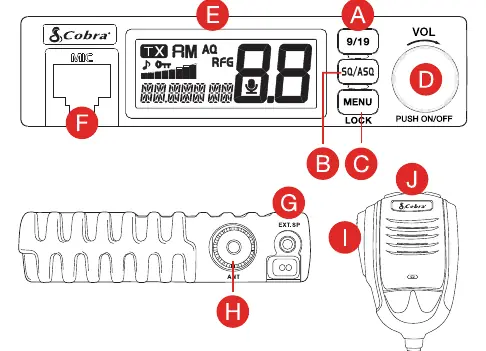
The radio features a microphone with PTT (Push-To-Talk) and channel up/down buttons. The main unit includes an LCD display, volume/power knob, menu/lock button, and squelch control button. External connections include a microphone jack, external speaker jack, and antenna jack.
Squelch Control
You can manually adjust the squelch level from 1-34 or use Auto Squelch (ASQ) to block out noisy signals. The ASQ measures the noise level to set the threshold automatically. Higher numbers indicate a stronger signal is required to break the squelch.
Menu Settings
Access the menu by pressing the MENU button. Use the microphone UP/DN buttons to navigate and the POWER button to select/confirm settings. Available options include:
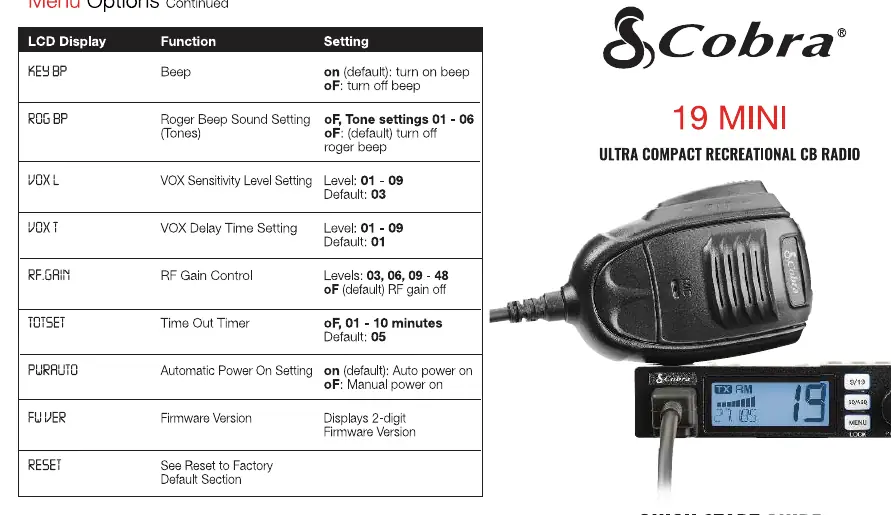
- KEY BP: Beep (on/off).
- ROG BP: Roger Beep (off, tones 01-06).
- VOX L: VOX Sensitivity (01-09).
- VOX T: VOX Delay Time (01-09).
- RF GAIN: RF Gain Control (03, 06, 09-48).
- TOTSET: Time Out Timer (off, 01-10 minutes).
- PWR AUTO: Automatic Power On (on/off).
- FW VER: Firmware Version.
Reset to Factory Default
To reset the radio: press the MENU button, turn the POWER button to select the RESET option, press the POWER button to select, and hold the POWER button until RESET stops blinking.
Technical Specifications
The device supports a maximum gain of 5 dBi. Antenna impedance is 50 Ohms. Ensure proper installation with the required minimum distance from the radiator to the body (45.5cm in USA, 54.1cm in Canada) to comply with RF exposure limits.
Support
For assistance, contact Cobra at 800-543-1608 or visit cobra.com/support.
Official resources from the manual
Manufacturer information
Cobra Electronics
Practical help
Common problems
Radio does not turn on
Check the power connection and ensure the vehicle ignition is on if required.
High background noise
Increase the Squelch or ASQ level to filter out noise.
Cannot change channels
Ensure the keypad lock is disabled (hold MENU button for 3 seconds).
Before use
- Ensure the antenna is securely connected to the antenna jack.
- Verify the power source is providing the correct voltage.
- Check that the microphone is properly connected to the microphone jack.
- If using an external speaker, ensure it has an 8 Ohm impedance and 3.5mm mono connector.
Images and diagrams
- A: 9/19 Emergency Channel button.
- B: Squelch Control button.
- C: Menu/Lock button.
- D: Power On/Off and Volume knob.
- E: LCD Display.
Model compatibility
- External speaker must be 8 Ohm with a 3.5mm mono connector.
- Maximum antenna gain supported is 5 dBi.
- Antenna impedance must be 50 Ohms.

Manual page author
Emily Carter
User documentation editor
Prepares concise manual descriptions and highlights the most useful setup, operation, and maintenance information for readers.