Electronics / Video Lighting
User Manual for Nanlite MixPad II 11C RGBWW LED Panel Light
Quick guide for the Nanlite MixPad II 11C RGBWW LED Panel Light. Learn how to operate CCT, HSI, and special effect modes, connect power, and troubleshoot common issues.
Table of contents
Manual images
Click an image to enlargeQuick Guide from the Manual
The Nanlite MixPad II 11C is a versatile RGBWW LED panel light. This guide provides essential information for setup, operation, and maintenance. Always ensure the power supply voltage matches the light's requirements before installation.
Product Overview
The device features a control panel on the back including:
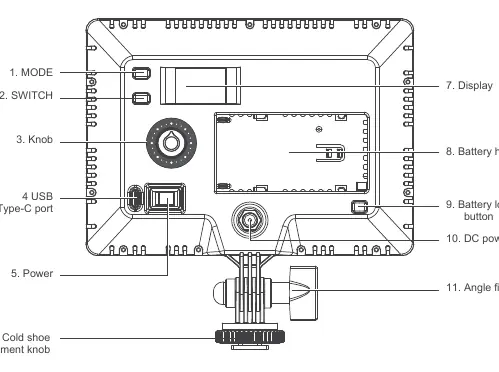
- MODE button: Switches between CCT-HARD, CCT-SOFT, HSI, EFFECT, and MENU modes.
- SWITCH button: Selects options within a mode.
- Knob: Adjusts selected option values.
- Power button: Turns the unit on and off.
- USB Type-C port: Used for firmware updates.
- Battery holder: Compatible with Sony NP-F or NP-FM lithium batteries.
- DC power socket: For external power adapter connection.
- Angle fixing knob: Adjusts the illumination direction.
Power Supply
The light can be powered via an external power adapter (sold separately) or a compatible lithium battery.
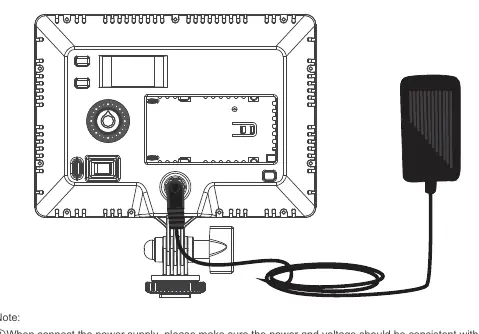
- DC Power: Connect the power adapter to the DC power socket. Ensure the power and voltage are consistent with the light's requirements.
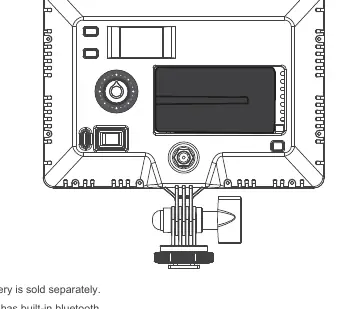
- Battery Power: Insert a Sony NP-F or NP-FM battery into the battery holder until it locks.
Operating Instructions
Press the Power button to turn on the unit. Use the MODE button to cycle through the following modes:
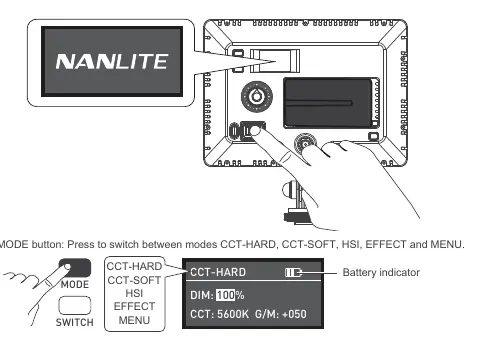
- CCT-HARD / CCT-SOFT: Adjust DIM (0-100%), CCT (2700K-6500K), and G/M (-100 to +100).
- HSI Mode: Adjust DIM, HUE (0-360), and SAT (0-100).
- EFFECT Mode: Includes 16 built-in effects such as Hue Loop, CCT Loop, Storm, Police Car, TV, Paparazzi, Candle/Fire, Disco, Bad Bulb, Firework, Explosion, and Welding. Use the knob to select the effect and the SWITCH button to adjust parameters like DIM, SPD, and INTVL.
- MENU: Allows setting the DMX channel (001-512), language (Chinese/English), and checking firmware version.
Safety and Maintenance
- Do not place objects on the light emitter.
- Keep away from liquids and flammable substances.
- Clean using a dry cloth with water or neutral cleanser.
- Do not attempt to repair the unit yourself; this voids the warranty.
- Store safely and keep away from children.
Practical help
Common problems
The light won't start up.
Long press the 'Power' button. If the 'NANLITE' logo does not appear, connect to a power source and try again.
The display is on but no light output.
Check if the intensity is set to zero or if the light is in a specific mode like storm/welding.
The light is flickering.
Ensure the unit is not being operated in extreme temperatures and is not in EFFECT mode.
Before use
- Check the package for damage caused in transit.
- Ensure the power supply voltage matches the light's specifications.
- Install a compatible Sony NP-F or NP-FM lithium battery if not using DC power.
- Ensure the light is turned off before cleaning or storage.
Specs in practice
- Input Voltage/Current
- DC 7.2-15V
- Color Temperature
- 2700K-6500K
Images and diagrams
- The control panel features a MODE button, SWITCH button, and a central adjustment knob.
- The battery holder is located on the back, compatible with Sony NP-F/NP-FM batteries.
- The DC power socket is located at the bottom of the control panel area.
- The angle fixing knob allows for tilting the light fixture.
Model compatibility
- Compatible with Sony NP-F and NP-FM lithium batteries.
- Built-in Bluetooth functionality included.
- Firmware updates are performed via the USB Type-C port.

Manual page author
Michael Turner
Technical manual editor
Reviews PDF manuals for structure, safety notes, and practical product details so readers can find the right information quickly.