Electronics / Gaming Peripherals
User Manual for NexiGo PS5 Cooling Fan
Quick guide for the NexiGo PS5 Cooling Fan. Includes installation steps, product specifications, safety notes, and usage instructions for optimal console cooling.
Table of contents
Manual images
Click an image to enlargeQuick Guide: Installation
The NexiGo Cooling Fan is designed to be installed directly onto the back of the PS5 console. Follow these steps to set it up:
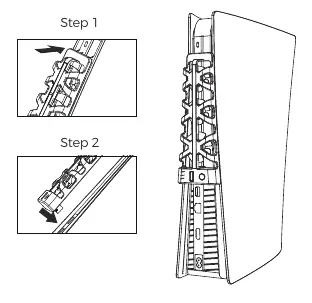
- Positioning: Slide the hooks located at the top of the fan into the uppermost slots in the back grill of the PS5 console.
- Connection: Insert the USB fan power connector into the upper USB port on the back of the PS5 console. The connector is positioned to align directly with the correct port.
- Operation: The fan will automatically turn on and off with the console. A blue LED light indicates that the unit is working.
Product Overview
The cooling fan features three integrated fans to dissipate excess heat from the PS5 console, helping to improve performance and lifespan. Key components include:
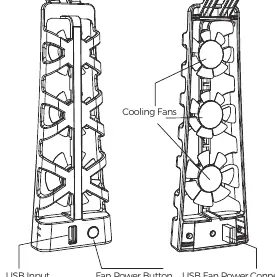
- Fan Power Button: Allows you to manually turn the cooling fan on or off.
- USB Fan Power Connector: Provides power to the fan and enables the passthrough feature.
- USB Input Passthrough Port: A built-in USB port on the fan case that allows you to continue using the USB port for other devices, ensuring you do not lose connectivity.
Specifications
- Working Voltage/Current: DC 5V/500mA
- Fan Speed: 5500 ± 1100 rev/min
- Product Material: ABS
- Compatibility: Compatible with both PS5 Disc and Digital editions.
Safety and Maintenance
To ensure the longevity of your device and the console, please adhere to the following guidelines:
- Airflow: Do not block or impede airflow to the device. Ensure the console has adequate clearance on all sides.
- Cleaning: Use a clean, dry cloth. Do not use water, alcohol, or other cleaning agents. Always unplug the unit before cleaning.
- Environment: Do not use or store the product in high humidity conditions. Keep the product dry.
- Handling: Do not insert fingers or objects into the fan openings. Do not place other consoles or heavy objects on top of the fan.
- Repairs: Do not attempt to open or repair the unit independently. If damaged, utilize the warranty or dispose of the item properly.
Practical help
Common problems
Fan does not turn on
Ensure the USB connector is fully inserted into the upper USB port on the back of the PS5 console.
USB port is occupied
Use the USB Input Passthrough Port located on the fan case to connect other devices.
Console overheating despite fan
Ensure the console has sufficient clearance on all sides and that the fan's airflow is not blocked.
Before use
- Ensure the PS5 console is powered off or in standby mode before installation.
- Verify the fan hooks are aligned with the top slots of the PS5 back grill.
- Check that the USB connector is plugged into the correct upper USB port.
- Ensure the area around the console is free of obstructions.
Specs in practice
- Working Voltage/Current
- DC 5V/500mA; powered directly by the console's USB port.
- Compatibility
- Fits both PS5 Disc and Digital console editions.
Images and diagrams
- The installation diagram shows the fan hooks sliding into the top grill slots of the PS5.
- The USB connector is shown plugging into the upper USB port on the console back panel.
Model compatibility
- Compatible with both PS5 Disc and Digital editions.

Manual page author
Emily Carter
User documentation editor
Prepares concise manual descriptions and highlights the most useful setup, operation, and maintenance information for readers.