Lighting / Smart Lighting
Philips Hue Lightstrip 1m Extension User Manual
Quick guide for the Philips Hue Lightstrip 1m extension. Learn how to install, connect, cut, and safely set up your smart lighting extension.
Quick answers from the manual
Quick answer
- This manual provides instructions for installing the Philips Hue Lightstrip 1m extension, including guidelines for cutting, bending, and connecting the strips safely. p. 1, 2, 3, 4
Key actions
- Install the lightstrip by cleaning the surface, peeling the adhesive backing, and pressing it into place. p. 5, 6
- Cut the lightstrip only at the designated marked points. p. 4
First start
- Connect the power adapter to the lightstrip and plug it into a wall outlet. p. 4, 6
Problems and fixes
Bending issues
Do not bend sharply; maintain at least a 90-degree radius.
p. 3Technical specifications
| Parameter | Value | Meaning | Pages |
|---|---|---|---|
| Maximum length | 32 ft | Maximum total length of the lightstrip system. | p. 3 |
Where to find it in the PDF
- Installation and Safety p. 2, 3, 4, 5
Table of contents
Manual images
Click an image to enlargeQuick guide from the manual
This document provides essential instructions for installing and setting up the Philips Hue Lightstrip 1m extension. Ensure the total length of your lightstrip system does not exceed 32 ft (approx. 10 meters). The product is designed for indoor use only and must be kept away from moisture and rain.
Installation
Follow these steps to install your lightstrip:
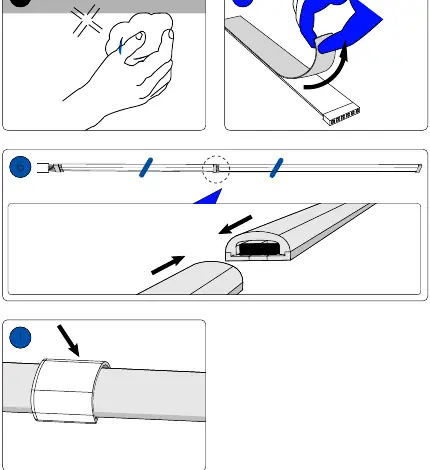
- Surface Preparation: Ensure the mounting surface is clean and dry before application.
- Peeling: Remove the protective backing from the adhesive strip on the back of the lightstrip.
- Sticking: Press the lightstrip firmly onto the desired surface.
- Connecting: Use the provided connector to join segments if necessary.
Cutting and Bending
Proper handling is required to avoid damaging the LEDs:
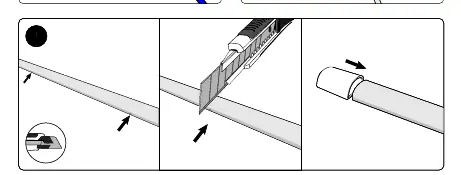
- Cutting: Only cut the lightstrip at the designated marked points indicated on the strip.
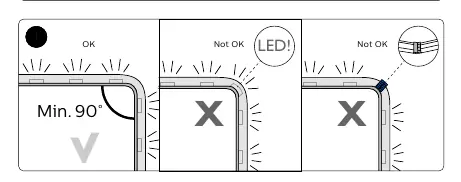
- Bending: Do not force sharp bends. Maintain a minimum bending radius of 90 degrees. Avoid bending directly over the LED components.
Power Connection
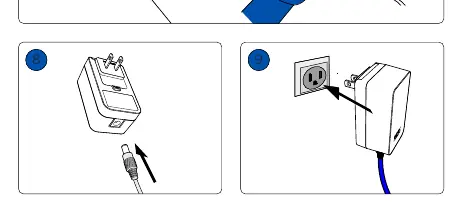
Connect the power adapter to the lightstrip connector, then plug the adapter into a standard wall outlet. Ensure all connections are secure before powering on.
Technical Specifications
- Maximum Length: 32 ft (total system length).
- Usage: Indoor use only.
Support
For further assistance, visit www.philips-hue.com/connectproduct. For contact information, you can reach Signify North America Corporation at 1-800-555-0050 or Signify Mexico at 01-800-508-9000.
Official resources from the manual
Manufacturer information
Philips
Practical help
Common problems
Lightstrip will not bend correctly
Ensure the bend is at least 90 degrees. Do not force sharp bends or bend directly over LED components.
System not working after extension
Verify that the total length of the connected lightstrip system does not exceed 32 ft.
Before use
- Ensure the mounting surface is clean and dry.
- Verify the total length of the lightstrip system is within the 32 ft limit.
- Confirm the installation area is indoors and protected from moisture.
- Check that you are only cutting at the designated marked points.
Images and diagrams
- Cutting: Cut only at the marked lines on the strip.
- Bending: Maintain a minimum 90-degree angle; do not bend sharply.
- Installation: Clean surface, peel adhesive, and press firmly.
Model compatibility
- Designed for indoor use only.
- Not suitable for outdoor or wet environments.

Manual page author
Emily Carter
User documentation editor
Prepares concise manual descriptions and highlights the most useful setup, operation, and maintenance information for readers.