Home Appliances / Vacuum Cleaners
Filter Replacement Guide for Philips PowerPro Active 2000W FC8670
A step-by-step maintenance guide for replacing and cleaning the motor protection and exhaust filters on the Philips PowerPro Active 2000W FC8670 vacuum cleaner. Includes instructions for filter cleaning, drying, and replacement.
Quick answers from the manual
Quick answer
- To maintain your Philips PowerPro Active 2000W FC8670, clean the filters monthly and replace them annually using the FC8058/01 kit. Always ensure the sponge is completely dry before reinsertion to avoid electrical hazards. p. 2, 4
Key actions
- Remove dust drum p. 3
- Clean motor protection filter p. 4
- Replace exhaust filter p. 6, 7
Problems and fixes
Filter dirty
Clean with toothbrush or wash sponge and dry completely.
p. 4Show 2 more answers Show less
Maintenance and reset
- Replace filters annually. p. 2
Where to find it in the PDF
- Introduction and Tools p. 2
- Motor Protection Filter Steps p. 3, 4, 5
- Exhaust Filter Steps p. 6, 7
Table of contents
Manual images
Click an image to enlargeQuick guide from the manual
This guide provides instructions for maintaining the filtration system of the Philips PowerPro Active 2000W FC8670 vacuum cleaner. It is recommended to clean the filters monthly and replace them annually to ensure optimal performance. The required replacement kit is FC8058/01.
Required tools and parts
- Old toothbrush
- Dust mask (optional)
- Philips PowerPro Active/PowerPro Compact Replacement kit FC8058/01
Removing the dust drum
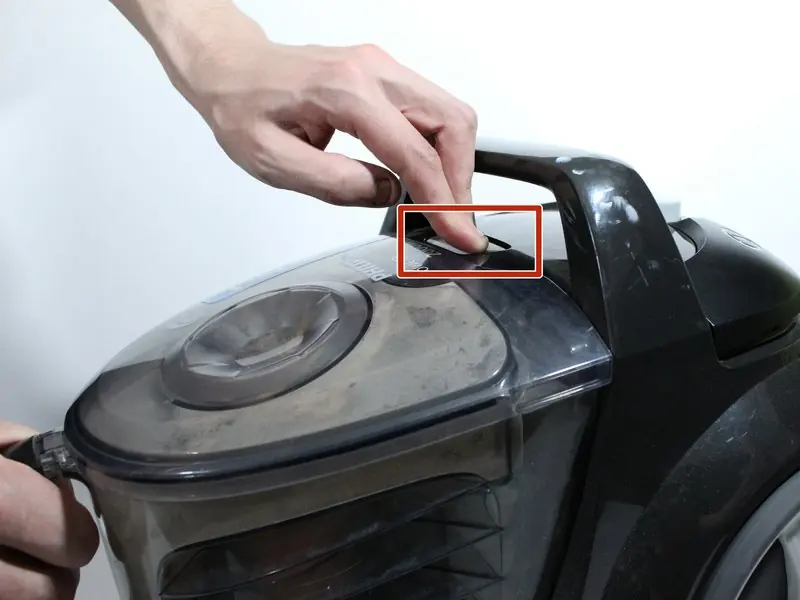
- Press the Eject button located on the top of the vacuum cleaner.
- Pull the dust drum upwards using the handle to access the motor protection filter.
Motor protection filter maintenance
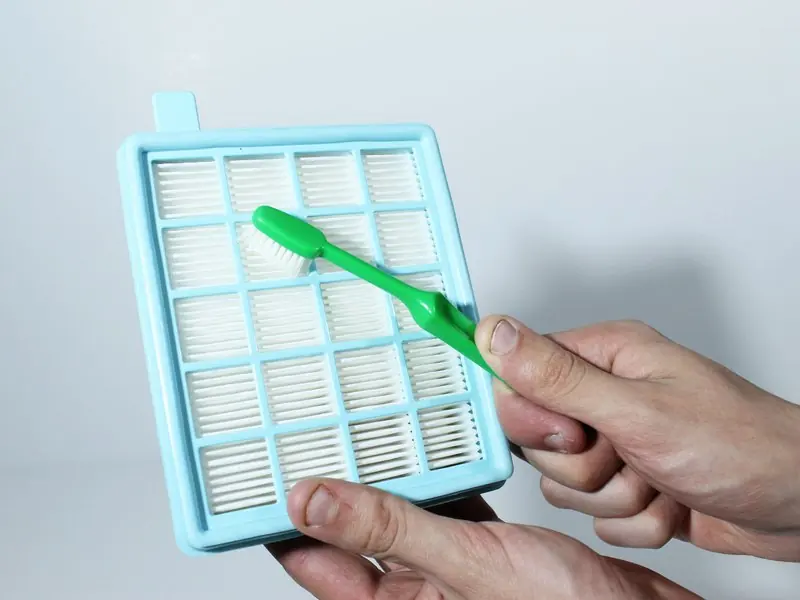
- Remove the filter from the back of the drum by pulling on the blue tab.
- If the filter is less than 12 months old, use an old, dry toothbrush to remove dust from the pleated side.
- Wash the sponge piece in water until the water runs clear.
- Important: Allow the sponge to dry completely before reinserting it. This can take up to 2 hours. Placing a wet sponge back into the vacuum is an electrical hazard.
- Return the dry sponge to the backside of the motor protection filter.
- If replacing the filter entirely, remove the new filter from the box and place it on the back of the dust drum, ensuring the blue tab is aligned with the protruding bar.
Exhaust filter maintenance
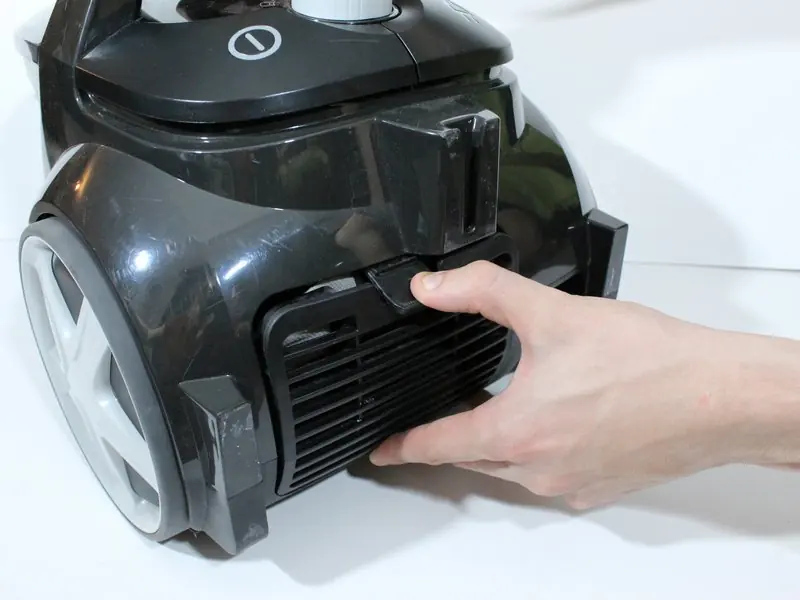
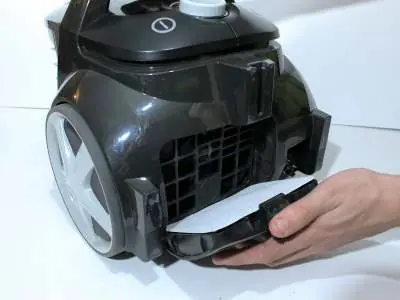
- Pull down on the tab at the back of the vacuum cleaner to access the exhaust filter.
- Pull the grill away from the vacuum and remove the exhaust filter.
- Pick away any large pieces of debris from the filter by hand.
- If replacing with a new filter, remove it from the box and place it over the exhaust filter grill.
- Return the grill to the back of the vacuum, ensuring the filter is aligned correctly, and press until it clicks into place.
Reassembly and safety
After servicing the motor protection filter, ensure it is fitted correctly to the back of the drum. Return the dust drum to the vacuum cleaner. Inserting the drum at an angle can prevent damage to the retaining tabs. Press down on the top of the drum to ensure it clicks into place.

Manufacturer information
Philips
Practical help
Common problems
Reduced suction or dirty filters
Clean filters monthly using a toothbrush and water; replace annually.
Wet sponge in vacuum
Never insert a wet sponge; it is an electrical hazard. Allow to dry for at least 2 hours.
Before use
- Check if the filter is less than 12 months old
- Have an old toothbrush ready for cleaning
- Ensure you have the replacement kit FC8058/01 if replacing
- Verify the sponge is completely dry before reassembly
Show more Show less
Specs in practice
- Replacement Kit
- FC8058/01 is the official replacement kit for this model.
Images and diagrams
- Blue tab indicates the filter release on the dust drum
- Eject button is located on the top of the vacuum unit
- Tabs at the back of the vacuum release the exhaust filter grill
Model compatibility
- Compatible with Philips PowerPro Active/PowerPro Compact Replacement kit FC8058/01

Manual page author
Emily Carter
User documentation editor