Home Appliances / Vacuum Cleaners
User Manual for Philips PowerPro Duo 2-in-1 Vacuum Cleaner
Comprehensive user guide for the Philips PowerPro Duo 2-in-1 vacuum cleaner. Includes safety instructions, battery removal procedures, troubleshooting tips, and technical specifications.
Quick answers from the manual
Quick answer
- The Philips PowerPro Duo 2-in-1 vacuum cleaner requires regular cleaning of the filter and cyclone for optimal suction. If the device fails to start, ensure it is charged and that the charging cable is disconnected from the unit. p. 1, 2
Key actions
- Remove the battery only when discarding the appliance. p. 2
- Clean the filter and cyclone if suction power is low. p. 2
First start
- Check voltage, ensure filter is assembled, and charge the appliance. p. 1
Show 4 more answers Show less
Problems and fixes
Appliance does not work
Charge battery, remove charging plug, or press On/Off then MAX button.
p. 2
Low suction power
Clean filter/cyclone and check assembly.
p. 2Maintenance and reset
- Clean the filter and cyclone regularly. p. 2
Technical specifications
| Parameter | Value | Meaning | Pages |
|---|---|---|---|
| Battery | 18V Li-ion | Rechargeable battery type. | p. 8 |
Where to find it in the PDF
- Safety Information p. 1
- Battery Removal p. 2
- Troubleshooting p. 2
Table of contents
Quick Guide
This guide covers the operation, safety, and maintenance of the Philips PowerPro Duo 2-in-1 vacuum cleaner. Always ensure the appliance is charged before use and that the filter unit is properly assembled.
Safety Information
Danger: Never vacuum up water, other liquids, flammable substances, or hot ashes. Never immerse the appliance or adapter in water.
Warning: Check voltage compatibility before connecting. Do not use if damaged. This appliance can be used by children aged 8 and above under supervision. Always remove the plug from the socket before cleaning or maintenance. Do not use to vacuum building waste, cement dust, or fine sand. Always use with the filter unit assembled.
Caution: Do not handle with wet hands. Do not unplug by pulling the cord. Switch off after use and during charging. Do not block exhaust air openings.
Battery Removal
The built-in rechargeable battery must only be removed by a qualified professional when the appliance is discarded. Ensure the appliance is disconnected from the wall socket and the battery is completely empty before removal.
- Let the appliance run until it stops.
- Remove the dust container and the cyclone from the handheld vacuum cleaner (Fig. 4).
- Undo two screws on the inside of the handheld vacuum cleaner (Fig. 5).
- Turn the handheld vacuum cleaner and remove four screws on the other side (Fig. 6).
- Remove the back panel from the handheld vacuum cleaner (Fig. 7).
- Insert a screwdriver and push it down to remove the panel on the left side of the appliance (Fig. 8).
- Remove two screws from the bottom (Fig. 9).
- Remove four screws on the left side of the appliance (Fig. 10).
- Remove the left housing part (Fig. 11).
- Take out the rechargeable battery and cut the wires connected to it one by one (Fig. 12).
Troubleshooting
If you encounter issues, check the following solutions:
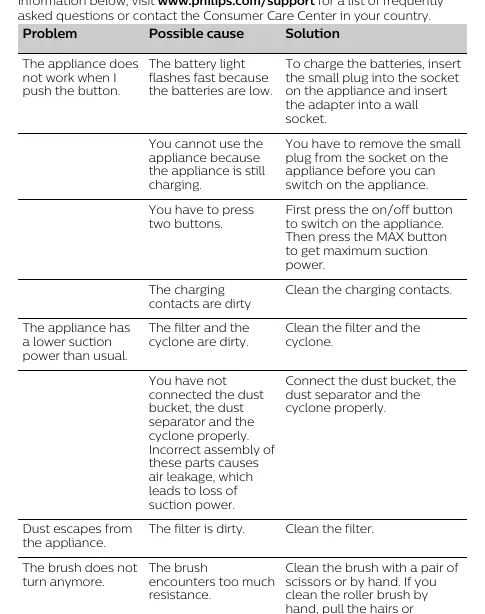
- Appliance does not work: Check if batteries are low (light flashes). Charge the appliance. Ensure the small plug is removed from the appliance before switching on. Press the On/Off button, then the MAX button for maximum power. Clean charging contacts.
- Low suction power: Clean the filter and cyclone. Ensure the dust bucket, dust separator, and cyclone are connected properly.
- Dust escapes: Clean the filter.
- Brush does not turn: Clean the brush of hair or threads using scissors or by hand.
Technical Specifications
Battery: 18V Li-ion. Noise Level: 85 dB(A). Operating Temperature: 5 °C to 50 °C.
Manufacturer information
Philips
Practical help
Common problems
Appliance does not work when button is pressed
Charge the batteries, ensure the charging plug is removed from the appliance, or press the On/Off button followed by the MAX button.
Lower suction power than usual
Clean the filter and cyclone, and ensure all dust container parts are assembled correctly.
Brush does not turn
Clean the brush of hair or threads using scissors or by hand.
Before use
- Check that the adapter voltage matches local mains voltage.
- Ensure the filter unit is assembled.
- Do not vacuum liquids or hot ashes.
- Ensure the appliance is fully charged.
- Check for any visible damage to the appliance or adapter.
Show more Show less
Specs in practice
- Operating Temperature
- 5 °C to 50 °C.
Images and diagrams
- Fig 1-2: Charging instructions.
- Fig 4-12: Step-by-step battery removal procedure.
Model compatibility
- Use only the supplied adapter for charging.
- Accessories may vary by product model.

Manual page author
Michael Turner
Technical manual editor