Power / Solar Inverters
User Manual for ECO-WORTHY 1100W/2000W Pure Sine Wave Inverter
Quick guide for the ECO-WORTHY 1100W/2000W Pure Sine Wave Inverter. Includes installation steps, wiring diagrams, troubleshooting, and technical specifications.
Table of contents
Manual images
Click an image to enlargeQuick Guide from the Manual
This ECO-WORTHY pure sine wave inverter is designed to convert 12V DC power into 115V AC power. Before use, ensure your battery bank is 12V and capable of handling the required load. Always install an ANL type fuse near the positive battery terminal to prevent fire or explosion. The unit must be mounted in a well-ventilated area, away from flammable materials, and protected from direct sunlight and moisture.
Device Overview
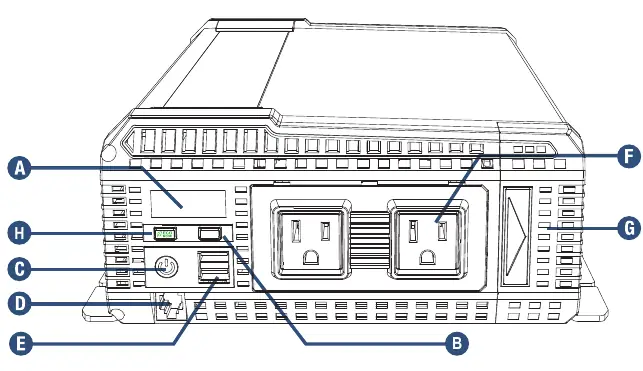
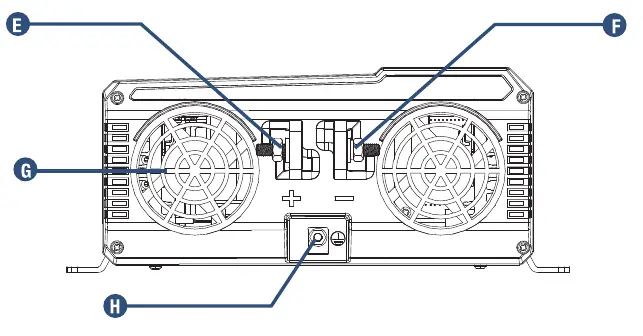
The front panel features an LCD display, power button, USB ports (QC3.0), AC outlets, and an ECO mode button. The rear panel contains the positive and negative DC input terminals, thermal activated cooling fans, and a ground terminal.
Installation
Mounting: Choose a dry, cool, and ventilated location. Mount the inverter horizontally to prevent foreign objects from falling into the ventilation openings. Use corrosion-resistant fasteners size #10 or larger.
Connecting the Inverter:
- Ensure the inverter is OFF.
- Use the recommended cable gauges: 2 AWG for the 1100W model and 0 AWG for the 2000W model.
- Connect the negative cable to the negative DC terminal.
- Connect the positive cable to the positive DC terminal.
- Connect the ground terminal to the chassis or earth ground using a 14 AWG wire.
- Tighten all nuts firmly but do not overtighten.
Hardwiring Instructions
The inverter includes an optional AC output hardwire connection. To access it, unscrew the front plate located under the AC outlets. You will find three terminals: Hot, Neutral, and Earth Ground. Ensure the unit is disconnected from all power sources before performing this procedure.
Operation
ECO Mode: When enabled, the inverter enters an ultra-low power standby mode when the load is below 50W and automatically exits when the load exceeds 50W.
General Operation: Ensure the inverter is OFF, plug your appliance into the AC outlet, turn the inverter ON, and then turn the appliance ON.
Troubleshooting
If the inverter displays an error or fails to operate, check the following:
- Low Voltage: Recharge the battery and check cable connections.
- High Voltage: Ensure the inverter is connected to a 12V battery.
- Overload: Ensure the connected load is within the inverter's operating limit.
- Over Temperature: Ensure ventilation openings are not obstructed and reduce ambient temperature.
- No Output: Check if the unit is ON, verify wiring, and ensure correct DC polarity.
Specifications
The 1100W model provides 1100W continuous power (2200W surge), while the 2000W model provides 2000W continuous power (4000W surge). Both models operate on a 12V DC input, output 115V AC, and feature an efficiency of 85% minimum.
Practical help
Common problems
Digital display shows LOW VOLTAGE
Recharge the battery and check if cables and connections are secure.
Digital display shows HIGH VOLTAGE
Ensure the inverter is connected to a 12V battery.
Digital display shows OVERLOAD
Ensure the load attached to the inverter is within the operating limit.
Digital display shows temperature icon
Ensure the inverter is in a well-ventilated area and ventilation openings are not obstructed.
No output voltage
Turn the inverter ON, check wiring, and verify DC polarity.
Before use
- Verify the battery bank is 12V.
- Use 2 AWG cables for 1100W model or 0 AWG for 2000W model.
- Install an ANL type fuse near the positive battery terminal.
- Ensure the mounting location is dry, cool, and ventilated.
- Check that all connections are secure and polarity is correct.
Specs in practice
- Continuous Watts
- The maximum power the inverter can supply continuously.
- Surge Capacity
- The peak power the inverter can handle for starting motorized appliances.
- Input Voltage Range
- The DC voltage range (10.5V to 16V) required for operation.
Images and diagrams
- Front Panel: Identifies LCD, power button, USB ports, AC outlets, and ECO mode button.
- Rear Panel: Identifies DC input terminals, cooling fans, and ground terminal.
- Hardwiring: Shows the location of Hot, Neutral, and Earth Ground terminals under the front plate.
Model compatibility
- Requires 12V deep-cycle or marine batteries.
- Not compatible with AC power sources.
- Operating temperature range: -20°C to 40°C.

Manual page author
Michael Turner
Technical manual editor
Reviews PDF manuals for structure, safety notes, and practical product details so readers can find the right information quickly.