Electronics / Special Effects
User Manual for QTX Double Bubble LED Bubble Machine
Quick guide for the QTX Double Bubble LED bubble machine. Learn how to set up, operate, clean, and maintain your device for optimal performance.
Table of contents
Manual images
Click an image to enlargeQuick guide from the manual
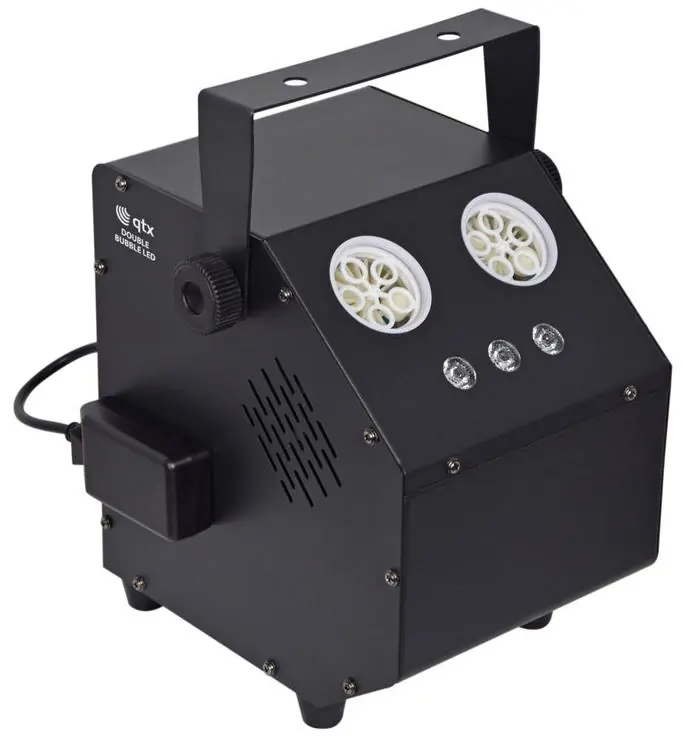
The QTX Double Bubble LED is a high-output bubble machine designed for stage effects. To ensure maximum performance and longevity, always operate the unit in an upright position and clean the fluid tanks after each use. The device features two operating modes controlled by a rear rocker switch and includes a wireless remote for bubble and light show control.
Unpacking and Safety
Upon unpacking, ensure the package contains the unit, IEC mains lead, wired remote-control sensor, and keyfob remote. If any items are missing or damaged, contact your dealer immediately. To prevent fire or electric shock, do not expose electrical parts to rain or moisture. If liquids are spilled on the housing, disconnect the mains, allow the unit to dry, and have it checked by qualified personnel.
Placement
The unit must always be operated in an upright position. Choose a location where the bubble output faces the desired area. Ensure the rear panel and fluid tank are easily accessible for refilling and cleaning. Take care not to spill fluid inside the machine when moving it.
Setting up
The machine requires bubble fluid to operate. It is recommended to use QTX bubble fluid (160.574UK, 160.575UK) or QTX UV bubble fluid (160.576UK, 160.577UK) for UV-reactive effects.
- Remove the fluid tank from the unit and fill it with the required fluid.
- Return the tank to the unit, ensuring the filling tubes are correctly replaced into the hole in the top of the bottle and pushed down fully into the liquid.
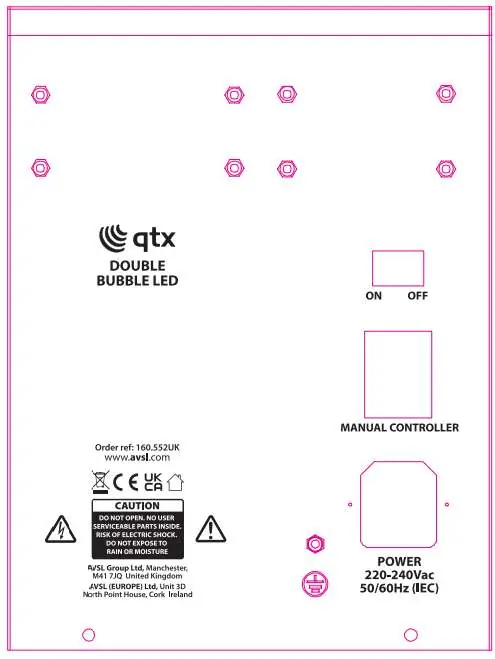
- Connect the supplied wired remote control to the female IEC connector on the rear panel.
- Connect the IEC mains plug to the power outlet and switch on.
Operation
The Double Bubble LED has two operating modes accessed via the On/Off rocker switch on the back of the unit:
- On position: Provides a constant flow of bubbles and activates the LED light show.
- Off position: Allows control of the bubble flow and light show using the wireless remote control. Use the Unlock button to start the effect and the Lock button to stop it.
After use, switch off the machine, disconnect from the mains, empty the bubble fluid tank, and rinse it out with clean water before allowing it to dry.
General maintenance
To maintain optimum performance and minimize wear, clean the unit frequently. Usage and environment determine the frequency, but as a rule, clean after each use to avoid dust build-up and blockages. Power off the unit before maintenance. Use a vacuum or air compressor and a soft brush to remove dust from external vents and internal components. Clean the external case with a dry cloth or tissue when the fixture is cold.
Replacing the fuse
If the unit fails to power on, check the fuse. Disconnect from the mains power supply first, then remove the fuse holder part of the IEC socket to reveal the fuse. Replace it with the correct fuse rating as stated on the fixture safety label or in this guide, then lock the fuse holder cover back into place.
Specifications
Power supply: 230Vac, 50Hz (IEC)Fuse rating: F2APower consumption: 30WNumber of wheels: 2Number of wands per wheel: 5Max. height: 3-4m (approx.)Max. distance: 2-4m (approx.)LED power: 3W RGB x 3pcsFluid capacity: 1 litreRemote control frequency: 433.92MHzDimensions: 180 x 240 x 260mmWeight: 2.8kg
Practical help
Common problems
Poor performance or overheating
Clean the unit frequently. Use a vacuum or air compressor to remove dust from external vents and internal components.
Bubbles not flowing
Ensure the fluid tank is filled and the filling tubes are correctly replaced and pushed down fully into the liquid.
Unit does not turn on
Check the mains connection and the fuse in the IEC socket. Replace the fuse if necessary with the correct rating (F2A).
Before use
- Check mains voltage and condition of the IEC lead.
- Ensure the unit is placed in an upright position.
- Fill the fluid tank with compatible QTX bubble fluid.
- Ensure filling tubes are pushed down fully into the liquid.
- Connect the wired remote control to the rear panel.
- Check the condition of the remote lead to ensure it is not trapped.
Specs in practice
- Power supply
- 230Vac, 50Hz (IEC connection).
- Fluid capacity
- 1 litre tank capacity.
- Remote frequency
- 433.92MHz.
Images and diagrams
- The rear panel diagram shows the On/Off rocker switch, the manual controller input, and the IEC power socket.
Model compatibility
- Recommended fluid: QTX bubble fluid (160.574UK, 160.575UK).
- UV effect fluid: QTX UV bubble fluid (160.576UK, 160.577UK).

Manual page author
Emily Carter
User documentation editor
Prepares concise manual descriptions and highlights the most useful setup, operation, and maintenance information for readers.