Lighting / Stage Lighting
User Manual for Chauvet DJ Hurricane Haze 1DX
Comprehensive user guide for the Chauvet DJ Hurricane Haze 1DX. This manual covers setup, DMX operation, maintenance procedures, cleaning instructions, and technical specifications.
Quick answers from the manual
Quick answer
- The Hurricane Haze 1DX is a haze machine that requires water-based haze fluid. It can be controlled manually via the Haze Volume knob or via DMX (1 channel). Regular maintenance with Fog Cleaner Quart (FCQ) every 40 hours is required to prevent clogging. p. 3, 6, 7
Key actions
- Clean the system with FCQ p. 7
- Clear fluid line for transport p. 7
First start
- Allow 2 minutes to heat up p. 6, 8
Problems and fixes
Clogged heating element
Run FCQ through the system.
p. 7Maintenance and reset
- Clean every 40 hours p. 7
Technical specifications
| Parameter | Value | Meaning | Pages |
|---|---|---|---|
| DMX Channels | 1 | Number of DMX channels used. | p. 8 |
| Fuse | F 5A, 250V | Required fuse rating. | p. 8 |
Where to find it in the PDF
- Product Overview p. 3
- Technical Specifications p. 8
Table of contents
Manual images
Click an image to enlargeQuick Guide from the Manual
The Hurricane Haze 1DX is a haze machine designed for indoor use. To ensure optimal performance and longevity, please note the following:
- Heat-up time: Allow the unit 2 minutes to heat up before operation.
- Fluid: Use only Chauvet DJ water-based haze fluid. Never operate without fluid.
- Maintenance: Clean the system every 40 hours of operation using Chauvet Fog Cleaner Quart (FCQ).
- Transport: Clear the fluid line before powering off to prevent leaks.
Safety Notes
Follow these safety guidelines to prevent damage or injury:
- Installation: Not intended for permanent installation. Ensure at least 20 inches (50 cm) of clearance from adjacent surfaces for ventilation.
- Electrical: Always connect to a grounded circuit. Do not connect to a dimmer or rheostat.
- Operation: Do not touch the output nozzle during or shortly after operation as it remains hot. Do not tilt the unit; keep it level.
- Environment: Indoor use only. Keep away from flammable materials.
Product Overview
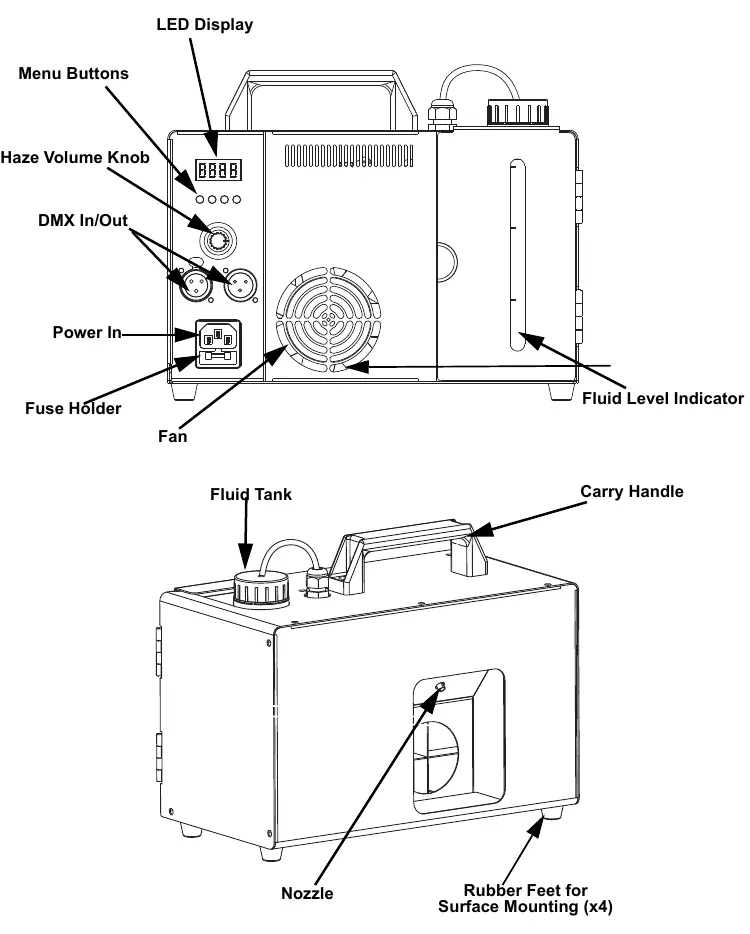
The unit features a control panel with an LED display, menu buttons, and a haze volume knob. The rear panel houses the power input, fuse holder, and DMX In/Out ports. The fluid tank is located on the top, with a level indicator on the side.
Setup
The Hurricane Haze 1DX has a fixed voltage power supply (120V or 230V depending on the model). Ensure the outlet voltage matches the unit's requirements.
Fuse Replacement
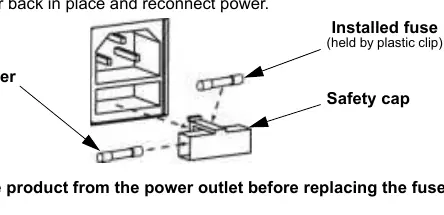
- Disconnect the product from the power outlet.
- Use a flat-head screwdriver to pry the fuse holder out of the housing.
- Remove the blown fuse and replace it with a fuse of the exact same type and rating (F 5A, 250V).
- Reinsert the holder and reconnect power.
Operation
The unit can be operated manually or via DMX controller.
- Manual Control: Use the Haze Volume knob to adjust output (H 1–3).
- DMX Control: Set the starting address using the menu buttons (d 1–512). The unit uses 1 DMX channel.
Maintenance and Storage
Regular maintenance is critical to prevent clogging.
- Cleaning: Every 40 hours, run FCQ through the system. Unplug, empty fluid, add cleaning solution, warm up, and run until the tank is almost empty.
- Storage: Clean the system with FCQ before long-term storage. Do not refill with haze fluid.
- Transport: To prevent leaks, turn the Haze Volume to off, wait 30-45 seconds for the pump to clear the line, then power off.
Practical help
Common problems
Unit is clogged or output is reduced
Run Chauvet Fog Cleaner Quart (FCQ) through the system to clear the heating element.
Unit will not power on
Check the fuse in the fuse holder and replace if blown with an F 5A, 250V fuse.
Fluid leaking during transport
Ensure the fluid line is cleared by turning the Haze Volume to off and waiting 30-45 seconds before powering off.
Before use
- Ensure the unit is on a level surface (do not tilt).
- Check that the fluid tank has adequate water-based haze fluid.
- Verify the power outlet voltage matches the unit's fixed voltage.
- Ensure at least 20 inches (50 cm) of ventilation space.
- Allow 2 minutes for the unit to heat up.
Images and diagrams
- The control panel includes an LED display, menu buttons, and a manual haze volume knob.
- The fuse holder is located on the rear panel near the power input.
Model compatibility
- Use only Chauvet DJ water-based haze fluid.
- Do not use with dimmers or rheostats.

Manual page author
David Miller
Documentation analyst
Organizes user manual content into clear summaries, with attention to model details, product context, and everyday usability.