Electronics / Special Effects
User Manual for QTX VertiBox 160.485UK Fog Machine
Quick guide for the QTX VertiBox 160.485UK fog machine. Learn how to set up, operate via DMX or RF remote, maintain the unit, and troubleshoot common issues.
Table of contents
Manual images
Click an image to enlargeQuick Start Guide
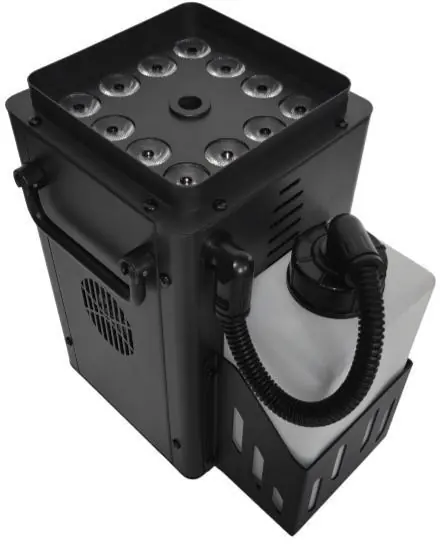
The QTX VertiBox is a compact vertical fog machine with integrated RGBA LED lighting. To get started, fill the 1.2L tank with fog fluid, connect the power, and allow the unit to warm up for 4-5 minutes. You can control the fog and light effects using the rear control panel, the included RF remote, or via DMX.
Safety Warnings
- Do not expose electrical parts to rain or moisture to prevent fire or electric shock.
- The unit must be earthed.
- Avoid impact, dropping, or extreme pressure to the housing.
- The housing may become hot during use due to the internal heating element.
- No user-serviceable parts inside; do not open the case.
- Allow the unit to acclimatize to room temperature before operating.
Setup and Installation
- Unpack the unit and check for any damage.
- Unscrew the tank cap and fill with fog fluid.
- Replace the bottle and ensure the pipe is fed to the bottom of the bottle for consistent flow.
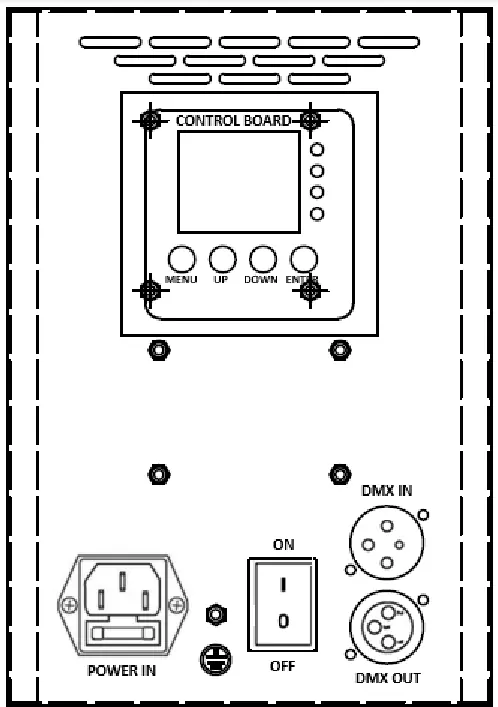
- If using DMX, connect your controller to the DMX IN XLR connector. Additional units can be daisy-chained via DMX OUT.
- Connect the IEC mains cable and switch the unit on.
- Wait 4-5 minutes for the unit to warm up. The LCD will display '----' when ready.
Operation
Use the control buttons on the rear panel to navigate modes:
- Menu: Scrolls between menu screens.
- Up/Down: Adjusts function or setting values.
- Enter: Saves the current setting.
The LCD displays status and settings, including DMX address (A001-A512), fog interval (I001-I900 seconds), fog duration (D001-D015 seconds), and LED color settings (C0-C8).
The included RF remote provides wireless control:
- 1: Fog effect on demand (max 15 seconds).
- 2: Solid color select (7 available).
- 3: Color change or color fade select.
- 4: LEDs on/off.
DMX Control
When set to DMX mode, the unit uses 8 channels:
- CH1: Fog off (0-5) / Start to fog (6-255).
- CH2: LEDs off (0-5) / Color change (6-126) / Color fade (127-255).
- CH3: Speed adjustment for CH2.
- CH4: Strobe effect.
- CH5-CH8: Individual intensity control for Red, Green, Blue, and Amber LEDs.
Maintenance and Cleaning
- Clean the casing with a soft, dry, or slightly damp cloth. Do not use strong solvents.
- Periodically clean the fog mechanism by operating the unit with distilled water.
- It is recommended to use QTX fog machine cleaning fluid (160.670UK) periodically.
- Check fluid levels regularly.
Troubleshooting
- No power: Check mains voltage, socket, power lead, and internal/plug fuses.
- No fog output: Check fluid level, ensure the pump is working, check for blockages, and ensure output is not set to zero on the control panel.
- LEDs not working: Ensure the unit is ready to fog and LEDs are switched on via the control panel or remote.
Specifications
- Power Supply: 220-240Vac, 50/60Hz.
- Power Consumption: 1200W.
- Warm-up Time: 4-5 minutes.
- Tank Capacity: 1.2 Liters.
- DMX Channels: 8.
- LEDs: 12 x 8W RGBA.
- Dimensions: 260 x 240 x 185mm.
- Weight: 4.52kg.
Practical help
Common problems
No power to unit
Check mains voltage, ensure the socket is switched on, verify the power lead is connected, and check the fuse in the unit and plug.
Power to unit but no fog output
Check fluid level in the tank, ensure the pump is working, check for blockages in the lines, and verify that output is not set to zero on the control panel.
LEDs not working
Check that the unit is ready to fog and that LEDs are switched on at the control panel or via the keyfob remote.
Before use
- Check contents for damage upon arrival.
- Ensure mains voltage is correct.
- Fill the 1.2L tank with fog fluid.
- Ensure the fluid pipe reaches the bottom of the bottle.
- Allow the unit to acclimatize to room temperature.
- Connect DMX controller if required.
Specs in practice
- Warm up time
- The time required (4-5 mins) before the unit can produce fog.
- DMX channels
- The unit uses 8 channels for full control over fog and LED effects.
- Tank capacity
- Holds 1.2 liters of fog fluid.
Images and diagrams
- The rear panel features the LCD control board, DMX IN/OUT XLR ports, power input, and the main power switch.
Model compatibility
- Recommended fluid: QTX Vapour Blast Effect Fluid (160.595UK).
- Recommended cleaning fluid: 160.670UK.

Manual page author
David Miller
Documentation analyst
Organizes user manual content into clear summaries, with attention to model details, product context, and everyday usability.