Computers / Keyboards Input
User Manual for Radioshack 2.4G Combo ST-SKB521W
Quick guide for the Radioshack 2.4G Combo (ST-SKB521W). Learn how to connect the keyboard and mouse, use hot keys, and check technical specifications.
Quick answers from the manual
Quick answer
- To connect the Radioshack 2.4G Combo, insert one AAA battery into the keyboard and one AA battery into the mouse. Plug the Nano receiver into your computer's USB port; the connection is automatic. p. 1
Key actions
- Connect to computer p. 1
Problems and fixes
Connection failure
Check battery installation and ensure the Nano receiver is connected to the USB port.
p. 1Technical specifications
| Parameter | Value | Meaning | Pages |
|---|---|---|---|
| Keyboard Layout | Standard Spanish | Key arrangement | p. 1 |
| Mouse DPI | 800/1200/1600 | Sensitivity levels | p. 2 |
Where to find it in the PDF
- Setup and Keyboard Specs p. 1
- Mouse Specs and Hot Keys p. 2
- Regulatory Information p. 3
Table of contents
Quick Start Guide
To connect the Radioshack 2.4G Combo to your computer, follow these steps:
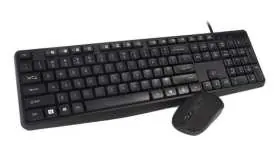
- Remove the battery cover from the keyboard and insert 1 AAA battery. Replace the cover.
- Remove the battery cover from the mouse and insert 1 AA battery. Replace the cover.
- Locate the Nano receiver inside the mouse, remove it, and plug it into an available USB port on your computer.
- The computer will automatically detect and connect to the devices.
Product Overview
This is a wireless office keyboard and 4D mouse combo. The keyboard features a standard Spanish layout with 105 keys. The mouse includes 4 buttons (left, right, scroll, DPI) and adjustable sensitivity.
Hot Keys
The keyboard supports 12 hot keys accessed by holding the FN key and pressing the corresponding function key:
- FN+F1: Music
- FN+F2: Volume -
- FN+F3: Volume +
- FN+F4: Mute
- FN+F5: Previous track
- FN+F6: Next track
- FN+F7: Pause/start
- FN+F8: Stop
- FN+F9: Home page
- FN+F10: Email
- FN+F11: My computer
- FN+F12: Favorite
Technical Specifications
Keyboard
- Dimensions: 495±1(L) x 145±2(W) x 40±2(H) mm
- Net weight: 458g
- Layout: Standard Spanish
- Voltage: 5V 10mA
Mouse
- Dimensions: 70 x 45 x 11.5 mm
- Net weight: 63g
- DPI: 800/1200/1600 (adjustable)
- Voltage: 5V 22mA
Compatibility and Environment
The device is compatible with Windows 98, NT, ME, 2000, XP, Vista, 7, 8, and 10.
Operating Conditions:
- Operating Temperature: 0°C to 40°C
- Storage Temperature: -20°C to +60°C
- Storage Humidity: 90% RH or less
Practical help
Common problems
Device not connecting to computer
Ensure batteries are installed correctly in both the keyboard and mouse. Verify the Nano receiver is securely plugged into a working USB port.
Before use
- Insert 1x AAA battery into the keyboard.
- Insert 1x AA battery into the mouse.
- Remove the Nano receiver from the mouse compartment.
- Plug the Nano receiver into the computer's USB port.
Images and diagrams
- The Nano receiver is stored inside the mouse battery compartment.
Model compatibility
- Compatible with Windows 98, NT, ME, 2000, XP, Vista, 7, 8, and 10.

Manual page author
Emily Carter
User documentation editor
Prepares concise manual descriptions and highlights the most useful setup, operation, and maintenance information for readers.