Tools / Nailing Tools
User Manual for Ridgid 18V/175W Power Inverter R86097
Quick guide for the Ridgid 18V/175W Power Inverter (R86097). Learn how to install battery packs, operate AC and USB ports, use the worklight, and troubleshoot LED error indicators.
Quick answers from the manual
Quick answer
- The Ridgid R86097 is a portable power inverter that converts 18V battery power into 120V AC and USB power for small electronics. It features a 175W AC output, USB-A and USB-C charging ports, and an integrated worklight. p. 1
Key actions
- Install battery pack by sliding it onto the inverter until latches snap. p. 1
- Turn on the inverter by pressing the power button (LED turns white). p. 1
- Use the worklight by pressing the light button (inverter must be ON). p. 1
First start
- Connect a charged 18V battery, press the power button, and plug in your device. p. 1
Problems and fixes
Blinking red LED
Overload. Disconnect device, check battery, and restart.
p. 1
Solid red LED
Overheat. Allow unit to cool.
p. 1Maintenance and reset
- Wait for the internal cooling fan to stop before disconnecting the battery. p. 1
Technical specifications
| Parameter | Value | Meaning | Pages |
|---|---|---|---|
| Input Voltage | 18V DC | Required battery input. | p. 1 |
| AC Output | 175W max | Maximum power for AC devices. | p. 1 |
| USB-A Output | 12W max | Charging power for USB-A devices. | p. 1 |
| USB-C Output | 45W max | Charging power for USB-C devices. | p. 1 |
Where to find it in the PDF
- Safety and Specifications p. 1
- Operation and Troubleshooting p. 1
Table of contents
Manual images
Click an image to enlargeQuick guide from the manual
The Ridgid 18V/175W Power Inverter (R86097) is designed to convert 18V battery power into 120V AC and USB power for small electronics. Important: This device uses a modified sine wave, which is not suitable for all sensitive electronics, medical equipment, or large appliances like air conditioners and compressors. Always check the power requirements of your device before connecting.
Product Overview
The inverter features an AC receptacle, USB-A and USB-C ports, and an integrated worklight. It is powered by Ridgid 18V battery packs.
Installation
Installing the Battery Pack:
- Slide the power inverter onto the battery pack.
- Ensure the latches on the battery pack snap securely into place before operation.
Removing the Battery Pack:
- Depress the latches on the battery pack to release the inverter.
Operation
Using the Inverter:
- Connect the inverter to a charged battery pack.
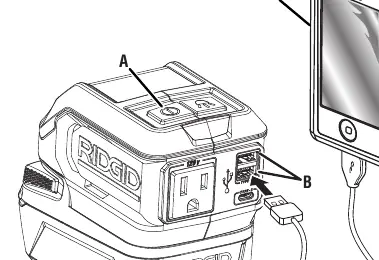
- Press the power button to turn the unit ON. The LED will light up white when ready.
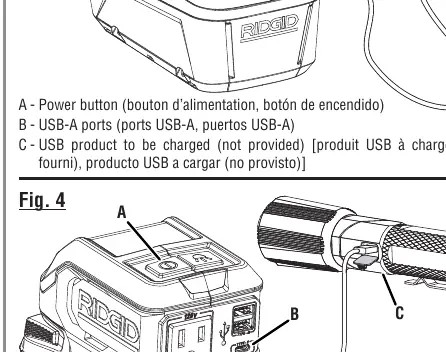
- Plug your device into the appropriate port (AC receptacle, USB-A, or USB-C).
- When finished, disconnect your device and press the power button again to turn the unit OFF.
Using the Worklight:
- The inverter must be turned ON for the worklight to function.
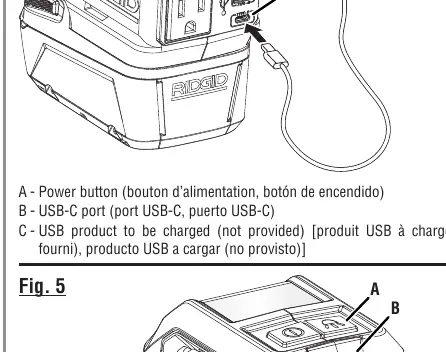
- Press the light button to turn the worklight ON or OFF.
Troubleshooting
The power button LED provides status indicators:
- Blinking Red: The unit is overloaded. Disconnect your device, ensure the battery is sufficiently charged, and press the power button to restart. If the issue persists, the device being powered exceeds the inverter's capacity.
- Solid Red: The unit is overheated. Allow the unit to cool down before attempting to use it again.
Safety and Maintenance
- Indoor Use Only: Do not expose the inverter to rain or wet conditions.
- Air Vents: Never block the air vents, as this can cause overheating and automatic shutdown.
- Cooling Fan: An internal fan may run to regulate temperature. Wait for the fan to stop before disconnecting the battery pack.
- Prohibited Uses: Do not use near flammable fumes, gases, or for life support/medical equipment.
Manufacturer information
RIDGID
Practical help
Common problems
Blinking red LED on power button
The unit is overloaded. Disconnect the device, check battery charge, and restart. If it happens again, the device exceeds the inverter's capacity.
Solid red LED on power button
The unit is overheated. Allow it to cool down before using again.
Worklight does not turn on
Ensure the main power button is turned ON first.
Before use
- Ensure the battery pack is fully charged.
- Verify the device being powered is compatible (not a large appliance or power tool).
- Check that air vents are clear of obstructions.
- Ensure the inverter is not being used for life support or medical equipment.
Specs in practice
- Modified Sine Wave
- Output waveform that may reduce performance or be incompatible with some sensitive electronics.
Images and diagrams
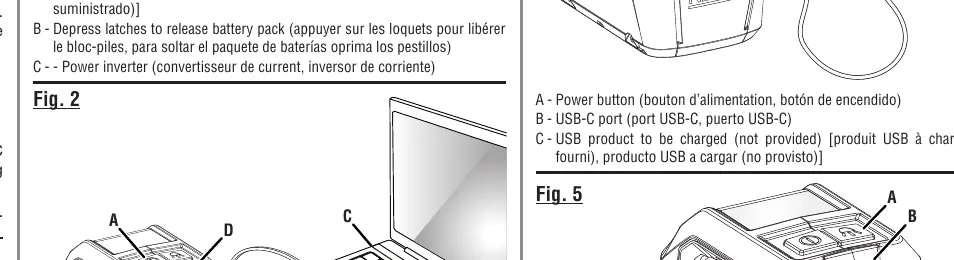
- Fig 1: Shows how to slide the inverter onto the battery pack and release it using the latches.
- Fig 2: Identifies the power button and AC receptacle.
- Fig 3: Identifies the USB-A ports.
- Fig 4: Identifies the USB-C port.
- Fig 5: Identifies the worklight and light button.
Model compatibility
- Not compatible with air conditioners, compressors, sump pumps, or power tools.
- Do not use with life support or medical equipment.

Manual page author
Emily Carter
User documentation editor
Prepares concise manual descriptions and highlights the most useful setup, operation, and maintenance information for readers.