Power / Batteries Chargers
User Manual for RIDGID 18V 30° Framing Nailer R09895
Quick guide for the RIDGID 18V 30° Framing Nailer (R09895). Includes setup, operation modes, jam clearing, maintenance, and safety instructions.
Table of contents
Manual images
Jump to the sectionQuick Start Guide
The RIDGID 18V 30° Framing Nailer is designed for heavy-duty fastening tasks. Before using the tool, ensure you have read all safety warnings. Always wear eye protection with side shields and hearing protection. Use only recommended nails (0.113 in. to 0.131 in. shank diameter) and a 3Ah or higher battery for optimal performance.
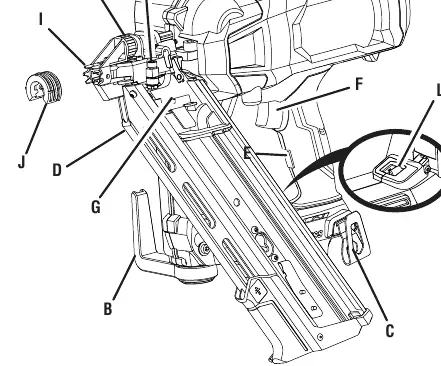
Operating Modes
The tool features two actuation modes, selectable via the mode selector switch:
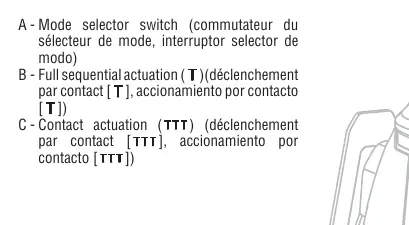
- Full Sequential Actuation: Provides the most accurate fastener placement. Requires the workpiece contact to be depressed before the trigger is squeezed.
- Contact Actuation: Allows for fast, repetitive fastener placement. The trigger can be held down while the workpiece contact is pressed against the surface to drive nails.
Adjustments
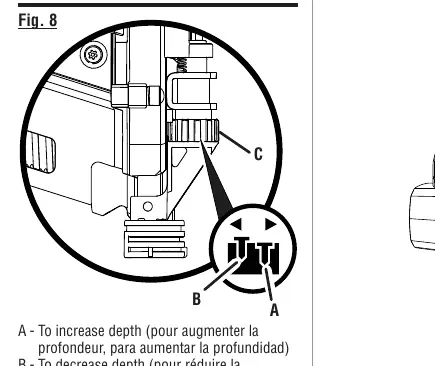
Depth-of-Drive Adjustment: Use the tool-free depth selector to adjust the driving depth of the fastener. Test on a scrap piece of wood to achieve the desired depth.
Air Pressure Tank: If performance decreases, the air pressure tank can be refilled to a maximum of 125 psi using an air compressor. Always replace the plastic cover after refilling.
Maintenance
Perform the following daily checklist to ensure safe operation:
- Remove the battery and all fasteners.
- Check all screws, nuts, bolts, and pins for tightness.
- Ensure the workpiece contact and trigger move smoothly without binding.
- Inspect the tool for any damage.
Clearing a Jammed Fastener
If a jam occurs, the tool will enter jam mode and the LED will flash red. Follow these steps:
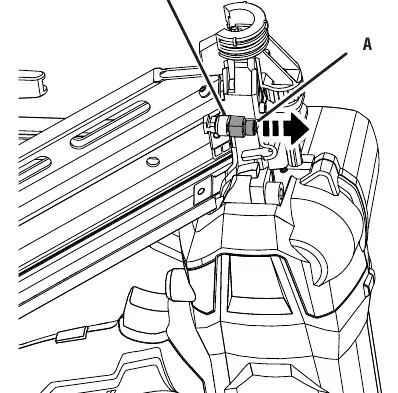
- Remove the battery pack and all fasteners.
- Loosen the front and rear magazine mounting screws using the included hex key.
- Slide the magazine toward the rear to expose the jammed fastener.
- Remove the bent nail using needle-nose pliers.
- Reverse the steps to reassemble the magazine.
Troubleshooting
If the tool operates sluggishly, verify the air pressure supply or allow the tool to reach proper operating temperature. If the tool jams frequently, verify the fastener size, replace damaged fasteners, or clean the magazine. For persistent issues, contact an authorized service center at 1-866-539-1710 or visit powertools.ridgid.com.
Official resources from the manual
Manufacturer information
RIDGID
Practical help
Common problems
Tool does nothing or operates sluggishly
Verify adequate air supply, check for worn O-ring seals, or allow the tool to warm up/cool down to proper operating temperature.
Tool jams frequently
Verify fasteners are the correct size, replace damaged fasteners, tighten magazine screws, or clean the magazine.
Before use
- Wear eye protection with side shields.
- Check all screws, nuts, bolts, and pins for tightness.
- Ensure the workpiece contact moves smoothly.
- Verify the trigger moves without binding.
- Check battery charge level (3Ah or higher recommended).
Specs in practice
- Magazine Capacity
- 60-70 nails
- Fastener Range
- 2 in. – 3-1/2 in.
Images and diagrams
- Figure 1: Overview of tool components including depth adjustment, rafter hook, and mode selector.
- Figure 6: Mode selector switch positions for Full Sequential and Contact Actuation.
- Figure 11-13: Procedure for clearing a jammed fastener.
Model compatibility
- Use only recommended nails (0.113 in. to 0.131 in. shank diameter).
- Do not use hardened nails.
- Use 3Ah or higher battery for best performance.

Manual page author
Michael Turner
Technical manual editor
Reviews PDF manuals for structure, safety notes, and practical product details so readers can find the right information quickly.