Home / Electrical Timers
Rogue 049X Home Timer User Guide
Quick start guide for the Rogue 049X Home Timer. Learn how to operate the remote, set training modes, adjust brightness, and manage battery and Bluetooth connectivity.
Table of contents
Manual images
Click an image to enlargeQuick guide from the manual
The Rogue 049X Home Timer is a versatile training tool designed for various workout routines. This guide covers the operation of the device, including power management, remote control functions, and specific training modes.
Timer Introduction and Power
The power button is located on the top of the timer housing.
- Power On: Short press the button. The screen will display time in 12H format by default.
- Sleep Mode: While charging, hold the button for 3 seconds.
- Start/Pause: When in sleep mode, short press the button to start counting from 0. Short press again to pause or resume.
- Power Off: Hold the button for 3 seconds (when not charging). The screen will display OFF.
Display Indicators
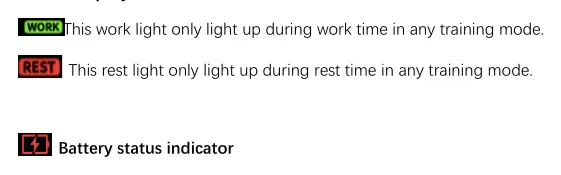
- Work Light: Illuminates during work time in any training mode.
- Rest Light: Illuminates during rest time in any training mode.
- Battery Status: Flashes every second when below 25%. Stays on while charging and turns off when fully charged.
- Bluetooth Status: Flashes when the device is turned on (waiting for pairing). Stays on when pairing is successful. If pairing fails, it turns off after 5 minutes but remains discoverable.
Remote Control Operation
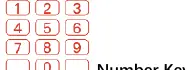
The timer features 20 pre-programmed modes accessible via the number keys (1-20). Press the desired number key followed by the START/STOP button to begin.
Training Modes
- Interval Timer: Allows customization of rounds, work time, and rest time.
- Tabata Timer: 4-minute sessions with 20-second intense training and 10-second rest.
- EMOM Mode: 1 minute work / 0 seconds rest, repeated 99 times.
- Fight Gone Bad (FGB): Three 5-minute rounds with 1-minute clock stoppage between rounds.
- Count-Up/Count-Down: Customizable timers for specific durations.
- Stopwatch: Standard stopwatch functionality.
Settings and Adjustments
- Brightness: Adjustable across 5 levels.
- Volume: Adjustable across 5 levels using the volume control buttons.
- Clock: Supports 12/24 hour format. Use the SET button to adjust the current time.
- 10s Prep: Adds a 10-second preparation countdown before every use.
Regulatory Information
This device complies with Part 15 of the FCC Rules and Industry Canada licence-exempt RSS standards. It is designed to operate in an uncontrolled environment with a minimum distance of 20 cm between the radiator and the body.
Practical help
Common problems
Bluetooth not pairing
The indicator flashes when the device is turned on. If pairing is not successful, the light turns off after 5 minutes, but the device remains available for pairing.
Battery low
The battery indicator light will flash every second when the level is below 25%.
Timer paused unexpectedly
Short press the button to pause or stop the timer mode; short press again to resume.
Before use
- Charge the device until the battery light turns off.
- Ensure the power button is accessible on top of the housing.
- Familiarize yourself with the 20 pre-programmed modes on the remote.
- Check the Bluetooth indicator status if wireless connectivity is required.
Specs in practice
- 12H/24H Format
- Toggle between standard 12-hour time and 24-hour military time.
Images and diagrams
- The remote control layout includes number keys 1-20 for quick access to pre-programmed workouts.
- Work and Rest lights provide visual feedback on the current training phase.
Model compatibility
- Complies with FCC Part 15 Class B digital device limits.
- Complies with CAN ICES-003 (B)/NMB-003(B).

Manual page author
Emily Carter
User documentation editor
Prepares concise manual descriptions and highlights the most useful setup, operation, and maintenance information for readers.