Home Appliances / Small Kitchen Appliances
User Manual for Russell Hobbs 10L Dehumidifier RHDH1001
Quick guide for the Russell Hobbs 10L Dehumidifier (RHDH1001). Learn how to set up, operate, empty the water tank, clean the filter, and troubleshoot common issues.
Table of contents
Manual images
Click an image to enlargeQuick guide from the manual
The Russell Hobbs 10L Dehumidifier is designed for indoor residential use. For the first use, it is recommended to run the unit in continuous mode for 24 hours. The unit features automatic shut-off when the tank is full, frost protection, and an auto-restart function in case of power cuts. Always store the unit in an upright position.
Safety Instructions
This appliance uses R290 (Propane) refrigerant, which is combustible; handle with care. Do not obstruct ventilation openings, cover the control panel, or place the unit on its power cord. Do not use extension leads or operate with wet hands. Ensure the unit is used in an earthed socket. Do not use near fire, oil, water splashes, or in greenhouses.
Feature Diagram
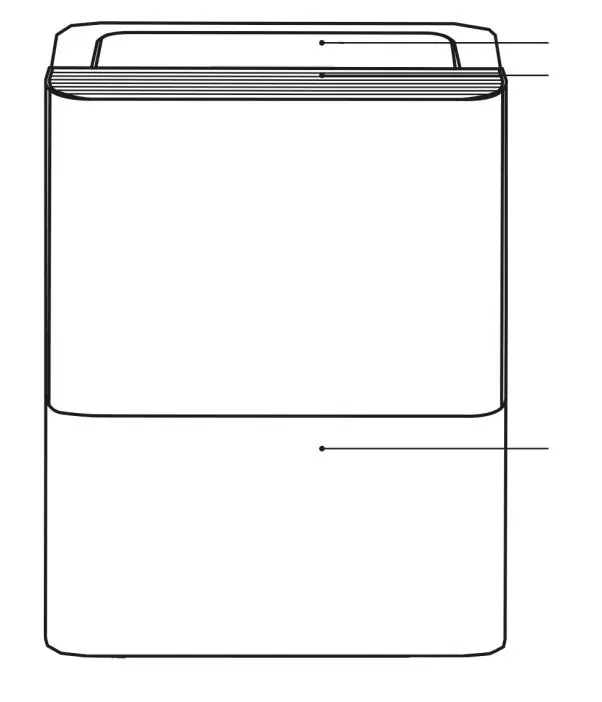
The front of the unit features the control panel, air outlet grille, and water tank. The rear includes the handle, air intake grille, air filter, drain hose outlet, and power cord storage.
Control Panel
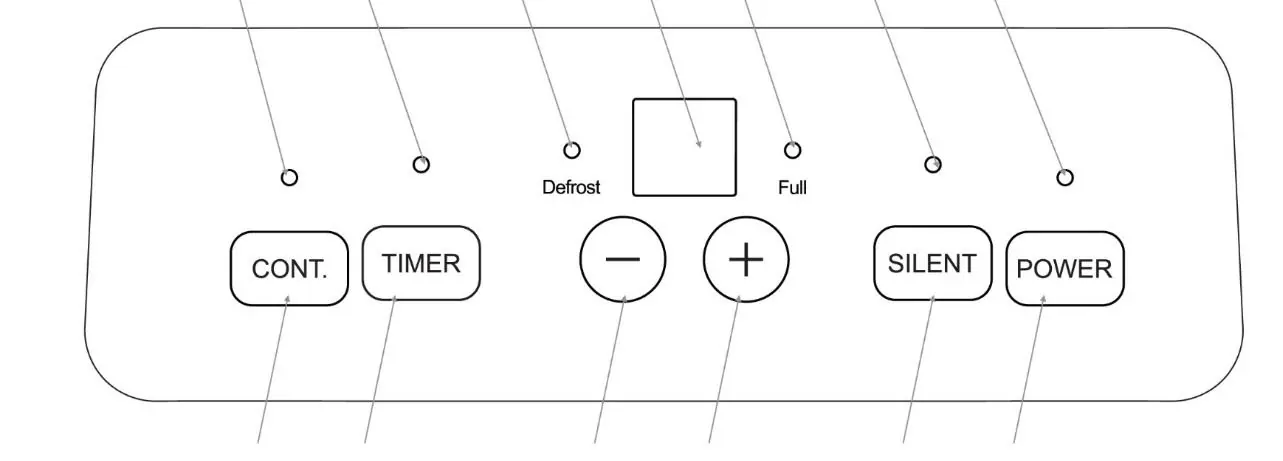
The control panel allows you to select modes and settings. Key indicators include Continuous mode, Timer, Defrost, Water tank full, Silent mode, and Power. Buttons include Continuous mode, Timer, Up/Down controls, Silent mode, and Power.
Positioning your Dehumidifier
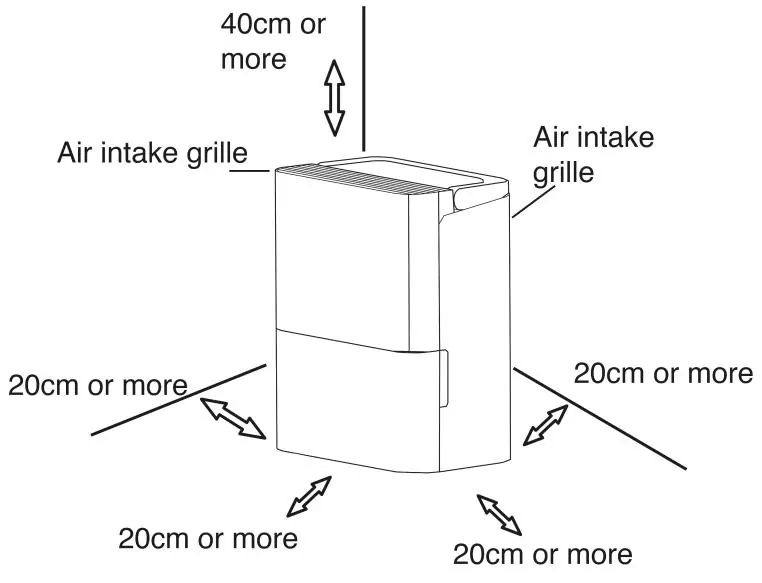
Place the unit on a smooth, level floor. Allow at least 20cm of air space on all sides and 40cm above the unit for proper circulation. Do not operate in temperatures below 5°C. Keep away from clothes dryers, heaters, or radiators. Close all doors and windows for maximum effectiveness.
Using your Dehumidifier
Turning the Unit On: Plug the unit in and press the Power button. The display will show the current room humidity level.
Continuous Mode: Press the Continuous button for maximum extraction. Humidity cannot be set in this mode.
Setting the Humidity: Ensure the unit is not in continuous mode. Use the Up and Down buttons to set the desired humidity between 35% and 85% in 5% increments.
Silent Mode: Press the Silent button to reduce noise; the fan speed and extraction rate will be lower.
Setting the Timer
Delayed Start: With the unit OFF, press the Timer button until the indicator illuminates. Use Up/Down buttons to set the start time (0.5-hour increments up to 10 hours, then 1-hour increments up to 24 hours).
Auto Stop: With the unit ON, press the Timer button until the Timer Off indicator illuminates. Use Up/Down buttons to set the stop time.
Emptying your Dehumidifier
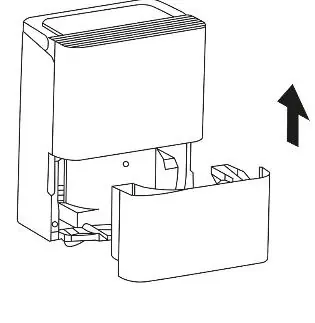
When the tank is full, the unit stops automatically. Pull the tank out carefully, empty the water, and replace it securely. Alternatively, for continuous draining, remove the rubber bung from the drain hose outlet on the back and attach a 13.5mm inner diameter hose, ensuring it slopes downward to a suitable drain.
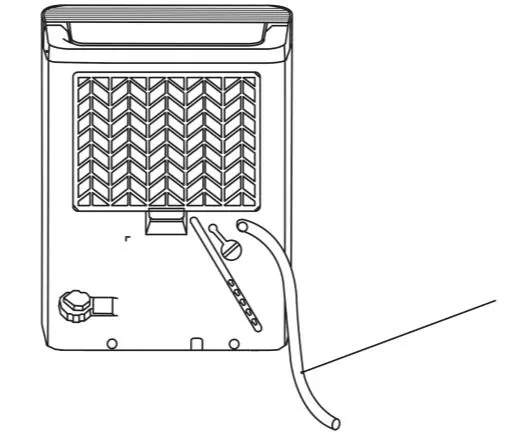
Cleaning and Care
Turn off and unplug the unit before cleaning. Clean the air filter at least every 30 days by pulling it out, washing with warm soapy water, and letting it dry. Do not use a dishwasher. Clean the grille and case with a damp cloth and mild detergent. Clean the water tank every few weeks to prevent mould.
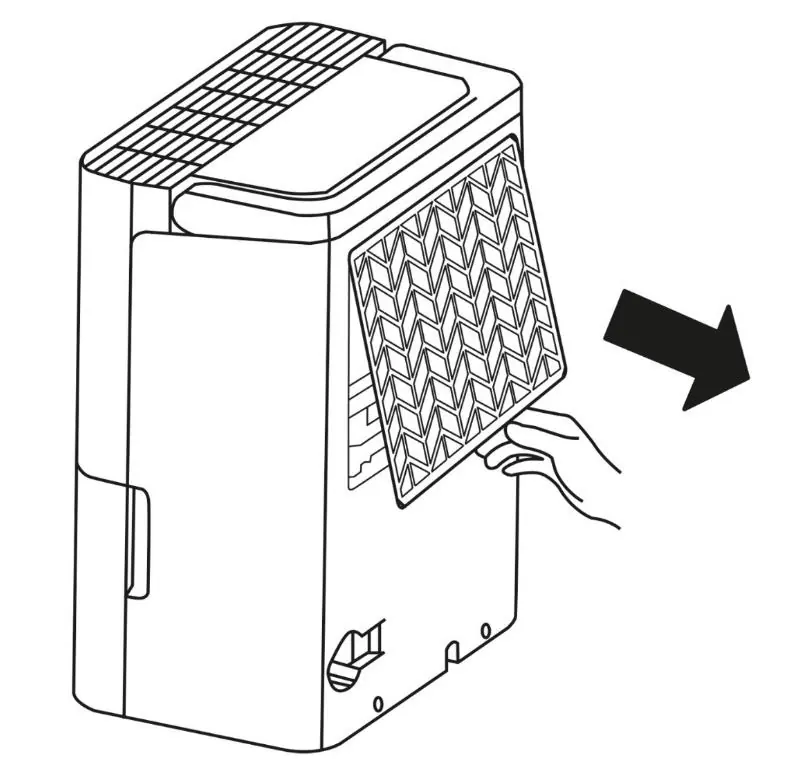
Troubleshooting
If the unit does not start, check the plug, fuse, tank position, or if the 3-minute restart delay is active. If the unit does not dry the air, check for blocked airflow or open windows. Error codes: P2 indicates the tank is full or misaligned; AS/ES indicate sensor errors; EC indicates refrigerant leakage (contact customer service).
Specifications
The unit operates on 220-240V, 50Hz, with a power input of 340W. It removes 10L of moisture per day (at 30°C, 80% RH). The operating temperature range is 5°C to 35°C.
Manufacturer information
Russell Hobbs
Practical help
Common problems
Unit does not start
Check if the plug is fully inserted, check the house fuse, ensure the water tank is correctly positioned, or wait for the 3-minute restart delay to finish.
Dehumidifier does not dry the air
Ensure no curtains or furniture are blocking the grilles, close all doors and windows, and check that the room temperature is above 5°C.
Loud operating noise
Check if the air filter is clogged, ensure the unit is upright, and verify the floor surface is level.
P2 error code
The water tank is full or not in the correct position. Empty the tank and reinsert it.
EC error code
Refrigerant leakage detected. Contact customer service.
Before use
- Place the unit on a smooth, level floor.
- Allow 20cm clearance on all sides and 40cm above.
- Ensure the voltage matches the 220-240V rating.
- Check that the water tank is correctly positioned.
- Run the unit in continuous mode for 24 hours during first use.
Specs in practice
- Moisture Removal
- 10L per day (at 30°C, 80% RH).
- Operating Temperature
- 5°C - 35°C.
Images and diagrams
- Front: Control panel, air outlet grille, water tank.
- Rear: Handle, air intake grille, air filter, drain hose outlet, power cord.
Model compatibility
- For indoor residential use only.
- Do not use in greenhouses or near water sources.

Manual page author
Michael Turner
Technical manual editor
Reviews PDF manuals for structure, safety notes, and practical product details so readers can find the right information quickly.