Tools / Saws
Operator's Manual for Ryobi ONE+ 18V Power Station RYi818BT
Comprehensive operator's manual for the Ryobi ONE+ 18V Power Station (RYi818BT). This guide covers setup, battery installation, operation of AC and USB outlets, Bluetooth connectivity, safety warnings, troubleshooting, and technical...
Quick answers from the manual
Quick answer
- The Ryobi RYi818BT is an 18V power station that converts battery power to 120V AC and USB power. It features Bluetooth monitoring, an LED task light, and parallel kit compatibility. p. 8, 10
Key actions
- Powering on the unit p. 10
- Activating AC outlets p. 10
First start
- Install battery, press and hold main power button for 2 seconds. p. 10
Problems and fixes
Unit will not power on
Charge battery or hold power button longer.
p. 13Maintenance and reset
- Inspect periodically for damage, keep clean, store indoors without batteries. p. 13
Technical specifications
| Parameter | Value | Meaning | Pages |
|---|---|---|---|
| Rated Output | 1,800 W | Continuous power rating | p. 8 |
Where to find it in the PDF
- Operation p. 9, 10, 11, 12
Table of contents
Manual images
Click an image to enlargeQuick Guide
The Ryobi ONE+ 18V Power Station (RYi818BT) is designed to provide portable AC and USB power using Ryobi 18V battery packs. To get started, install at least one charged battery pack, press and hold the main power button for two seconds to turn the unit on, and then activate the desired output (AC or USB).

Safety Information
- Dry Conditions Only: Do not expose the power station or charger to rain, moisture, or damp locations.
- Overload Protection: Do not exceed the product's rated wattage/amperage capacity. The unit will shut off if overloaded.
- Medical Devices: This inverter is not tested for use with life-critical medical devices.
- Ventilation: Never block air vents; doing so may cause overheating and automatic shutdown.
- Battery Safety: Use only with Ryobi 18V battery packs. Do not use damaged or modified batteries.
Operation
Installing and Removing Batteries
The power station has eight battery ports. While it functions with a single battery, using at least four 4Ah or greater batteries is recommended for best performance. Insert the battery pack until the latches snap into place. Depress the latches to remove.
Powering Devices
- Main Power: Press and hold the main power button for two seconds. The LCD will activate.
- AC Outlets: After powering on the unit, press and hold the AC output button to activate the 120V AC outlets.
- USB Ports: USB ports are active when the main power button is on.
- Sleep Mode: The unit enters sleep mode after 30 minutes of inactivity (unless AC output is ON). Press the main power button to wake it.
Bluetooth and App Control
The GENCONTROL app allows monitoring of battery levels, runtime, and load. To pair, press and hold the "Hold to Pair" button on the unit until "Pairing Mode" appears on the LCD, then follow the app instructions.
Maintenance
Periodically inspect the product for damaged, missing, or loose parts. Clean plastic parts with a clean cloth; avoid commercial solvents. Store indoors in a dry, locked location without battery packs, unless actively charging.
Troubleshooting
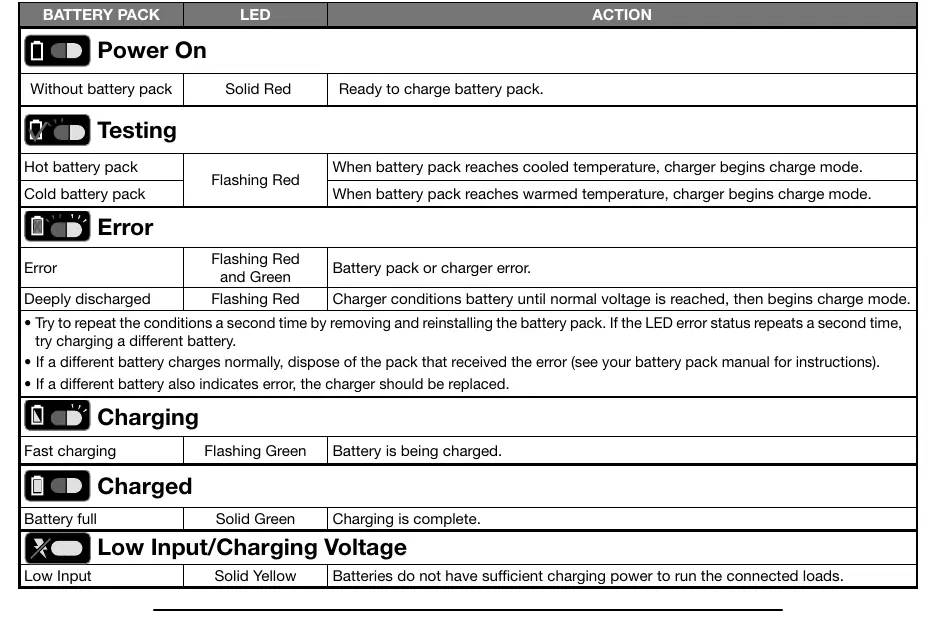
- Unit will not power on: Check if the battery is charged and ensure the power button was held for two seconds.
- AC outlet not working: Ensure AC output is active, check for overload, or try a different device.
- Unexpected shutdown: Check battery temperature or charge level.
- Overload message: Remove loads and press the AC output button to reset.
Manufacturer information
Ryobi
Practical help
Common problems
Unit will not power on
Ensure the battery is charged and that you are pressing and holding the main power button for two full seconds.
AC receptacle does not work
Ensure the AC output is active (button pressed), check if the unit is overloaded, or try a different device.
Unit powers off unexpectedly
Check if the battery temperature is within operating thresholds (-4°F to 120°F) or if the battery is discharged.
Overload message on LCD
Remove all loads from the product and press the AC output button to reset the unit.
Before use
- Ensure battery packs are fully charged.
- Inspect the unit for any damage or loose parts.
- Verify that the environment is dry and well-ventilated.
- Check that the total load of devices does not exceed the power station's capacity.
- Ensure air vents are not blocked.
Specs in practice
- Rated AC Output
- 120V AC, 60Hz, 15A (15A for 3 min max)
- Rated Output
- 1,800 Watts continuous power
- Starting Watts
- 3,000 Watts (surge power for motor-driven tools)
- Operating Temp
- 32°F – 104°F (0°C – 40°C)
Images and diagrams
- Figure 1: Overview of the power station, including the main power button, light button, and AC/USB ports.
- Figure 2: Battery installation and removal procedure.
- Figure 4: Generator condition notifications and LCD status messages.
Model compatibility
- Compatible with RYOBI 18V battery packs.
- Not compatible with life-critical medical devices.
- Not suitable for hard-wiring into a circuit.

Manual page author
David Miller
Documentation analyst
Organizes user manual content into clear summaries, with attention to model details, product context, and everyday usability.