Plumbing / Toilets Urinals
User Manual for Sanela SLP 03KB Automatic Urinal Flushing Unit
Quick guide for the Sanela SLP 03KB automatic urinal flushing unit. Includes installation steps, parameter settings, Eco modes, and battery maintenance instructions.
Table of contents
Manual images
Click an image to enlargeQuick guide from the manual
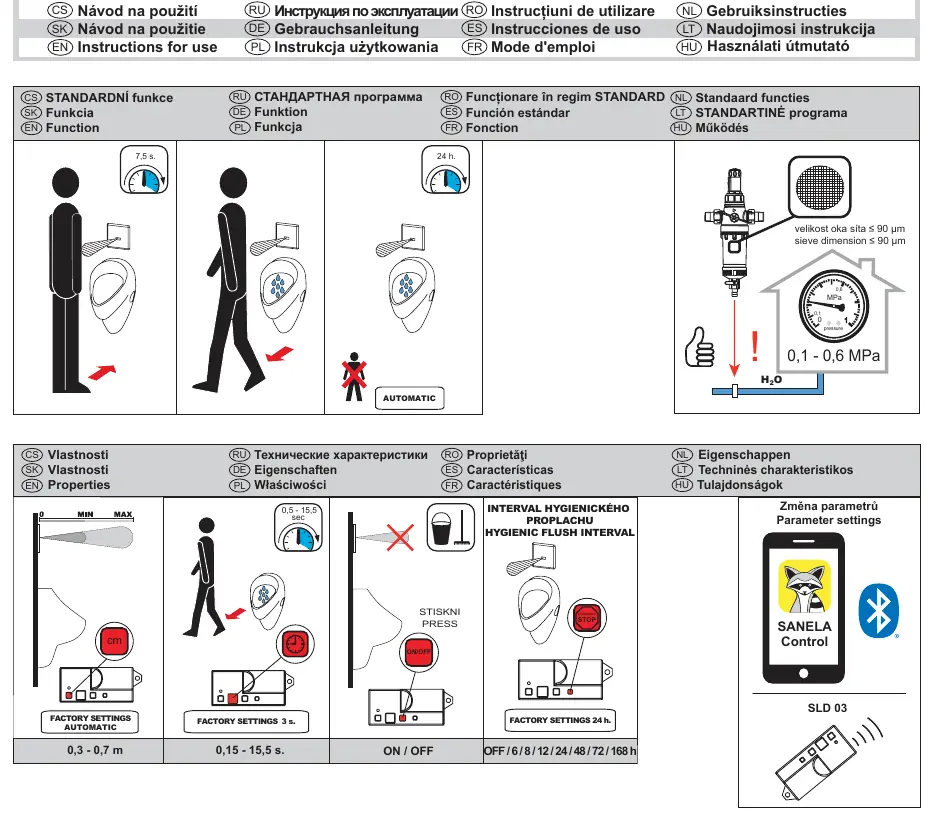
The Sanela SLP 03KB is an automatic urinal flushing unit designed for efficient water management. This guide covers installation, parameter configuration, and maintenance. Ensure the water pressure is between 0.1 and 0.6 MPa and the sieve dimension is no larger than 90 µm for proper operation.
Installation
The installation process involves mounting the frame and connecting the flushing unit. Follow these steps:
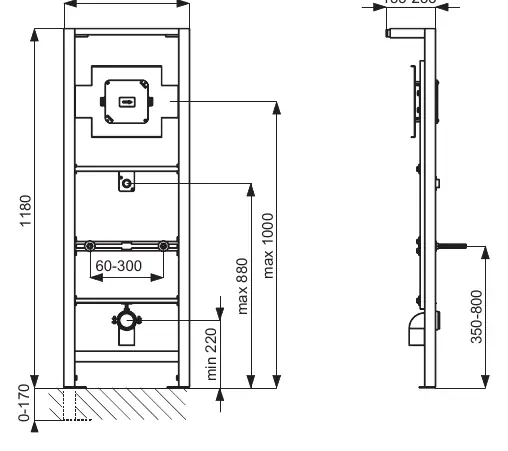
- Preparation: Ensure the wall is prepared according to the dimensions provided (410mm width, 1180mm height).
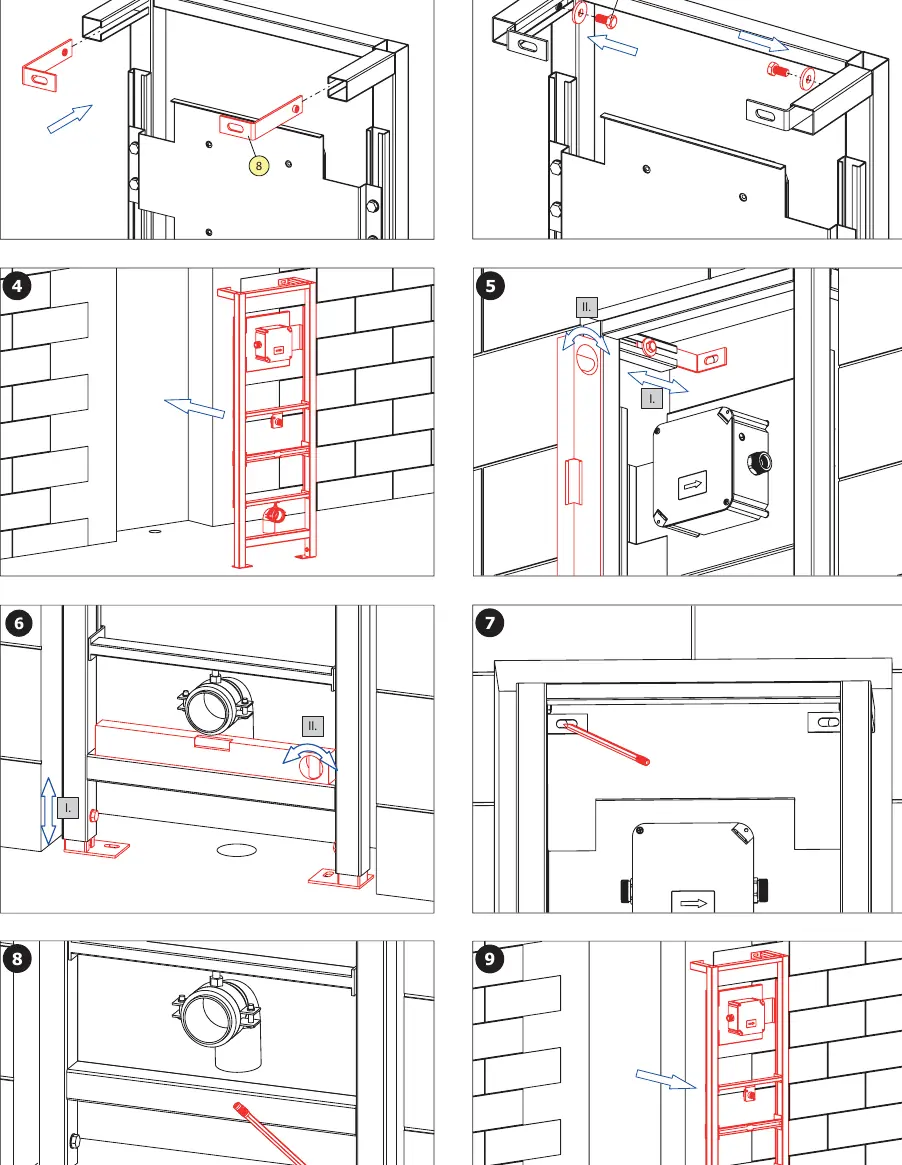
- Frame Mounting: Secure the frame to the wall using the provided screws and anchors. Use a spirit level to ensure the frame is perfectly vertical and horizontal.
- Plumbing: Connect the water supply (G 3/4") to the flushing unit. Ensure all seals are correctly placed.
- Final Assembly: Install the flushing unit into the frame, connect the power supply (batteries), and attach the cover plate.
Parameter Settings
Parameters can be adjusted using the Sanela Control application or the SLD 03 remote control. Key adjustable settings include:
- Sensor Range: 0.3 - 0.7 meters.
- Flush Duration: 0.5 - 15.5 seconds.
- Hygienic Flush Interval: OFF / 6 / 8 / 12 / 24 / 48 / 72 / 168 hours.
Eco Modes
The system supports two Eco modes to optimize water usage:
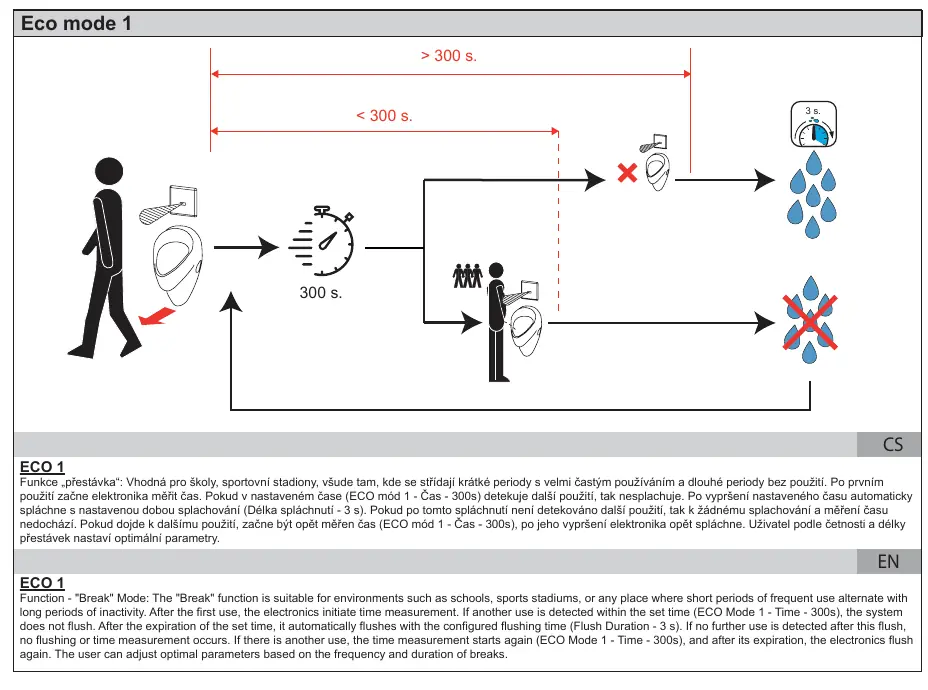
- Eco 1 (Break Mode): Suitable for schools or stadiums. If the system detects frequent use within a set time (300s), it does not flush. It flushes only after the set time expires or after the first use.
- Eco 2 (Office Mode): Suitable for irregular intervals. It alternates between "small" flushes (1s) to rinse the urinal and "large" flushes (3s) to clean the siphon.
Battery Maintenance
The unit is powered by 4x AA alkaline batteries. The system provides LED feedback on battery status:
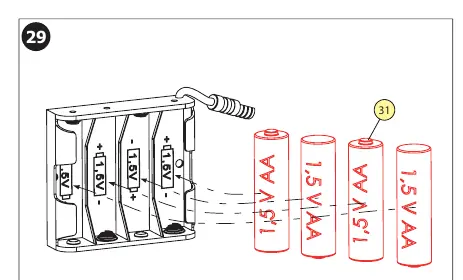
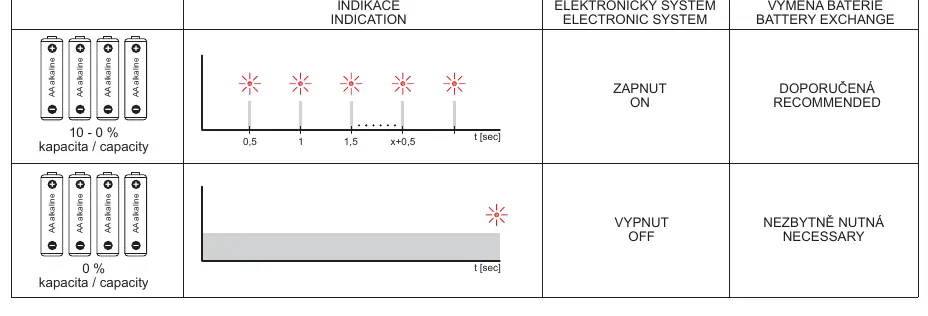
- Normal Operation: LED indicates system is ON.
- Low Battery: When the LED indicates low capacity, replace the batteries immediately to ensure continued operation.
Manufacturer information
SANELA spol. s r. o.
Practical help
Common problems
System does not flush
Check battery status. If the LED indicates low capacity, replace the 4x AA batteries.
Sensor not detecting user
Verify the sensor range setting. Ensure the sensor area is clean and unobstructed.
Water flow issues
Check that the water pressure is within 0.1 - 0.6 MPa and the sieve is clean (max 90 µm).
Before use
- Ensure water pressure is between 0.1 and 0.6 MPa.
- Verify the sieve dimension is ≤ 90 µm.
- Install 4x AA alkaline batteries.
- Ensure all plumbing connections are tight and leak-free.
- Verify the frame is level before final wall closure.
Specs in practice
- Flush Duration
- Adjustable from 0.5 to 15.5 seconds.
- Sensor Range
- Adjustable from 0.3 to 0.7 meters.
- Hygienic Flush
- Automatic flush interval to prevent odors; adjustable from 6 to 168 hours.
Images and diagrams
- Page 1: Overview of parameter settings and factory defaults.
- Page 2-3: Logic flow for Eco 1 (Break) and Eco 2 (Office) modes.
- Page 5: Dimensional drawing for installation.
- Page 6-9: Step-by-step installation sequence.
- Page 11: Battery status LED indicators.
Model compatibility
- Compatible with Sanela Control app for configuration.
- Requires 4x AA alkaline batteries (1.5V, 2700 mAh recommended).
- Requires SLD 03 remote control for manual parameter adjustment.

Manual page author
Emily Carter
User documentation editor
Prepares concise manual descriptions and highlights the most useful setup, operation, and maintenance information for readers.