Plumbing / Toilets Urinals
User Manual for Sanela SLP 05KX Infra-red Flushing Unit
Complete installation and configuration guide for the Sanela SLP 05KX infra-red flushing unit. Includes wiring diagrams, mounting steps, parameter settings, and maintenance instructions.
Table of contents
Manual images
Jump to the sectionQuick guide from the manual
The Sanela SLP 05KX is an infra-red flushing unit designed for a group of urinals. For proper operation, the unit must be kept under constant 24V DC voltage. Do not connect the power supply behind a light switch. Ensure the water pressure is maintained between 0.1 and 0.6 MPa and that the sieve dimension is ≤ 90 µm to prevent clogging.
Product description
The SLP 05KX is a brushed, 24V DC infra-red flushing unit. It features an electronic control system (ALS) and is designed for group urinal flushing. The system requires a constant power supply and specific water pressure conditions to function correctly.
Supplied equipment
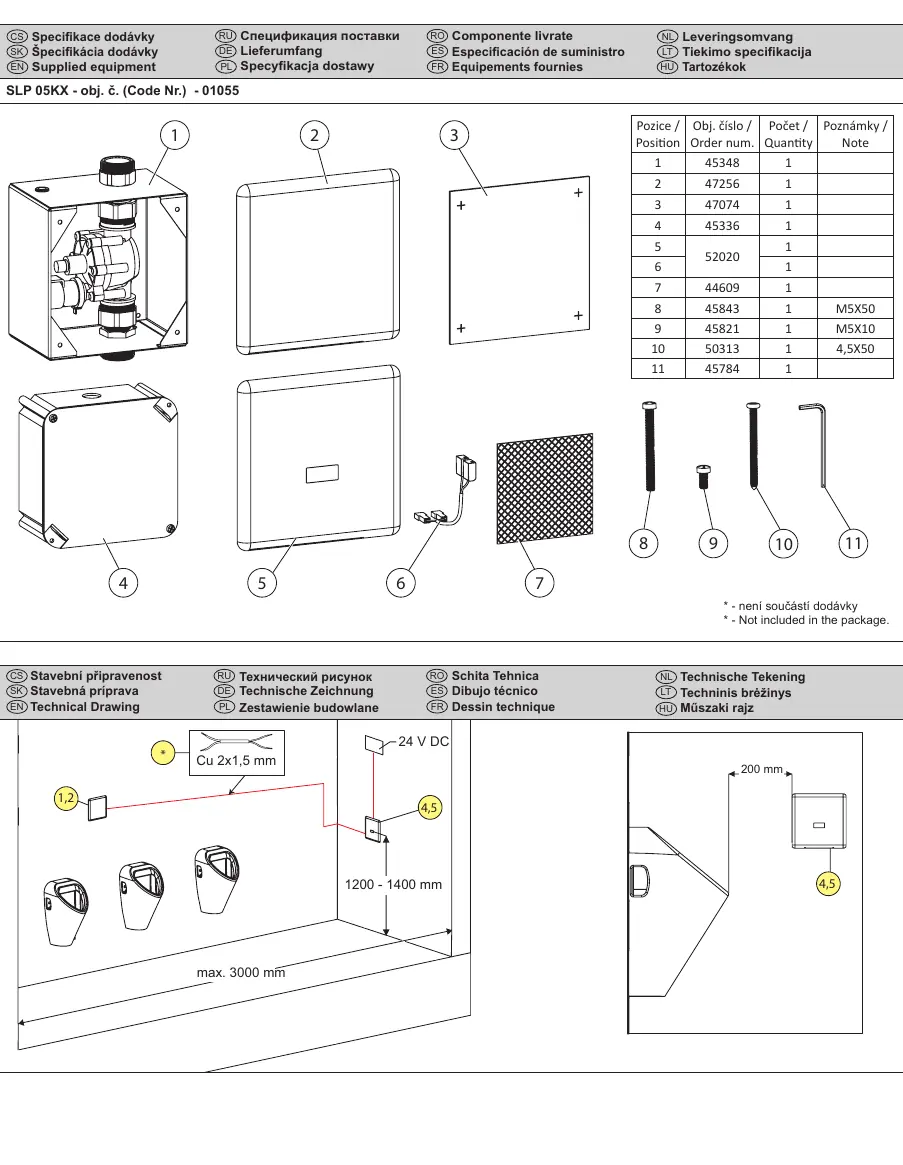
The package includes the following components:
- Mounting box (item 1)
- Solenoid valve cover (item 2)
- Cover with electronics (item 5)
- Electronic unit (item 4)
- Various mounting hardware (screws, keys, connectors)
Installation
Installation must be performed by qualified personnel. Before starting, ensure you have read the safety instructions. The installation process involves:
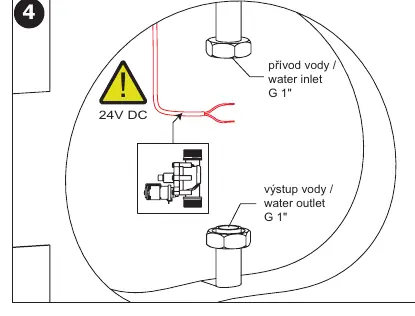
- Preparing the wall and water supply lines (G 1" inlet/outlet).
- Installing the mounting box into the wall.
- Connecting the solenoid valve and electronic unit within the mounting box.
- Ensuring the water supply is connected correctly to the solenoid valve.
- Sealing the installation with the provided covers.
Wiring and connection
The unit requires a 24V DC power supply. It is critical that the unit remains under constant voltage. Do not connect the power supply unit to a circuit controlled by a light switch, as this will disrupt the flushing cycle. Use the provided connectors to link the electronic unit and solenoid valve.
Settings and calibration
The unit allows for water flow adjustment and sensor calibration:
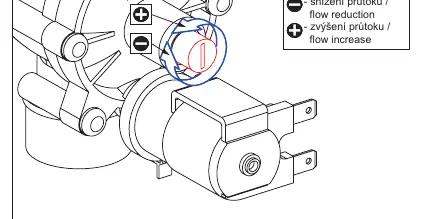
- Water flow: Adjust the flow using the screw on the solenoid valve (clockwise to reduce, counter-clockwise to increase).
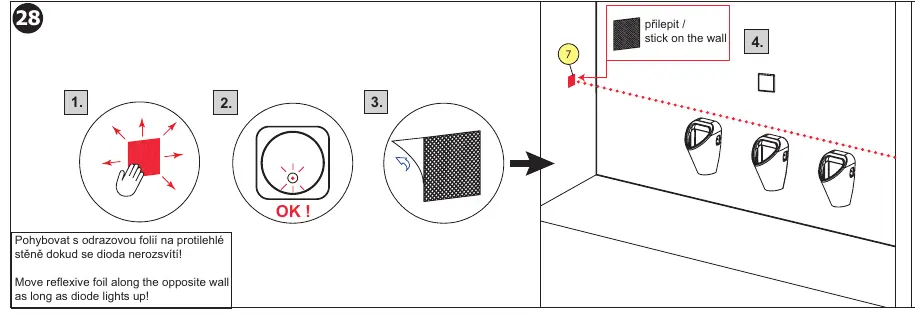
- Sensor calibration: Use the reflexive foil to calibrate the sensor. Move the foil along the opposite wall until the diode lights up, then stick it in place.
- Advanced settings: Parameters can be adjusted using the SLD 03 remote control or the Sanela Control application.
Maintenance
Regular maintenance is recommended to ensure long-term reliability. Check the water supply sieve periodically for debris. If the unit fails to flush, verify the power supply is active and the sensor is not obstructed. For further technical support or service, contact the installation company or visit www.sanela.eu/service.
Official resources from the manual
Manufacturer information
SANELA spol. s r. o.
Practical help
Common problems
Unit does not flush
Verify that the power supply is active and providing a constant 24V DC. Ensure it is not connected to a light switch circuit.
Water flow is too weak or too strong
Adjust the flow setting screw on the solenoid valve. Turn clockwise to reduce flow or counter-clockwise to increase it.
Sensor does not detect presence
Recalibrate the sensor using the reflexive foil. Move the foil along the opposite wall until the diode lights up, then secure it.
Before use
- Ensure water pressure is between 0.1 and 0.6 MPa.
- Verify the sieve dimension is ≤ 90 µm.
- Confirm 24V DC power supply is constant and not switched.
- Check that all components from the supplied equipment list are present.
- Ensure the installation wall is prepared according to technical drawings.
Images and diagrams
- The wiring diagram illustrates the connection of the solenoid valve and electronic unit to the 24V DC power source.
- Installation steps show the mounting of the box into the wall and the connection of water lines.
Model compatibility
- Requires Sanela Control app for advanced configuration.
- Compatible with various Sanela power supplies (SLZ series).

Manual page author
Michael Turner
Technical manual editor
Reviews PDF manuals for structure, safety notes, and practical product details so readers can find the right information quickly.