Plumbing / Toilets Urinals
User Manual for Sanela SLP 19B Urinal with Radar Flushing Unit
Comprehensive user guide for the Sanela SLP 19B Urinal with radar flushing unit. Includes installation steps, parameter settings, Eco mode configurations, and maintenance instructions.
Table of contents
Manual images
Jump to the sectionImportant Information
The Sanela SLP 19B is a urinal equipped with a 6V radar flushing unit. It is designed for efficient water usage with adjustable parameters. Before installation, ensure you have read the safety instructions. The system requires a water pressure between 0.1 and 0.6 MPa and a sieve dimension of ≤ 90 µm.
Installation
The installation process involves mounting the urinal, connecting the water supply, and setting up the electronics.
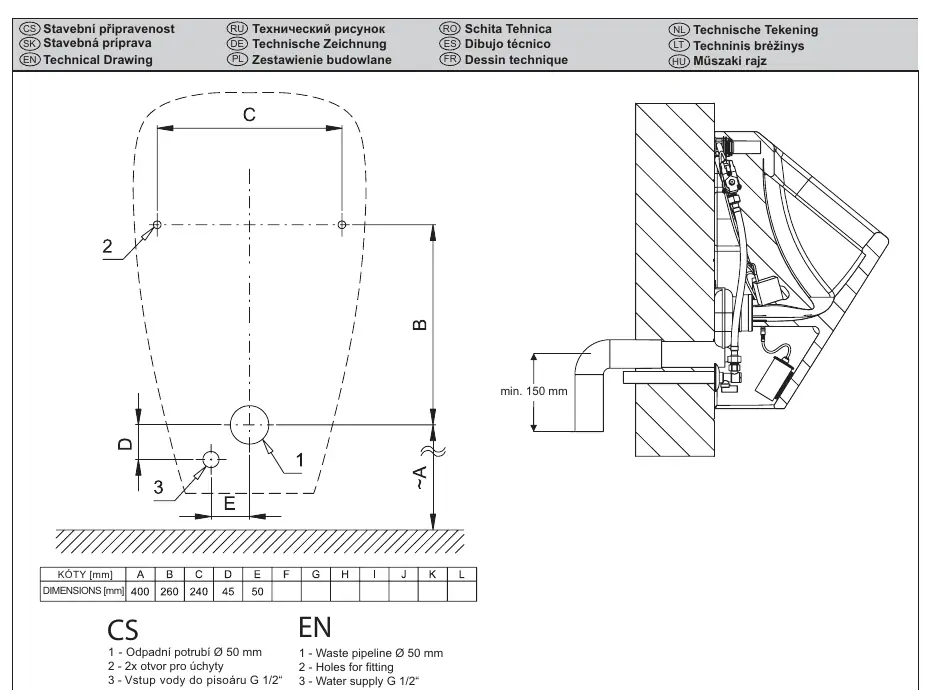
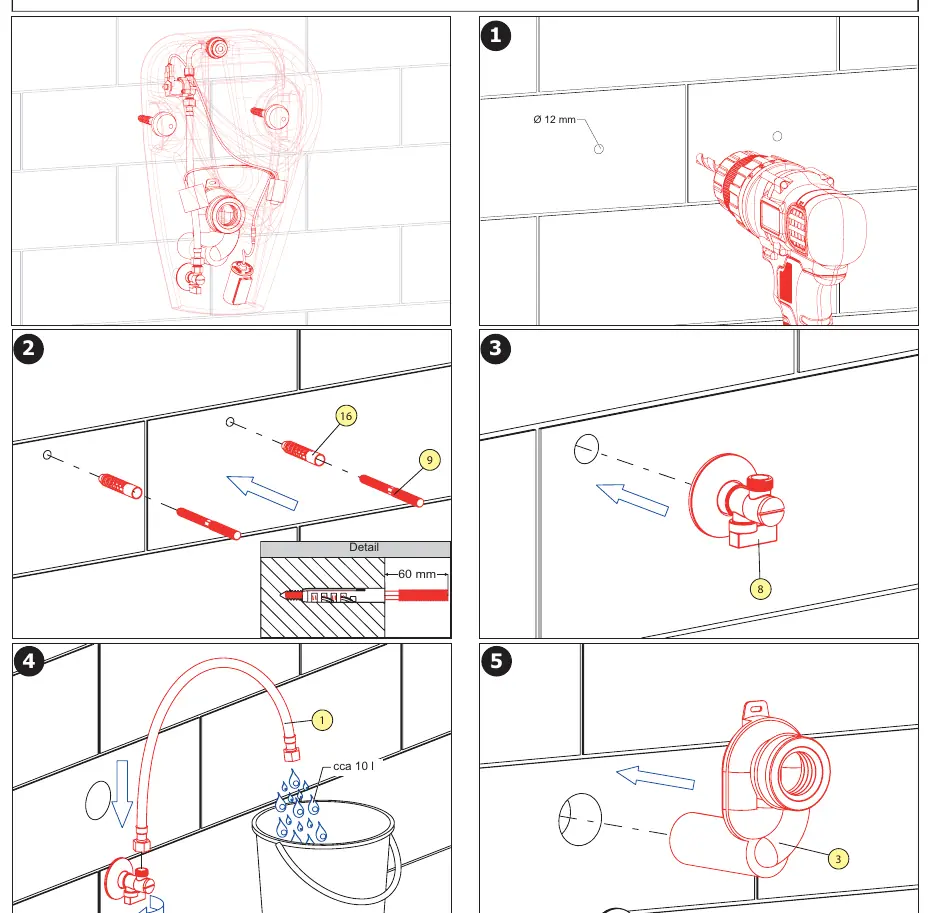
- Mounting: Follow the technical drawing on page 3 for precise dimensions. Ensure the waste pipeline is Ø 50 mm and the water supply is G 1/2".
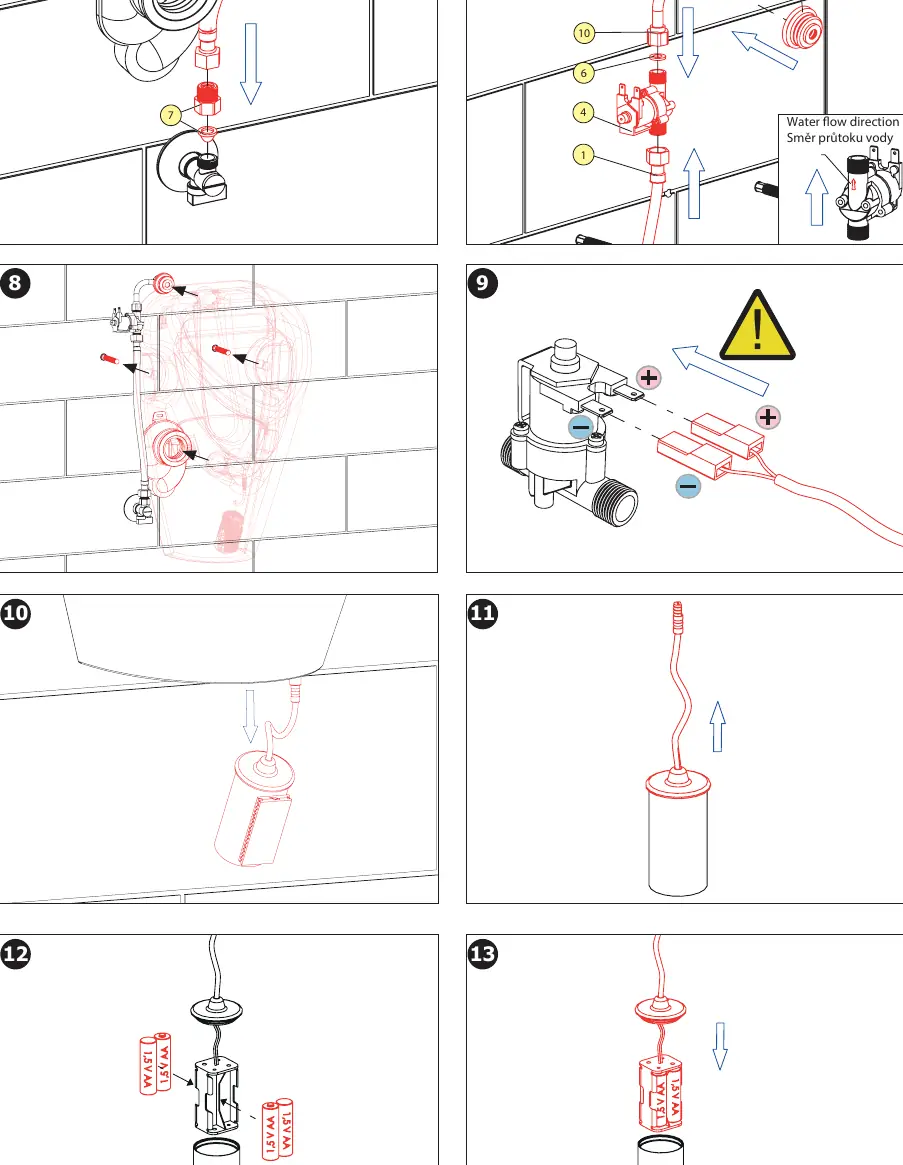
- Electronics: Connect the solenoid valve and battery pack as shown in the installation steps on pages 4 and 5.
- Activation: The electronics will switch on 15 minutes after inserting the batteries. An automatic adjustment process (1 minute) will start immediately after activation.
Eco Modes
The system features two specialized Eco modes to optimize water consumption based on the environment:
Eco 1 (Break Mode)
Suitable for schools, sports stadiums, or places with alternating periods of frequent use and long inactivity. After the first use, the system measures time. If another use is detected within the set time (default 300s), it does not flush. After the set time expires, it flushes with the configured duration (default 3s).
Eco 2 (Office Mode)
Suitable for offices with irregular intervals. The urinal flushes after each use but alternates between "small" flushes (1s) to rinse the urinal and "large" flushes (3s) to clean the trap. In factory settings, this consumes 48 liters of water for 118 flushes.
Maintenance and Battery
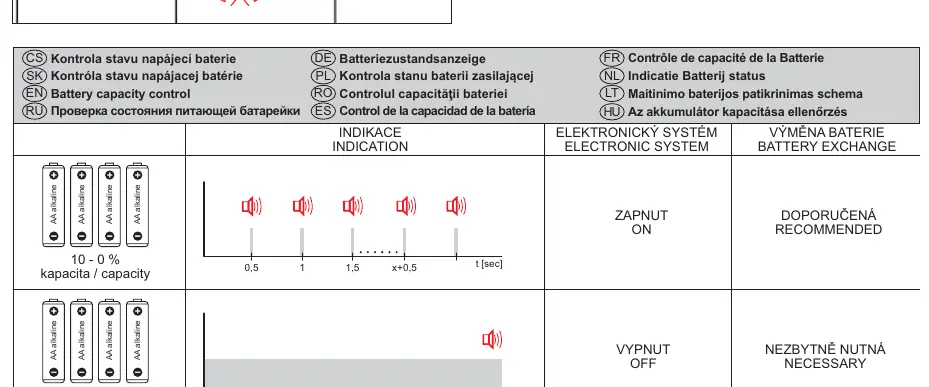
Regular maintenance is recommended. If the battery capacity is low, the system will indicate this through the electronic system. Replace batteries when necessary. Ensure the sieve is kept clean to maintain proper flow.
Manufacturer information
SANELA spol. s r. o.
Practical help
Common problems
Electronics not working after battery insertion
Wait 15 minutes after inserting batteries for the system to activate and complete the 1-minute automatic adjustment.
Flushing issues
Check that water pressure is within 0.1 - 0.6 MPa and ensure the sieve is clean (≤ 90 µm).
Before use
- Ensure water pressure is between 0.1 and 0.6 MPa.
- Verify sieve dimension is ≤ 90 µm.
- Install 6V batteries correctly.
- Wait 15 minutes after battery insertion for electronics to activate.
- Ensure the urinal is mounted according to the technical drawing dimensions.
Specs in practice
- Eco 1 (Break Mode)
- Flushes only after a set period of inactivity (300s) to save water in high-traffic areas with long breaks.
- Eco 2 (Office Mode)
- Alternates between 1s (rinse) and 3s (trap clean) flushes to maintain hygiene with irregular usage.
- Water Pressure
- Operating range is 0.1 - 0.6 MPa; pressure outside this range may affect flushing performance.
Images and diagrams
- Page 3 contains the technical drawing and parts list for installation.
- Pages 4-5 provide a step-by-step visual guide for installation and wiring.
- Page 7 details the battery status indication and replacement guide.
Model compatibility
- Requires 6V power supply (batteries).
- Compatible with Sanela Control (SLD 04) remote for parameter adjustment.

Manual page author
Emily Carter
User documentation editor
Prepares concise manual descriptions and highlights the most useful setup, operation, and maintenance information for readers.